Operating MATRIX control panel MATRIX control panel
50 PR-2011-0110-GB • Subject to modifications • R9-03-2016
If a message has been registered
– it is displayed in plain language stating the error group (e.g. sensor error).
– detailed information is listed in the next menu option (e.g. which controller stat-
ing the error code).
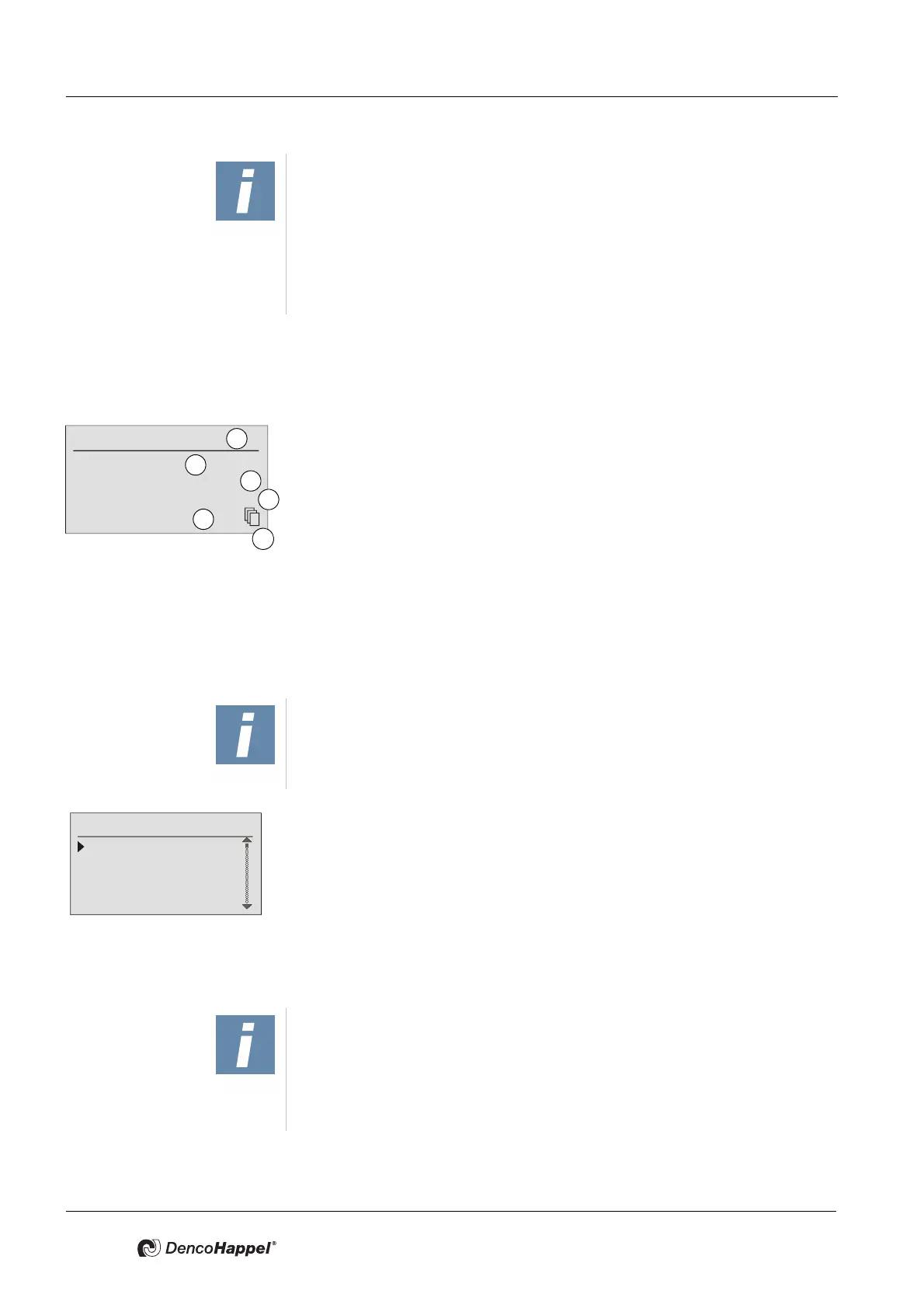
After an error message has been selected in the list (1) using the "SET" button,
the additional information will be displayed:
– The date with the time when the message occurred is (2)
– the type in plain text (3)
– the place (origin) in plain text (4) (plain text can be changed by service tool),
and
– the network address (S = group; N = unit) with the message code (EC) (5)
The “Other menus” icon (6) indicates that by using the “SET” button you can reach
a submenu where you can confirm a message (by deleting the message see
"Deleting settings" on page 37).
7.21.2 Clock timer submenu
The entries take place in the "Timer" submenu:
– to specify the valid week program with data about the switching pattern on the
individual days of the week
– to specify special days such as floating public holidays within a year (e.g.
Easter)
– to specify the holiday program such as company holidays and fixed public
holidays (e.g. 1st of May)
– to execute the block-up protection
– to preselect morning warmup time.
NOTICE!
If the faults of warning and information messages could not be corrected during
operation, such messages are then automatically removed from the "Operating
messages" list.
Depending on the type, error messages must be acknowledged (delete status
message) or they are likewise automatically removed from the list of "Operation
messages". If the cause is not resolved, the message is re-entered in the list
after confirmation.
1. Sensor error
30.08.03 08:55
RT sensor shorted
Loc: 1st floor Room 12
S/N: 0/5 EC: 2.2
4
1
2
3
5
6
NOTICE!
The "Timer" submenu is only available in the OP51x MATRIX control panel.
Week program
Special days
Holiday program
Block-up protection
Clock Timer
NOTICE!
The programs are arranged according to priority. The holiday program has
uppermost priority. Then special days and the week program follow. This
means, if e.g. settings are programmed for a time period in the holiday program
and in the week program, only the settings in the holiday program are carried
out, since it has higher priority.



 To Next Page