EasyManua.ls Logo

Denon AVC-3000 - Playback of Program Sources 1 and 2

Denon AVC-3000
66 pages
Print Icon
To Next Page IconTo Next Page
To Previous Page IconTo Previous Page
Loading...
AVC-3000/3000G
e
Playback
of
program
sources
1
e
Playback
of
program
sources
2
.
(Same
sound
and
picture)
.
(Picture
and
sound
from
different
sources
“Simulcast”
playback)
(1)
Video
program
source
source
glacial
Video
program
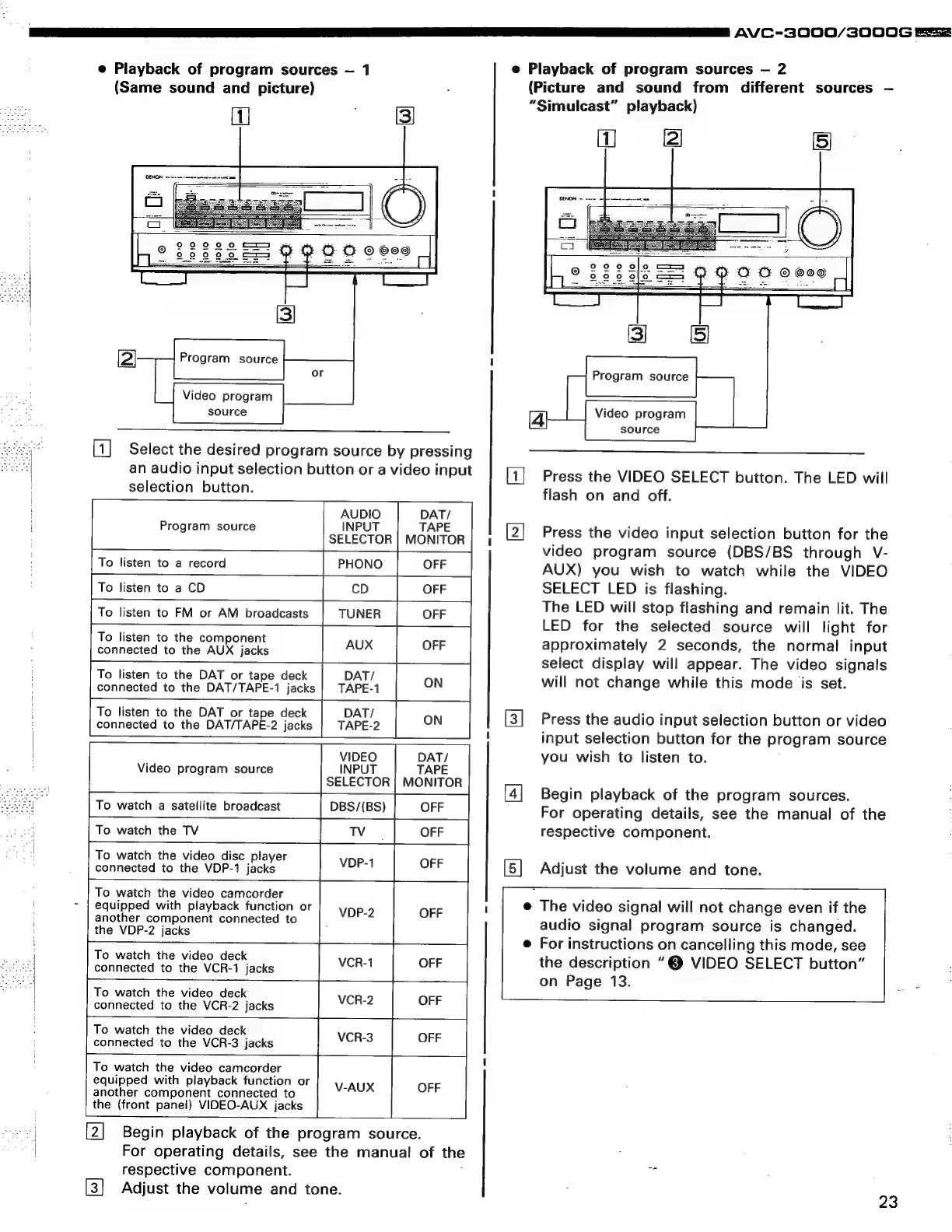
Select
the
desired
program
source
by
pressing
an
audio
input
selection
button
or
a
video
input
[1]
Press
the
VIDEO
SELECT
button.
The
LED
will
selection
button.
flash
on
and
off.
AUDIO
DAT/
Program
source
INPUT
TAPE
i
i
j
SELECTOR|
MONITOR
|
|
Press
the
video
input
selection
button
for
the
video
program
source
(DBS/BS
through
V-
AUX)
you
wish
to
watch
while
the
VIDEO
SELECT
LED
is
flashing.
The
LED
will
stop
flashing
and
remain
lit.
The
LED
for
the
selected
source
will
light
for
approximately
2
seconds,
the
normal
input
select
display
will
appear.
The
video
signals
will
not
change
while
this
mode
is
set.
To
listen
to
a
record
To
listen
to
a
CD
To
listen
to
FM
or
AM
broadcasts
To
listen
to
the
component
connected
to
the
AUX
jacks
To
listen
to
the
DAT
or
tape
deck
connected
to
the
DAT/TAPE-1
jacks
To
listen
to
the
DAT
or
tape
deck
|
connected
to
the
DAT/TAPE-?
jacks
Press
the
audio
input
selection
button
or
video
input
selection
button
for
the
program
source
you
wish
to
listen
to.
Video
program
source
[4]
Begin
playback
of
the
program
sources.
For
operating
details,
see
the
manual
of
the
respective
component.
To
watch
a
satellite
broadcast
an
ee
watch
the
TV
To
watch
the
video
disc
player
suas
to
the
VDP-1
jacks
[5]
Adjust
the
volume
and
tone.
To
watch
the
video
camcorder
~
|
equipped
with
playback
function
or
another
component
connected
to
the
VDP-2
jacks
1
@
The
video
signal
will
not
change
even
if
the
audio
signal
program
source
is
changed.
e
For
instructions
on
cancelling
this
mode,
see
\
To
watch
the
video
deck
connected
to
the
VCR-1
jacks
the
description
“@
VIDEO
SELECT
button”
on
Page
13.
iy
&
To
watch
the
video
deck
connected
to
the
VCR-2
jacks
To
watch
the
video
deck
connected
to
the
VCR-3
jacks
To
watch
the
video
camcorder
equipped
with
playback
function
or
another
component
connected
to
the
(front
panel)
VIDEO-AUX
jacks
[N]
Begin
playback
of
the
program
source.
For
operating
details,
see
the
manual
of
the
respective
component.
j
Adjust
the
volume
and
tone.
[2]
23

Related product manuals