EasyManua.ls Logo

Denon AVC-3000 - System Call KEYS; System Entry Keys

Denon AVC-3000
66 pages
Print Icon
To Next Page IconTo Next Page
To Previous Page IconTo Previous Page
Loading...
a
AV
C-3000/
300
C C
Rea
e
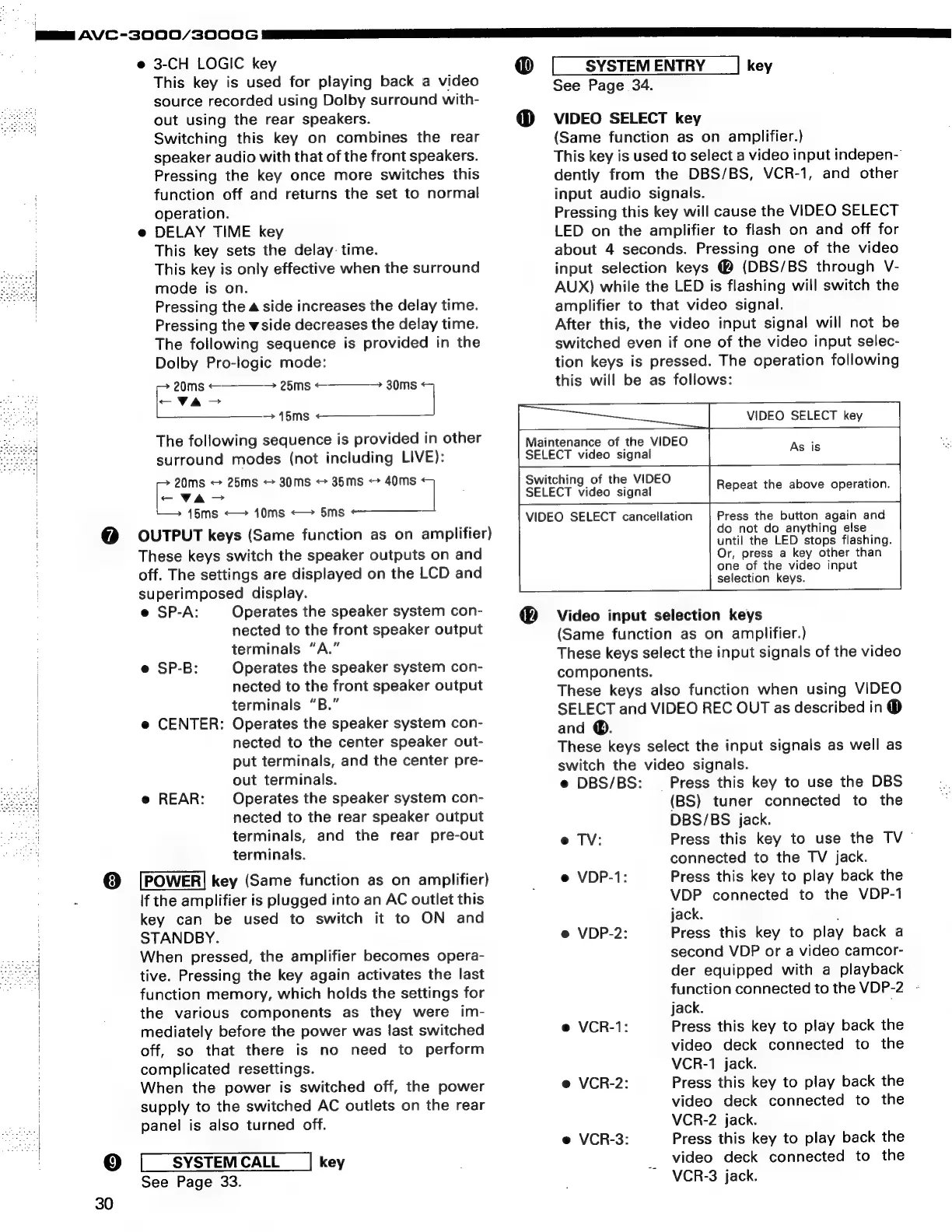
3-CH
LOGIC
key
This
key
is
used
for
playing
back
a
video
source
recorded
using
Dolby
surround
with-
out
using
the
rear
speakers.
Switching
this
key
on
combines
the
rear
speaker
audio
with
that
of
the
front
speakers.
Pressing
the
key
once
more
switches
this
function
off
and
returns
the
set
to
normal
operation.
e@
DELAY
TIME
key
This
key
sets
the
delay:
time.
This
key
is
only
effective
when
the
surround
mode
is
on.
Pressing
the
a
side
increases
the
delay
time.
Pressing
the
wside
decreases
the
delay
time.
The
following
sequence
is
provided
in
the
Dolby
Pro-logic
mode:
>
20ms
<
>
25ms
<
va-
15ms
The
following
sequence
is
provided
in
other
surround
modes
(not
including
LIVE):
20ms
-
25ms
30ms
35ms
<>
40ms
ae
7
145ms
<—
10ms
<—
5ms
<—————_
>
30ms
®
SYSTEM
ENTRY
key
O
See
Page
34.
VIDEO
SELECT
key
(Same
function
as
on
amplifier.)
This
key
is
used
to
select
a
video
input
indepen-
dently
from
the
DBS/BS,
VCR-1,
and
other
input
audio
signals.
Pressing
this
key
will
cause
the
VIDEO
SELECT
LED
on
the
amplifier
to
flash
on
and
off
for
about
4
seconds.
Pressing
one
of
the
video
input
selection
keys
@
(DBS/BS
through
V-
AUX)
while
the
LED
is
flashing
will
switch
the
amplifier
to
that
video
signal.
After
this,
the
video
input
signal
will
not
be
switched
even
if
one
of
the
video
input
selec-
tion
keys
is
pressed.
The
operation
following
this
will
be
as
follows:
VIDEO
SELECT
key
Maintenance
of
the
VIDEO
SELECT
video
signal
As
is
Bi
Switching
of
the
VIDEO
SELECT
video
signal
Repeat
the
above
operation.
VIDEO
SELECT
cancellation
Press
the
button
again
and
@
OUTPUT
keys
(Same
function
as
on
amplifier)
do
not
do
anything
else
|
These
keys
switch
the
speaker
outputs
on
and
off.
The
settings
are
displayed
on
the
LCD
and
superimposed
display.
e
SP-A:
Operates
the
speaker
system
con-
nected
to
the
front
speaker
output
terminals
“A.”
e
SP-B:
Operates
the
speaker
system
con-
nected
to
the
front
speaker
output
terminals
“B.”
e
CENTER:
Operates
the
speaker
system
con-
nected
to
the
center
speaker
out-
put
terminals,
and
the
center
pre-
out
terminals.
Operates
the
speaker
system
con-
nected
to
the
rear
speaker
output
terminals,
and
the
rear
pre-out
terminals.
key
(Same
function
as
on
amplifier)
If
the
amplifier
is
plugged
into
an
AC
outlet
this
key
can
be
used
to
switch
it
to
ON
and
STANDBY.
When
pressed,
the
amplifier
becomes
opera-
tive.
Pressing
the
key
again
activates
the
last
function
memory,
which
holds
the
settings
for
the
various
components
as
they
were
im-
mediately
before
the
power
was
last
switched
off,
so
that
there
is
no
need
to
perform
complicated
resettings.
When
the
power
is
switched
off,
the
power
supply
to
the
switched
AC
outlets
on
the
rear
panel
is
also
turned
off.
@
REAR:
9]
SYSTEM
CALL
key
30
See
Page
33.
until
the
LED
stops
flashing.
Or,
press
a
key
other
than
one
of
the
video
input
selection
keys.
Video
input
selection
keys
(Same
function
as
on
amplifier.)
These
keys
select
the
input
signals
of
the
video
components.
These
keys
also
function
when
using
VIDEO
SELECT
and
VIDEO
REC
OUT
as
described
in
®
and
@.
These
keys
select
the
input
signals
as
well
as
switch
the
video
signals.
e
DBS/BS:
Press
this
key
to
use
the
DBS
(BS)
tuner
connected
to
the
DBS/BS
jack.
Press
this
key
to
use
the
TV
~
connected
to
the
TV
jack.
Press
this
key
to
play
back
the
VDP
connected
to
the
VDP-1
jack.
.
Press
this
key
to
play
back
a
second
VDP
or
a
video
camcor-
der
equipped
with
a
playback
function
connected
to
the
VDP-2
-
jack.
,
Press
this
key
to
play
back
the
video
deck
connected
to
the
VCR-1
jack.
Press
this
key
to
play
back
the
video
deck
connected
to
the
VCR-2
jack.
Press
this
key
to
play
back
the
video
deck
connected
to
the
VCR-3
jack.
e
TV:
e
VDP-1:
e
VDP-2:
e
VCR-1:
e
VCR-2:
e
VCR-3:

Related product manuals