EasyManua.ls Logo

Denon AVC-3000 - Page 27

Denon AVC-3000
66 pages
Print Icon
To Next Page IconTo Next Page
To Previous Page IconTo Previous Page
Loading...
AY)
3000
/
3000
|
Figure
3
;
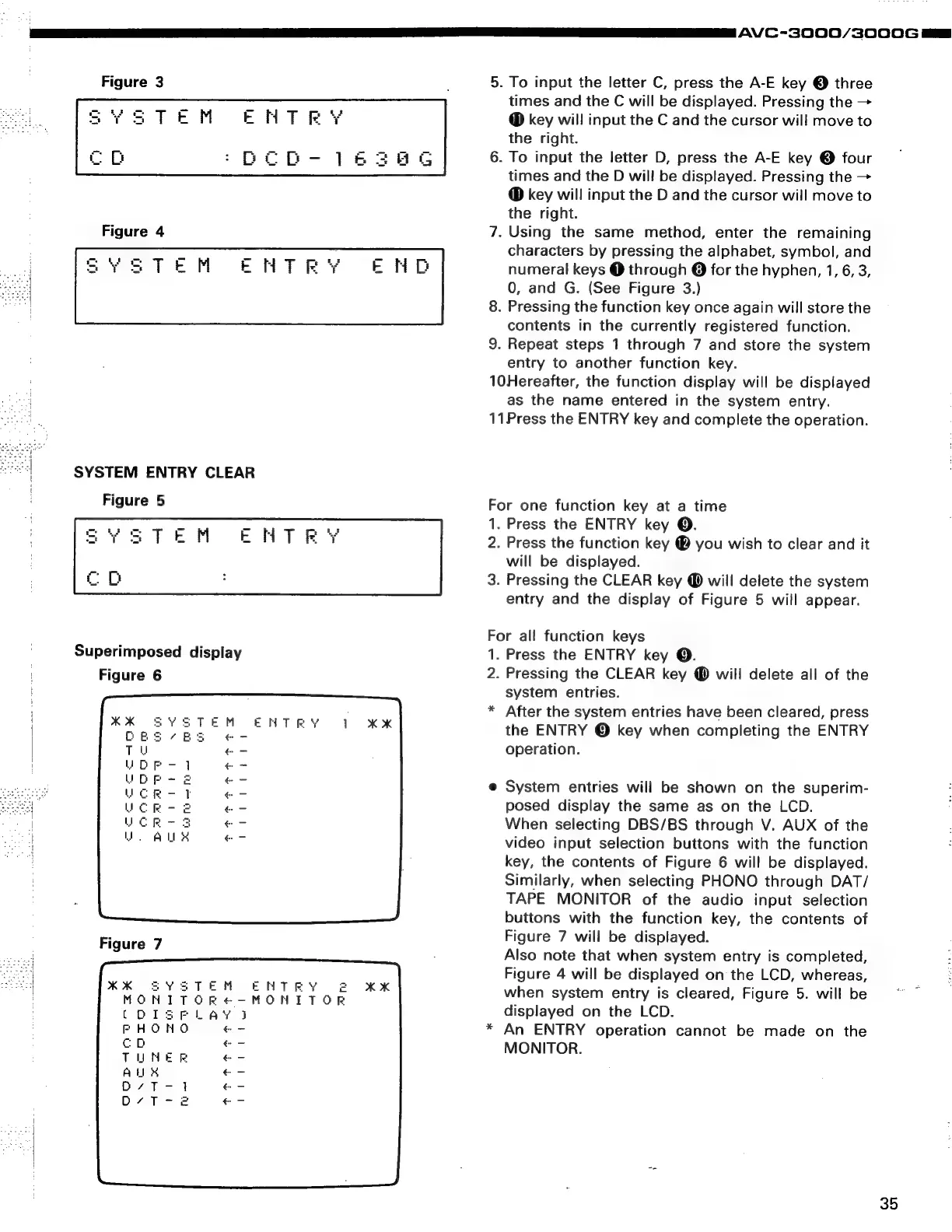
5.
To
input
the
letter
C,
press
the
A-E
key
©
three
times
and
the
C
will
be
displayed.
Pressing
the
>
key
will
input
the
C
and
the
cursor
wil!
move
to
the
right.
6.
To
input
the
letter
D,
press
the
A-E
key
©
four
times
and
the
D
will
be
displayed.
Pressing
the
>
key
will
input
the
D
and
the
cursor
will
move
to
the
right.
7.
Using
the
same
method,
enter
the
remaining
characters
by
pressing
the
alphabet,
symbol,
and
EFHTRY
END
numeral
keys
@
through
@
for
the
hyphen,
1,
6,
3,
0,
and
G.
(See
Figure
3.)
8.
Pressing
the
function
key
once
again
will
store
the
contents
in
the
currently
registered
function.
9.
Repeat
steps
1
through
7
and
store
the
system
entry
to
another
function
key.
10Hereafter,
the
function
display
will
be
displayed
as
the
name
entered
in
the
system
entry.
11Press
the
ENTRY
key
and
complete
the
operation.
SYSTEM
ENTRY
CLEAR
Figure
5
For
one
function
key
at
a
time
;
ae
1.
Press
the
ENTRY
key
©.
HTR
'Y
2.
Press
the
function
key
@
you
wish
to
clear
and
it
will
be
displayed.
3.
Pressing
the
CLEAR
key
@
will
delete
the
system
entry
and
the
display
of
Figure
5
will
appear.
For
all
function
keys
Superimposed
display
1.
Press
the
ENTRY
key
©.
Figure
6
2.
Pressing
the
CLEAR
key
@
will
delete
all
of
the
system
entries.
*
After
the
system
entries
have
been
cleared,
press
the
ENTRY
©
key
when
completing
the
ENTRY
operation.
@
System
entries
will
be
shown
on
the
superim-
posed
display
the
same
as
on
the
LCD.
When
selecting
DBS/BS
through
V.
AUX
of
the
video
input
selection
buttons
with
the
function
key,
the
contents
of
Figure
6
will
be
displayed.
Similarly,
when
selecting
PHONO
through
DAT/
TAPE
MONITOR
of
the
audio
input
selection
buttons
with
the
function
key,
the
contents
of
Figure
7
will
be
displayed.
Also
note
that
when
system
entry
is
completed,
Figure
4
will
be
displayed
on
the
LCD,
whereas,
when
system
entry
is
cleared,
Figure
5.
will
be
displayed
on
the
LCD.
*
An
ENTRY
operation
cannot
be
made
on
the
MONITOR.
rays
Figure
7
ED
2
Oo
=
On
zw
xm
Oz
2-4
wm
4<
VOUPAAID
"zx
pao
oboe
ob
tet
x
T
T
NN
35

Related product manuals