EasyManua.ls Logo

Denon AVC-3000 - Recording; E@ Monitoring the Recording

Denon AVC-3000
66 pages
Print Icon
To Next Page IconTo Next Page
To Previous Page IconTo Previous Page
Loading...
[=
AVC-3000/3000G
e
Recording
program
sources
and
copying
tapes
e
Recording
video
program
sources
and
copying
(Recording
the
audio
source
currently
being
mon-
videos
itored)
(Recording
the
sound
and
picture
of
the
video
(Same
sound
and
picture)
source
currently
being
monitored)
IN]
Video
program
source
DAT
(analog)
Video
deck
[1]
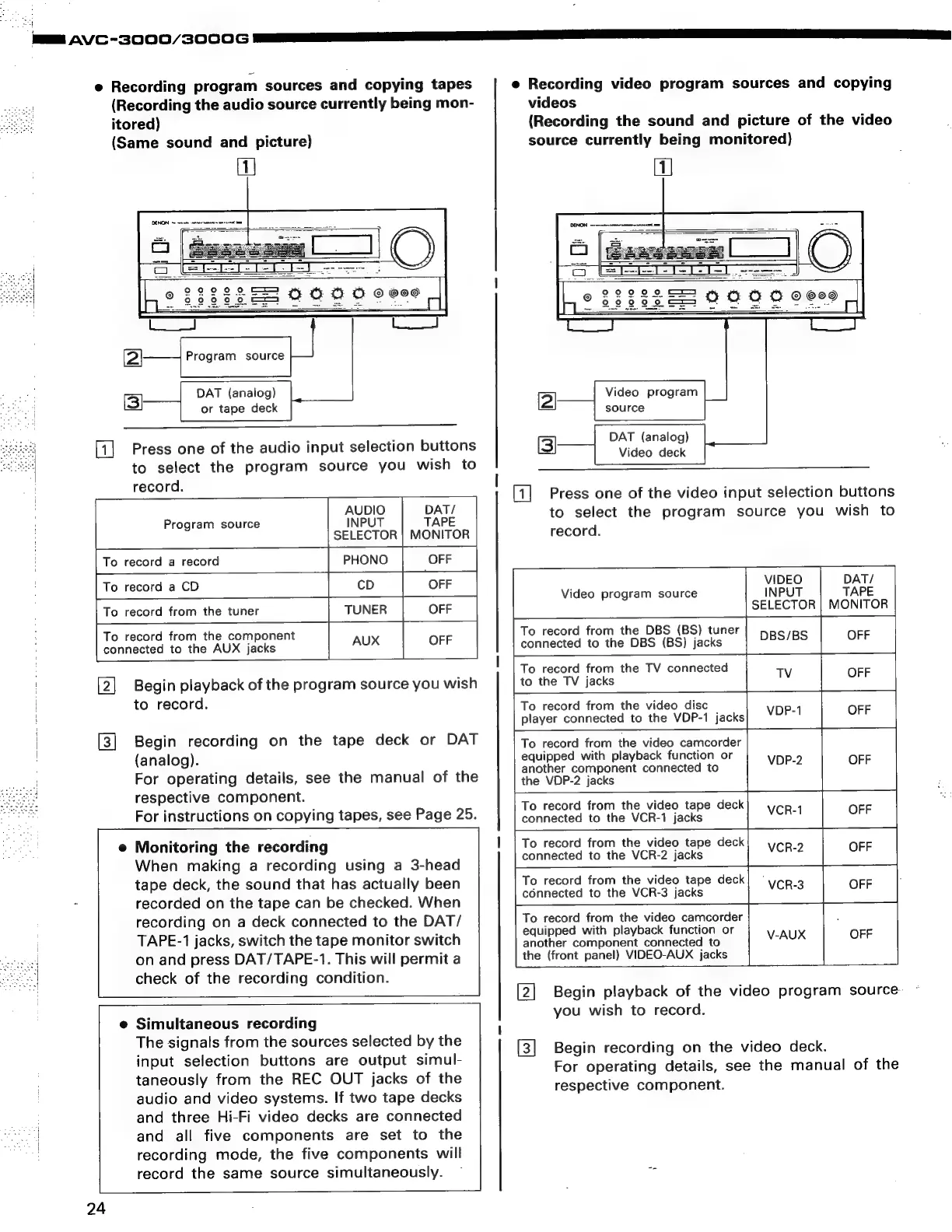
Press
one
of
the
video
input
selection
buttons
to
select
the
program
source
you
wish
to
record.
[(]
Press
one
of
the
audio
input
selection
buttons
to
select
the
program
source
you
wish
to
record.
AUDIO
DAT/
Program
source
INPUT
TAPE
SELECTOR
|
MONITOR
PHONO
To
record
a
record
OFF
To
record
from
the
component
connected
to
the
AUX
jacks
Begin
playback
of
the
program
source
you
wish
to
record.
VIDEO
Video
program
source
INPUT
SELECTOR
To
record
from
the
DBS
(BS)
tuner
connected
to
the
DBS
(BS)
jacks
DBS/BS
To
record
from
the
TV
connected
Tv
to
the
TV
jacks
To
record
from
the
video
disc
player
connected
to
the
VDP-1
jacks
VOP-1
OFF
To
record
from
the
video
camcorder
equipped
with
playback
function
or
|
VDP-2
OFF
Begin
recording
on
the
tape
deck
or
DAT
(analog).
For
operating
details,
see
the
manual
of
the
respective
component.
For
instructions
on
copying
tapes,
see
Page
25.
another
component
connected
to
the
VDP-2
jacks
To
record
from
the
video
tape
deck
connected
to
the
VCR-1
jacks
VCR-1
OFF
To
record
from
the
video
tape
deck
connected
to
the
VCR-2
jacks
VCR-2
OFF
To
record
from
the
video
tape
deck
connected
to
the
VCR-3
jacks
VCR-3
he
OFF
der
;
To
record
from
the
video
camcor
equipped
with
playback
function
or
V-AUX
OFF
Monitoring
the
recording
When
making
a
recording
using
a
3-head
tape
deck,
the
sound
that
has
actually
been
7
recorded
on
the
tape
can
be
checked.
When
pee
ee
le:
recording
on
a
deck
connected
to
the
DAT/
TAPE-1
jacks,
switch
the
tape
monitor
switch
on
and
press
DAT/TAPE-1.
This
will
permit
a
check
of
the
recording
condition.
another
component
connected
to
the
(front
panel)
VIDEO-AUX
jacks
Begin
playback
of
the
video
program
source-
you
wish
to
record.
e
Simultaneous
recording
The
signals
from
the
sources
selected
by
the
input
selection
buttons
are
output
simul-
taneously
from
the
REC
OUT
jacks
of
the
audio
and
video
systems.
If
two
tape
decks
and
three
Hi-Fi
video
decks
are
connected
oe
and
all
five
components
are
set
to
the
recording
mode,
the
five
components
will
record
the
same
source
simultaneously.
~
om
[ยป]
SD
Begin
recording
on
the
video
deck.
For
operating
details,
see
the
manual
of
the
respective
component.
24

Related product manuals