EasyManua.ls Logo

Denon AVC-3000 - Troubleshooting

Denon AVC-3000
66 pages
Print Icon
To Next Page IconTo Next Page
To Previous Page IconTo Previous Page
Loading...
“4
|
_
AVC-3000/3000G
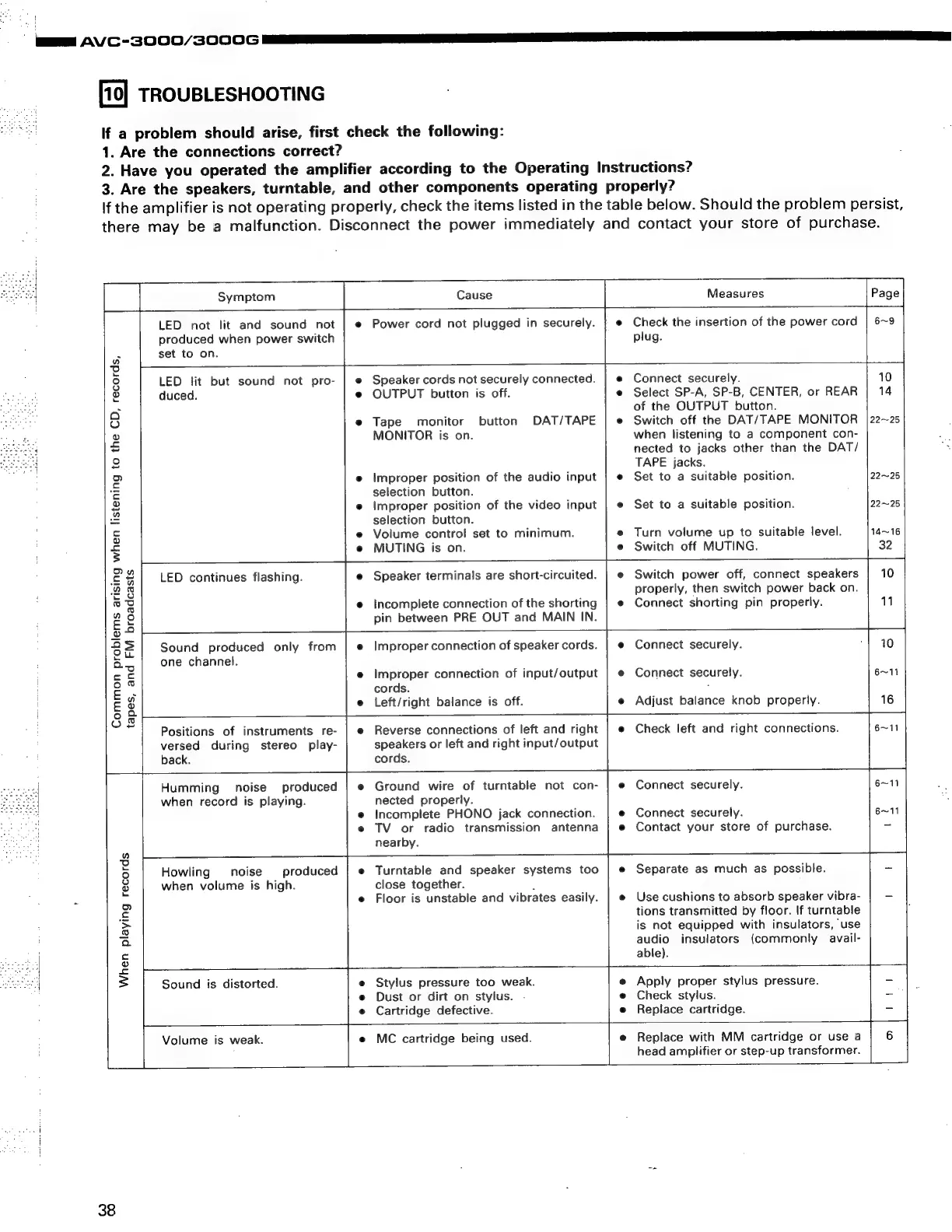
TROUBLESHOOTING
If
a
problem
should
arise,
first
check
the
following:
1.
Are
the
connections
correct?
2.
Have
you
operated
the
amplifier
according
to
the
Operating
Instructions?
3.
Are
the
speakers,
turntable,
and
other
components
operating
properly?
If
the
amplifier
is
not
operating
properly,
check
the
items
listed
in
the
table
below.
Should
the
problem
persist,
there
may
be
a
malfunction.
Disconnect
the
power
immediately
and
contact
your
store
of
purchase.
Symptom
Cause
Measures
LED
not
lit
and
sound
not
|
«
Power
cord
not
plugged
in
securely.
|
@
Check
the
insertion
of
the
power
cord
produced
when
power
switch
plug.
:
set
to
on.
w
ae)
9
LED
lit
but
sound
not
pro-
|
e
Speaker
cords
not
securely
connected.
|
e
Connect
securely.
©
duced.
e
OUTPUT
button
is
off.
e
Select
SP-A,
SP-B,
CENTER,
or
REAR
|
14
o
of
the
OUTPUT
button.
oO
e
Tape
monitor
button
DAT/TAPE
|
e
Switch
off
the
DAT/TAPE
MONITOR
|22~25
2
MONITOR
is
on.
when
listening
to
a
component
con-
-
nected
to
jacks
other
than
the
DAT/
7
TAPE
jacks.
=
e
Improper
position
of
the
audio
input
|
e
Set
to
a
suitable
position.
22~25
‘€
selection
button.
2
e
Improper
position
of
the
video
input
|
e
Set
to
a
suitable
position.
22~25
=
selection
button.
a
e
Volume
control
set
to
minimum.
e
Turn
volume
up
to
suitable
level.
14~16
$
e@
MUTING
is
on.
e
Switch
off
MUTING.
32
£2
LED
continues
flashing.
Speaker
terminals
are
short-circuited.
|
«
Switch
power
off,
connect
speakers
;
2s
properly,
then
switch
power
back
on.
.
oO
e
Incomplete
connection
of
the
shorting
|
¢
Connect
shorting
pin
properly.
11
gs
pin
between
PRE
OUT
and
MAIN
IN.
©
$2
Sound
produced
only
from
|
e
Improper
connection
of
speaker
cords.
|
¢
Connect
securely.
10
G4]
one
channel.
5
&
e
eee
connection
of
input/output
|
e
Connect
securely.
6~11
!
ie
coras.
:
E
3
e
Left/right
balance
is
off.
e
Adjust
balance
knob
properly.
4
16
9
iss)
me
Positions
of
instruments
re-
|
e
Reverse
connections
of
left
and
right
|
¢
Check
left
and
right
connections.
6~11
versed
during
stereo
play-
speakers
or
left
and
right
input/output
z
back.
cords.
Humming
noise
produced
|
e
Ground
wire
of
turntable
not
con-
|
e
Connect
securely.
6~11
when
record
is
playing.
nected
properly.
e
Incomplete
PHONO
jack
connection.
e
Connect
securely.
6~11
e
TV
or
radio
transmission
antenna
|
e
Contact
your
store
of
purchase.
=
L
nearby.
3
3)
Howling
noise
produced
|
e
Turntable
and
speaker
systems
too
|
e
Separate
as
much
as
possible.
-
Pf
when
volume
is
high.
close
together.
:
me
=
e
Floor
is
unstable
and
vibrates
easily.
|
e
Use
cushions
to
absorb
speaker
vibra-
a
c
tions
transmitted
by
floor.
If
turntable
a
is
not
equipped
with
insulators,
use
a
audio
insulators
(commonly
avail-
c
able).
IS
|
3
Sound
is
distorted.
Stylus
pressure
too
weak.
e
Apply
proper
stylus
pressure.
-
Dust
or
dirt
on
stylus.
.
e
Check
stylus.
-
|
o
Cartridge
defective.
e
Replace
cartridge.
2
=
Volume
is
weak.
MC
cartridge
being
used.
e
Replace
with
MM
cartridge
or
use
a
6
;
head
amplifier
or
step-up
transformer.
38

Related product manuals