EasyManua.ls Logo

Denon AVC-3000 - Page 29

Denon AVC-3000
66 pages
Print Icon
To Next Page IconTo Next Page
To Previous Page IconTo Previous Page
Loading...
.
SP
a
RRC
AVC-3000/3000G
mmm
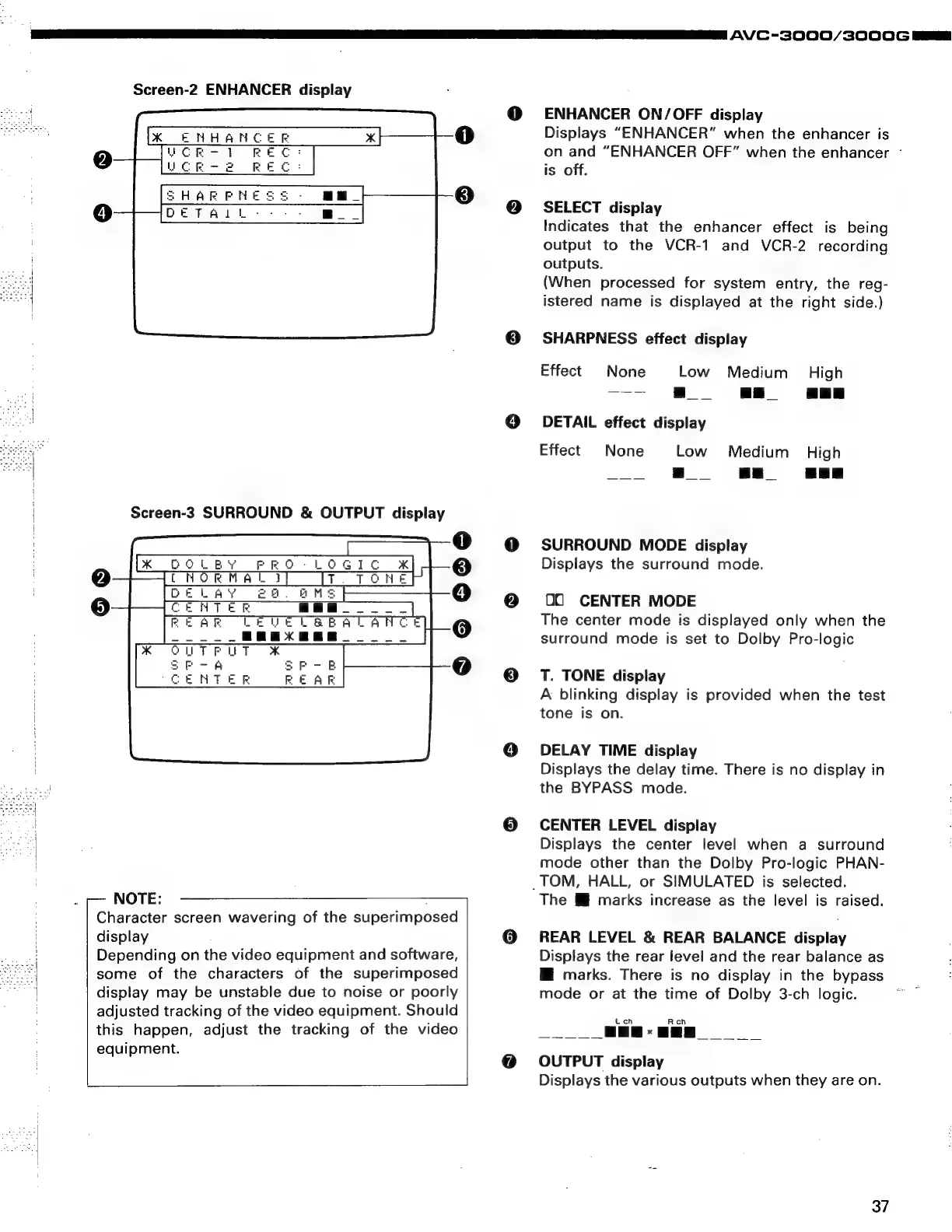
Screen-2
ENHANCER
display
Screen-3
SURROUND
&
OUTPUT
display
oo
606
NOTE:
Character
screen
wavering
of
the
superimposed
display
Depending
on
the
video
equipment
and
software,
some
of
the
characters
of
the
superimposed
display
may
be
unstable
due
to
noise
or
poorly
adjusted
tracking
of
the
video
equipment.
Should
this
happen,
adjust
the
tracking
of
the
video
equipment.
ENHANCER
ON/OFF
display
Displays
“ENHANCER”
when
the
enhancer
is
on
and
“ENHANCER
OFF”
when
the
enhancer
-
is
off.
SELECT
display
Indicates
that
the
enhancer
effect
is
being
output
to
the
VCR-1
and
VCR-2
recording
outputs.
(When
processed
for
system
entry,
the
reg-
istered
name
is
displayed
at
the
right
side.)
SHARPNESS
effect
display
Effect
None
Low
Medium
High
———-
|
oe
|
|
DETAIL
effect
display
Effect
None
Low
Medium
High
|
|
i
SURROUND
MODE
display
Displays
the
surround
mode.
00
CENTER
MODE
The
center
mode
is
displayed
only
when
the
surround
mode
is
set
to
Dolby
Pro-logic
T.
TONE
display
A
blinking
display
is
provided
when
the
test
tone
is
on.
DELAY
TIME
display
Displays
the
delay
time.
There
is
no
display
in
the
BYPASS
mode.
CENTER
LEVEL
display
Displays
the
center
level
when
a
surround
mode
other
than
the
Dolby
Pro-logic
PHAN-
_TOM,
HALL,
or
SIMULATED
is
selected.
The
&
marks
increase
as
the
level
is
raised.
REAR
LEVEL
&
REAR
BALANCE
display
Displays
the
rear
level
and
the
rear
balance
as
Mi
marks.
There
is
no
display
in
the
bypass
mode
or
at
the
time
of
Dolby
3-ch
logic.
OUTPUT
display
Displays
the
various
outputs
when
they
are
on.
37

Related product manuals