EasyManua.ls Logo

Denon AVC-3000 - Installation Precautions; Handling Precautions

Denon AVC-3000
66 pages
Print Icon
To Next Page IconTo Next Page
To Previous Page IconTo Previous Page
Loading...
AVC-3000/3000G
maa
[2]
INSTALLATION
PRECAUTIONS.
«|
meen
note
on
stacking
Using
this
amplifier
or
other
electronic
equipment
;
=
ae
=
containing
microprocessors
simultaneously
with
a
OG
Se
eee
tuner
or
TV
may
result
in
noise
in
the
sound
or
picture.
If
this
should
happen,
take
the
following
steps:
e
Install
the
amplifier
as
far
as
possible
from
the
tuner
or
TV
set.
@
Keep
the
antenna
lines
of
the
tuner
or
TV
as
far
as
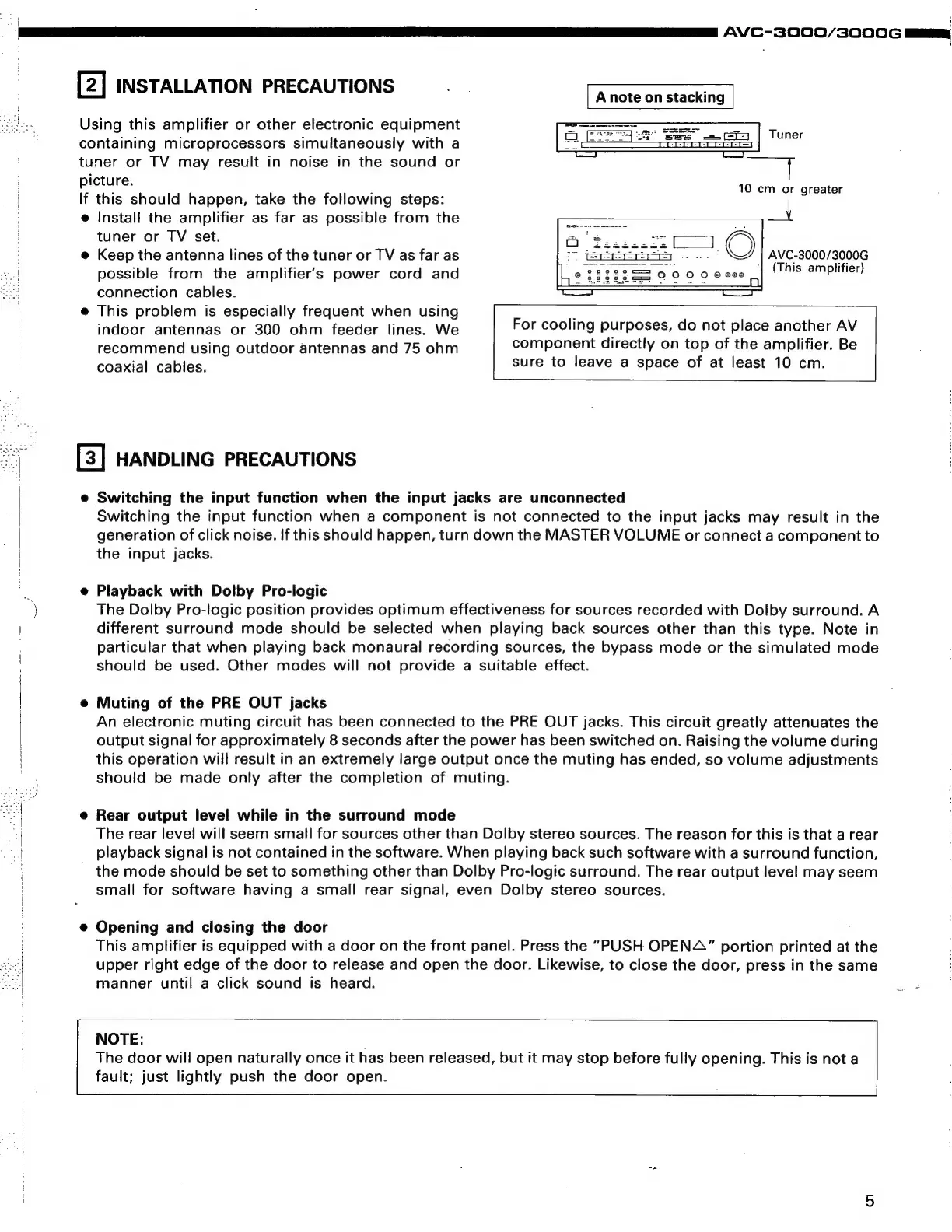
Tuner
10
cm
or
greater
AVC-3000/3000G
possible
from
the
amplifier’s
power
cord
and
[als
sayapliner)
connection
cables.
e
This
problem
is
especially
frequent
when
using
;
indoor
antennas
or
300
ohm
feeder
lines.
We
For
cooling
purposes,
do
not
place
another
AV
recommend
using
outdoor
antennas
and
75
ohm
component
directly
on
top
of
the
amplifier.
Be
cnanial
Cables:
sure
to
leave
a
space
of
at
least
10
cm.
[3]
HANDLING
PRECAUTIONS
:
e
Switching
the
input
function
when
the
input
jacks
are
unconnected
Switching
the
input
function
when
a
component
is
not
connected
to
the
input
jacks
may
result
in
the
generation
of
click
noise.
If
this
should
happen,
turn
down
the
MASTER
VOLUME
or
connect
a
component
to
the
input
jacks.
7
e
Playback
with
Dolby
Pro-logic
\
The
Dolby
Pro-logic
position
provides
optimum
effectiveness
for
sources
recorded
with
Dolby
surround.
A
|
different
surround
mode
should
be
selected
when
playing
back
sources
other
than
this
type.
Note
in
particular
that
when
playing
back
monaural
recording
sources,
the
bypass
mode
or
the
simulated
mode
should
be
used.
Other
modes
will
not
provide
a
suitable
effect.
An
electronic
muting
circuit
has
been
connected
to
the
PRE
OUT
jacks.
This
circuit
greatly
attenuates
the
output
signal
for
approximately
8
seconds
after
the
power
has
been
switched
on.
Raising
the
volume
during
this
operation
will
result
in
an
extremely
large
output
once
the
muting
has
ended,
so
volume
adjustments
should
be
made
only
after
the
completion
of
muting.
|
|
e
Muting
of
the
PRE
OUT
jacks
e
Rear
output
level
while
in
the
surround
mode
a
The
rear
level
will
seem
small
for
sources
other
than
Dolby
stereo
sources.
The
reason
for
this
is
that
a
rear
playback
signal
is
not
contained
in
the
software.
When
playing
back
such
software
with
a
surround
function,
the
mode
should
be
set
to
something
other
than
Dolby
Pro-logic
surround.
The
rear
output
level
may
seem
small
for
software
having
a
small
rear
signal,
even
Dolby
stereo
sources.
e@
Opening
and
closing
the
door
This
amplifier
is
equipped
with
a
door
on
the
front
panel.
Press
the
“PUSH
OPENA”
portion
printed
at
the
upper
right
edge
of
the
door
to
release
and
open
the
door.
Likewise,
to
close
the
door,
press
in
the
same
manner
until
a
click
sound
is
heard.
<
NOTE:
The
door
will
open
naturally
once
it
has
been
released,
but
it
may
stop
before
fully
opening.
This
is
not
a
fault;
just
lightly
push
the
door
open.

Related product manuals