EasyManua.ls Logo

Denon AVC-3000 - Page 28

Denon AVC-3000
66 pages
Print Icon
To Next Page IconTo Next Page
To Previous Page IconTo Previous Page
Loading...
C
ADV
C-32000/
300
CO
CG
Raa
ae
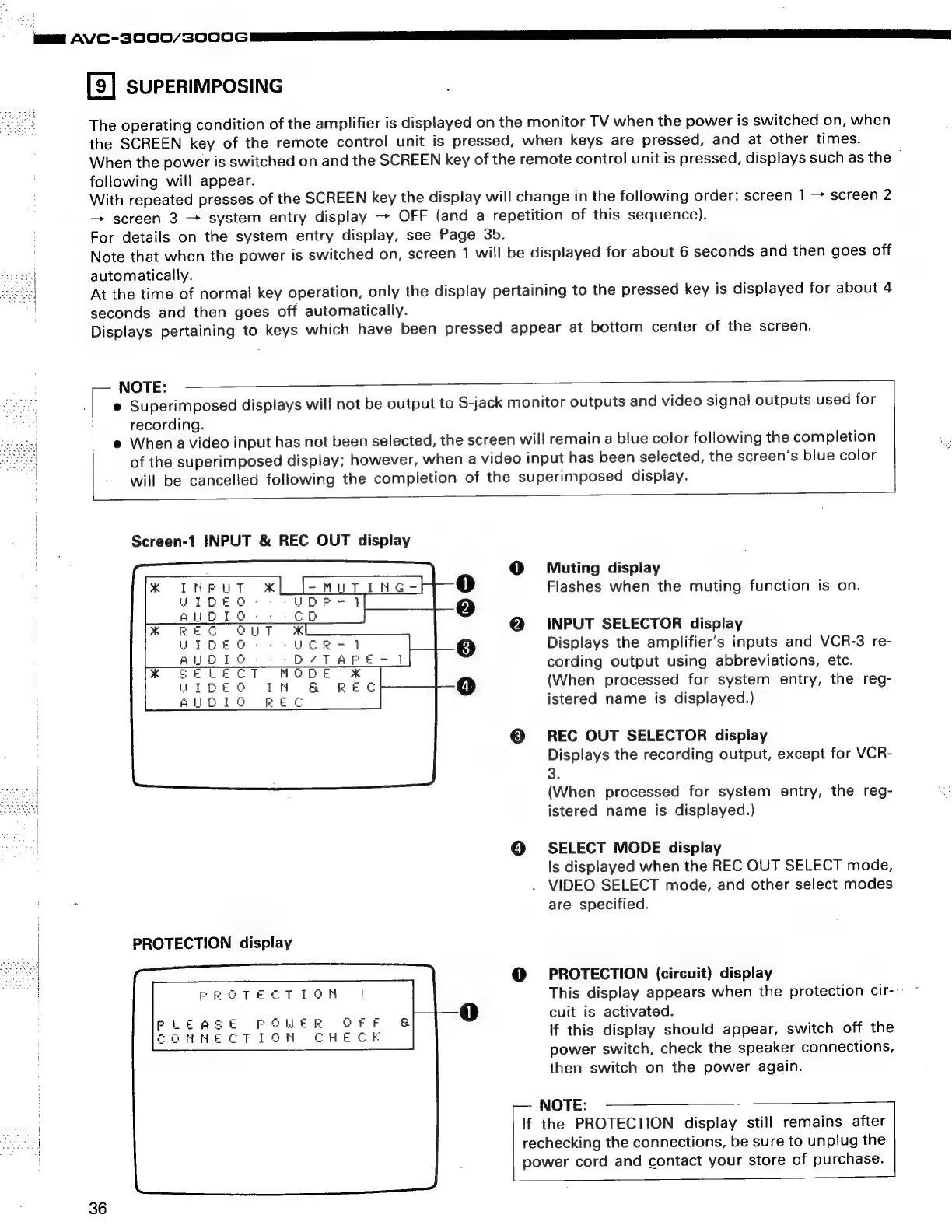
SUPERIMPOSING
The
operating
condition
of
the
amplifier
is
displayed
on
the
monitor
TV
when
the
power
is
switched
on,
when
the
SCREEN
key
of
the
remote
control
unit
is
pressed,
when
keys
are
pressed,
and
at
other
times.
When
the
power
is
switched
on
and
the
SCREEN
key
of
the
remote
control
unit
is
pressed,
displays
such
as
the
~
following
will
appear.
With
repeated
presses
of
the
SCREEN
key
the
display
will
change
in
the
following
order:
screen
1
screen
2
screen
3
system
entry
display
-
OFF
(and
a
repetition
of
this
sequence).
For
details
on
the
system
entry
display,
see
Page
35.
Note
that
when
the
power
is
switched
on,
screen
1
will
be
displayed
for
about
6
seconds
and
then
goes
off
automatically.
seconds
and
then
goes
off
automatically.
At
the
time
of
normal
key
operation,
only
the
display
pertaining
to
the
pressed
key
is
displayed
for
about
4
Displays
pertaining
to
keys
which
have
been
pressed
appear
at
bottom
center
of
the
screen.
NOTE:
e
Superimposed
displays
will
not
be
output
to
S-jack
monitor
outputs
and
video
signal
outputs
used
for
recording.
e@
When
a
video
input
has
not
been
selected,
the
screen
will
remain
a
blue
color
following
the
completion
of
the
superimposed
display;
however,
when
a
video
input
has
been
selected,
the
screen’s
blue
color
will
be
cancelled
following
the
completion
of
the
superimposed
display.
Screen-1
INPUT
&
REC
OUT
display
PROTECTION
display
36
Muting
display
Flashes
when
the
muting
function
is
on.
INPUT
SELECTOR
display
Displays
the
amplifier’s
inputs
and
VCR-3
re-
cording
output
using
abbreviations,
etc.
(When
processed
for
system
entry,
the
reg-
istered
name
is
displayed.)
REC
OUT
SELECTOR
display
Displays
the
recording
output,
except
for
VCR-
3.
(When
processed
for
system
entry,
the
reg-
istered
name
is
displayed.)
SELECT
MODE
display
Is
displayed
when
the
REC
OUT
SELECT
mode,
.
VIDEO
SELECT
mode,
and
other
select
modes
are
specified.
PROTECTION
(circuit)
display
This
display
appears
when
the
protection
cir--
~
cuit
is
activated.
if
this
display
should
appear,
switch
off
the
power
switch,
check
the
speaker
connections,
then
switch
on
the
power
again.
NOTE:
If
the
PROTECTION
display
still
remains
after
rechecking
the
connections,
be
sure
to
unplug
the
power
cord
and
contact
your
store
of
purchase.

Related product manuals