EasyManua.ls Logo

Denon AVC-3000 - Page 24

Denon AVC-3000
66 pages
Print Icon
To Next Page IconTo Next Page
To Previous Page IconTo Previous Page
Loading...
=n
AVC-3000/3000G
a
a
a
IE
a
TN
-
Follow
the
procedure
described
below
to
use
the
learning
function
of
the
remote
control
unit.
|
@
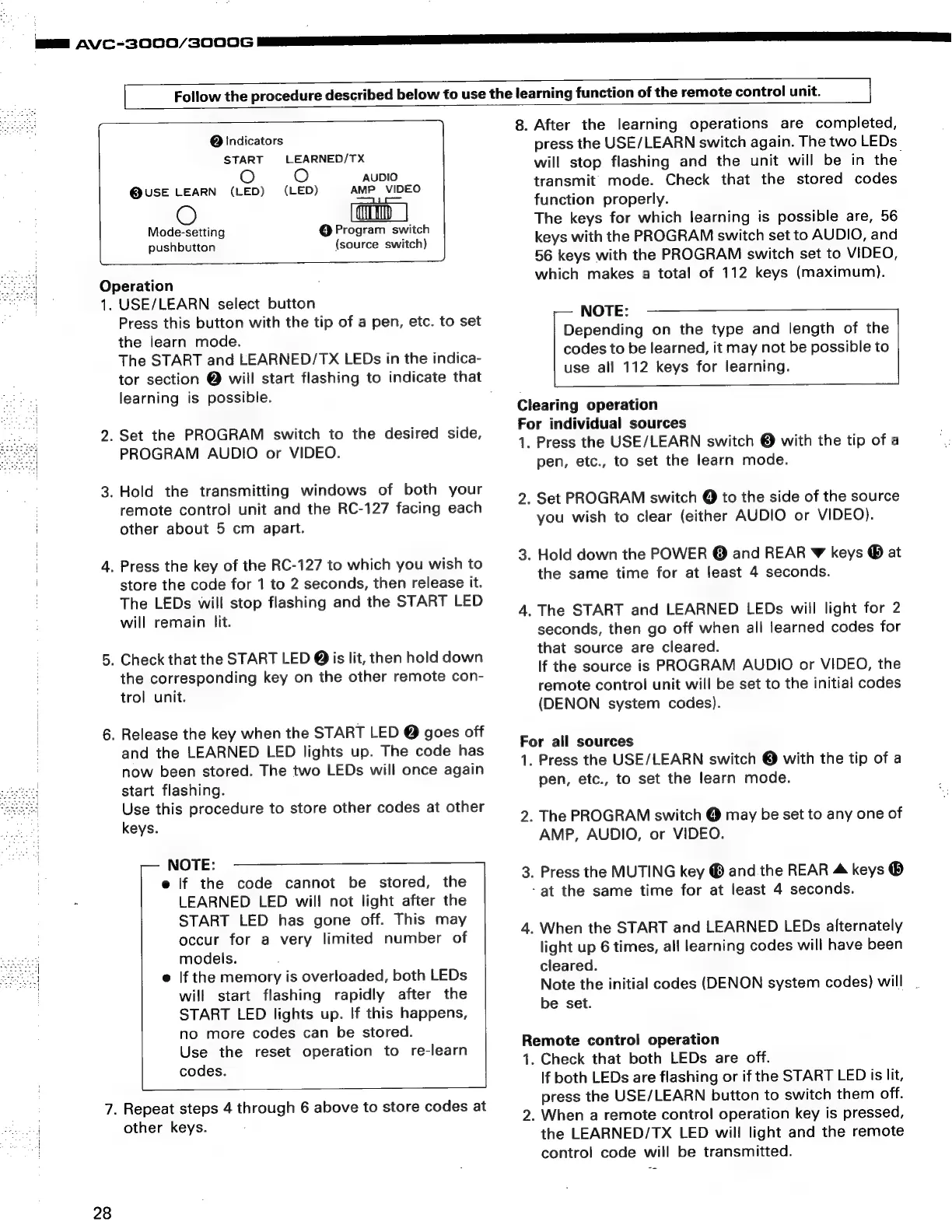
Indicators
START
LEARNED/TX
O
AUDIO
@USE
LEARN
(LED)
(LED)
AMP
VIDEO
@
Program
switch
(source
switch)
Mode-setting
pushbutton
7.
28
Operation
1.
USE/LEARN
select
button
Press
this
button
with
the
tip
of
a
pen,
etc.
to
set
the
learn
mode.
The
START
and
LEARNED/TX
LEDs
in
the
indica-
tor
section
@
will
start
flashing
to
indicate
that
learning
is
possible.
.
Set
the
PROGRAM
switch
to
the
desired
side,
PROGRAM
AUDIO
or
VIDEO.
.
Hold
the
transmitting
windows
of
both
your
remote
control
unit
and
the
RC-127
facing
each
other
about
5
cm
apart.
.
Press
the
key
of
the
RC-127
to
which
you
wish
to
store
the
code
for
1
to
2
seconds,
then
release
it.
The
LEDs
will
stop
flashing
and
the
START
LED
will
remain
lit.
.
Check
that
the
START
LED
@
is
lit,
then
hold
down
the
corresponding
key
on
the
other
remote
con-
trol
unit.
.
Release
the
key
when
the
START
LED
@
goes
off
and
the
LEARNED
LED
lights
up.
The
code
has
now
been
stored.
The
two
LEDs
will
once
again
start
flashing.
Use
this
procedure
to
store
other
codes
at
other
keys.
-—
NOTE:
e
if
the
code
cannot
be
stored,
the
LEARNED
LED
wil!
not
light
after
the
START
LED
has
gone
off.
This
may
occur
for
a
very
limited
number
of
models.
e
If
the
memory
is
overloaded,
both
LEDs
will
start
flashing
rapidly
after
the
START
LED
lights
up.
If
this
happens,
no
more
codes
can
be
stored.
Use
the
reset
operation
to
re-learn
|
codes.
Repeat
steps
4
through
6
above
to
store
codes
at
other
keys.
8.
After
the
learning
operations
are
completed,
press
the
USE/LEARN
switch
again.
The
two
LEDs_
will
stop
flashing
and
the
unit
will
be
in
the
transmit
mode.
Check
that
the
stored
codes
function
properly.
The
keys
for
which
learning
is
possible
are,
56
keys
with
the
PROGRAM
switch
set
to
AUDIO,
and
56
keys
with
the
PROGRAM
switch
set
to
VIDEO,
which
makes
a
total
of
112
keys
(maximum).
NOTE:
Depending
on
the
type
and
length
of
the
codes
to
be
learned,
it
may
not
be
possible
to
use
all
112
keys
for
learning.
Clearing
operation
For
individual
sources
1:
Press
the
USE/LEARN
switch
@
with
the
tip
of
a
pen,
etc.,
to
set
the
learn
mode.
.
Set
PROGRAM
switch
@
to
the
side
of
the
source
you
wish
to
clear
(either
AUDIO
or
VIDEO).
.
Hold
down
the
POWER
@
and
REAR
w
keys
®
at
the
same
time
for
at
least
4
seconds.
.
The
START
and
LEARNED
LEDs
will
light
for
2
seconds,
then
go
off
when
all
learned
codes
for
that
source
are
cleared.
If
the
source
is
PROGRAM
AUDIO
or
VIDEO,
the
remote
control
unit
will
be
set
to
the
initial
codes
(DENON
system
codes).
For
all
sources
1.
Press
the
USE/LEARN
switch
©
with
the
tip
of
a
pen,
etc.,
to
set
the
learn
mode.
.
The
PROGRAM
switch
@
may
be
set
to
any
one
of
AMP,
AUDIO,
or
VIDEO.
.
Press
the
MUTING
key
®
and
the
REAR
4
keys
®
-at
the
same
time
for
at
least
4
seconds.
.
When
the
START
and
LEARNED
LEDs
alternately
light
up
6
times,
all
learning
codes
will
have been
cleared.
Note
the
initial
codes
(DENON
system
codes)
will
.
be
set.
Remote
control
operation
1.
Check
that
both
LEDs
are
off.
lf
both
LEDs
are
flashing
or
if
the
START
LED
is
lit,
press
the
USE/LEARN
button
to
switch
them
off.
.
When
a
remote
contro!
operation
key
is
pressed,
the
LEARNED/TX
LED
will
light
and
the
remote
control
code
will
be
transmitted.

Related product manuals