Magnify schematic / printed wiring
board diagrams - 2
(Pan & Zoom function)
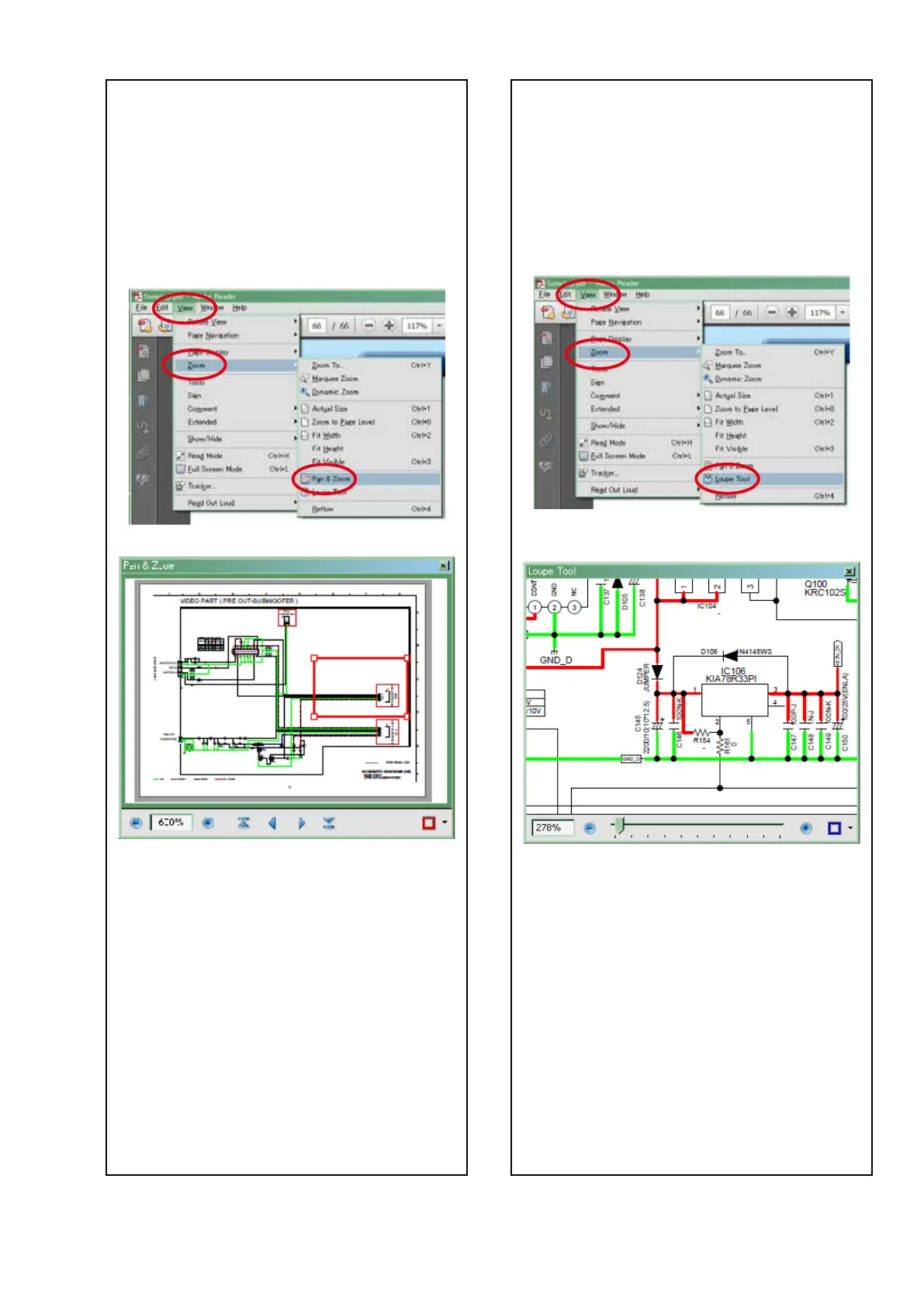
The Pan & Zoom function lets you see which part of
a magnied diagram is being shown in a separate
window.
[Example using Adobe Reader X]
On the "View" menu, point to "Zoom", and then click
"Pan & Zoom".
• The Pan & Zoom window appears on the screen.
[Example using Adobe Reader 9]
On the "Tools" menu, point to "Select & Zoom", and
then click "Pan & Zoom Window".
Magnify schematic / printed wiring
board diagrams - 3
(Loupe Tool function)
The Loupe Tool function lets you magnify a specic
part of a diagram in a separate window.
[Example using Adobe Reader X]
On the "View" menu, point to "Zoom", and then click
"Loupe Tool".
• The Loupe Tool window appears on the screen.
[Example using Adobe Reader 9]
On the "Tools" menu, point to "Select & Zoom", and
then click "Loupe Tool Window".
5



 To Next Page
 Loading...