54
ENGLISH
⁄5 USING THE MENUS
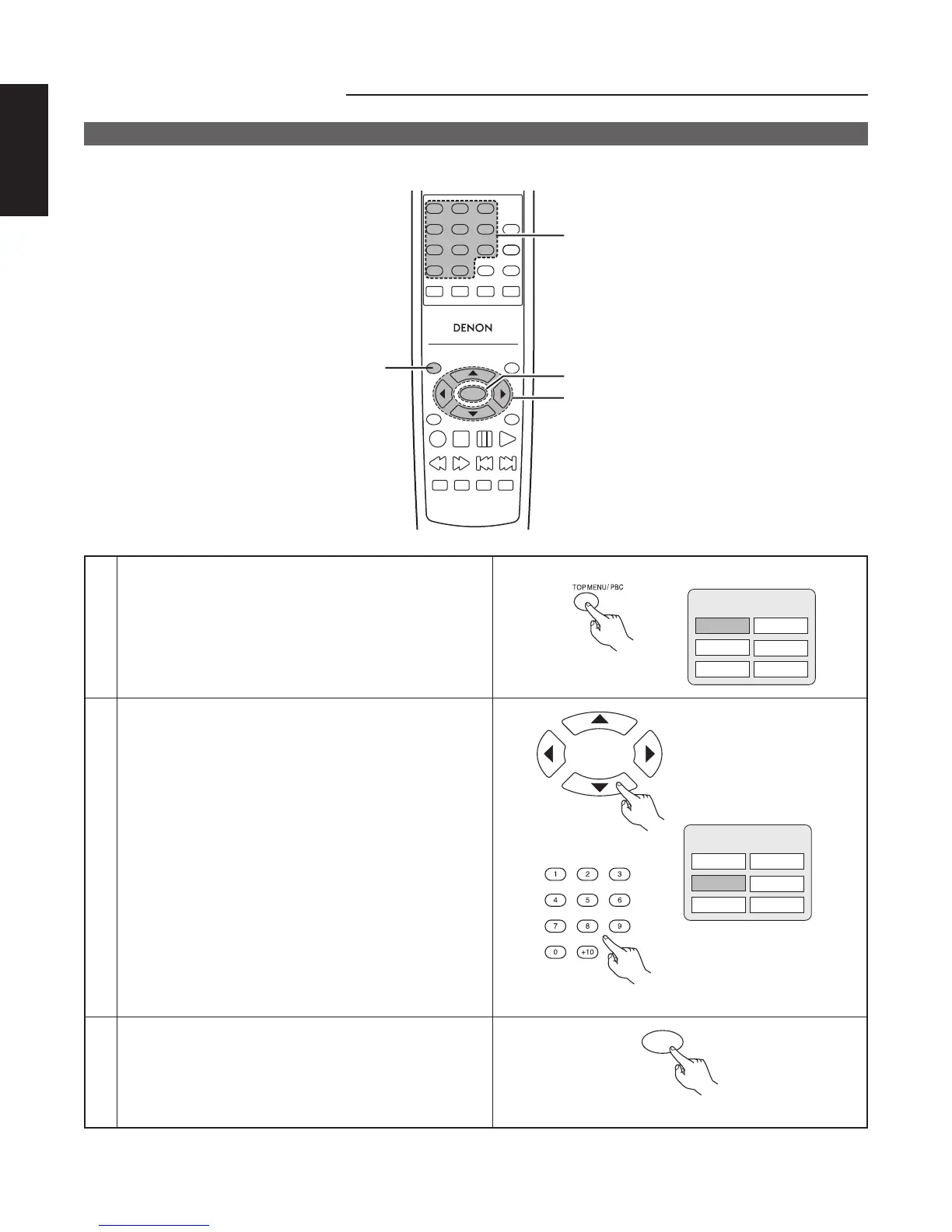
Using the Top Menu
■ For DVDs containing multiple titles, the desired title can be selected and played from the top menu.
TOP MENU
/PBC
MENU
RETURN
ANGLE
DISPLAY
STOP
STILL/PAUSE
PLAY
RC-963
123
456
789
0 +10
A-B REPEAT
REPEAT
AUDIO
SUBTITLE
ENTER
SETUP NTSC/PAL
ZOOM SLIDE SHOW
SLOW/SEARCH SKIP
CALL
RANDOM
CLEAR
PROG /
DIRECT
2
2
3
1
1
During playback, press the TOP MENU button.
• The top menu appears.
Remote control unit
Example:
Apple Banana
Orange Strawberry
TOP MENU
Peach Pineapple
2
Use the cursor or number buttons to select the desired
title.
Remote control unit
Remote control unit
Example:
When “Orange” is selected
Apple Banana
Orange Strawberry
TOP MENU
Peach Pineapple
3
Press the ENTER button.
• Playback starts.
• Playback also starts if the PLAY button is pressed.
ENTER
Remote control unit



 To Next Page