10
OPERATION
4) HOUR 24/12
You can select time format to 12 hour or 24
hour format. (In AREA item. When you
change the area to the EUR. The time
format will be changed to 24 HOUR
format automatically. When you change
the area to the USA. The time format will
be change to 12 HOUR format
automatically.)
AUXILIARY INPUT
A portable audio player can be connected
to the unit through the AUX IN jack (13) on
the front panel. After finishing the
connection, Press MODE button (1) to
switch the mode to AUX IN mode.
DAB OPERATION
1) Press AS/PS button for DAB full scan. If
there isn't any station, Scroll display "NO
STATION FOUND".
2) Press / buttons (5/23)button to
change the stations.
Shortly press M1-M6(10/11/12/8/9/14)
button to read M1-M6 station.
If Read Empty Preset, Display "NO
SAVED"
3) Press and hold M1-M6(10/11/12/8/9/14)
button to memory the current station to
the M1-M6 station.
4) Press DSP(18) to show the information
(This is rotate below sequence)
Station name -> Ensemble name ->
Current Frequency -> Current PTY ->
DLS Message -> CLOCK -> Signal
Strength -> Signal Quality -> Station name
5) List Search mode
Press PTY button to List Search Enter/Exit.
In list search mode rotating the Volume
UP/DOWN(4) to list UP/DOWN. Press SEL
button to select Current List Station.
* In this mode LCD display blinking
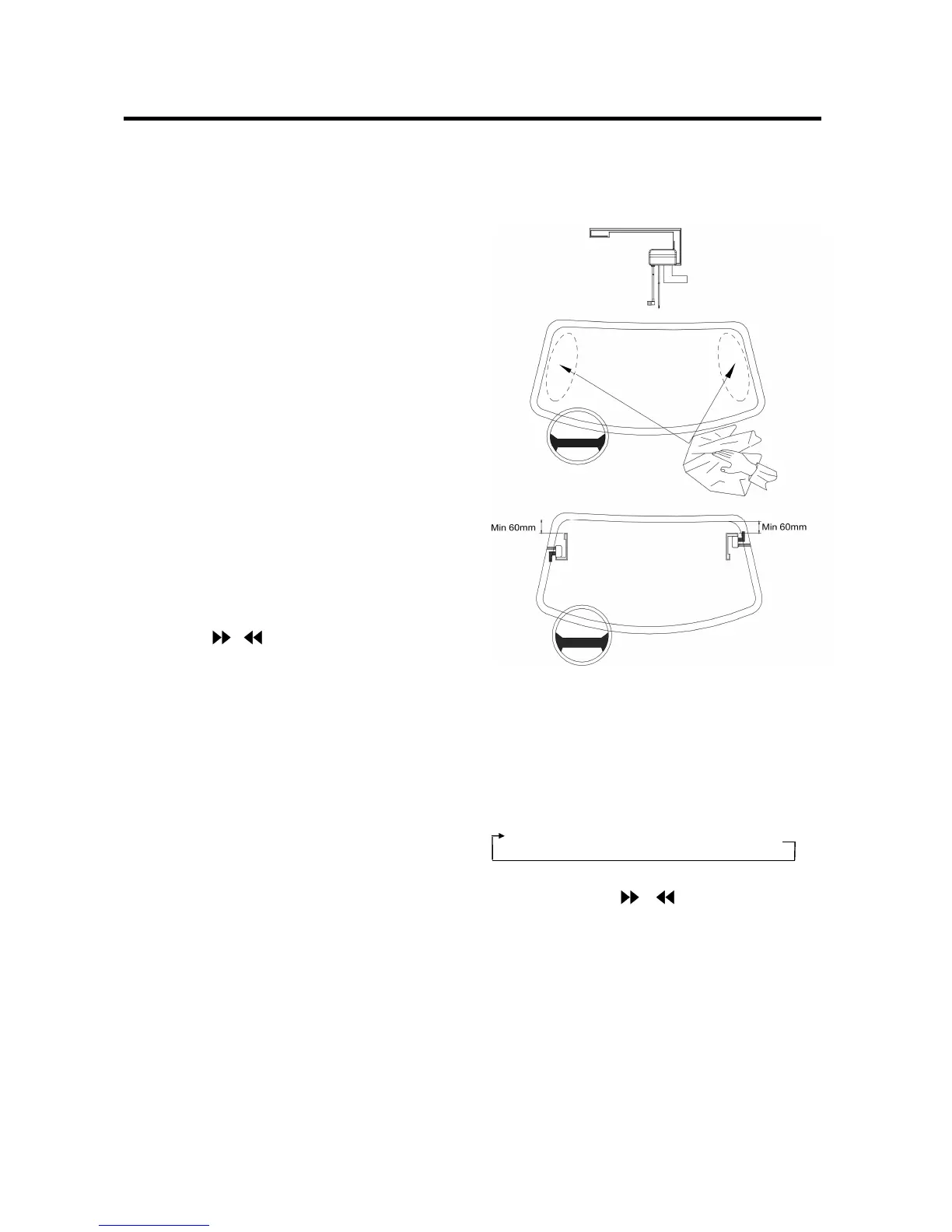
DAB ANTENNA INSTALLATION
Put the antenna on the left or right
of windows. The minimum installation
height is 60mm from the windows top.
RADIO OPERATION
SELECTING THE FREQUENCY BAND
In radio mode, press BAND button (3) to
select the desired band.
The reception band will change in the
following order:
FM1FM2FM3 MW
SELECTING A STATION
Shortly press / buttons (5/23) to
activate automatic seek function. It will
search up/down a station automatically.
Press for 2 seconds until “MANUAL……”
appears on the display, the manual tuning
mode is selected. In this mode you can turn
up/down a step frequency one by one till to
search a station. If both buttons have not
been pressed for several seconds, they will
return to seek tuning mode and


 To Next Page