3 Thermostat Setup and Usage
3.1 Set Time and Date
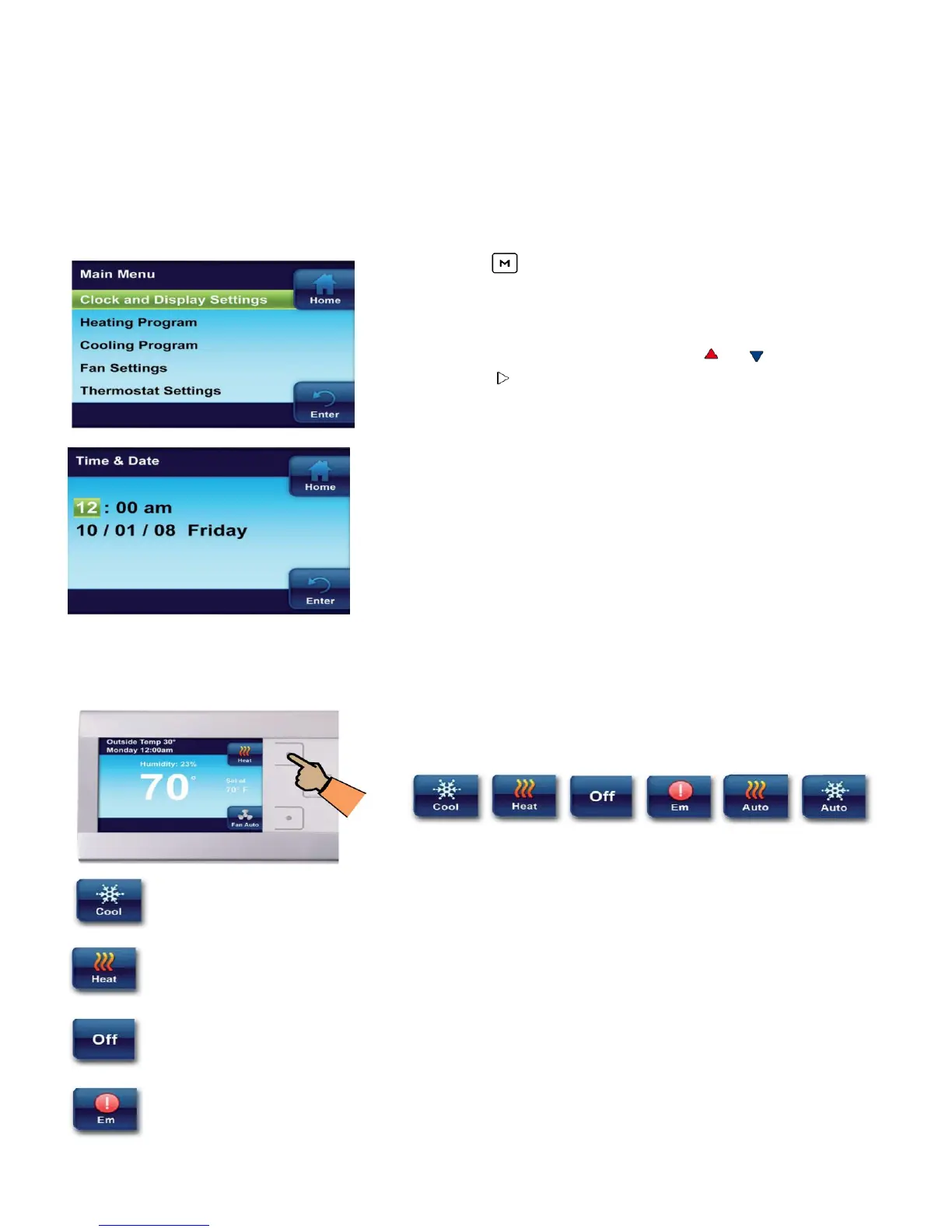
• Press to enter the Main Menu.
• On the Main Menu, highlight and enter Clock and
Display Settings.
• Highlight and Enter Time & Date.
• Set the time and date using the or buttons.
• Press to highlight Minute, AM/PM, Month, Day or
Year.
• The thermostat will automatically assign the correct
day of the week after the date is set.
• Press the Enter button when finished.
Note: If system power is lost for more than eight hours, the
clock will have to be reset. Programming and configuration
settings will be saved.
3.2 System Setting
From the Home screen, press the button as shown to
choose the system setting.
Thermostat controls only the cooling system.
Thermostat controls only the heating system.
Heating and Cooling systems are off.
Emergency setting available only when the thermostat detects a heat pump. When
selected, system will use only the backup heat.
10


 To Next Page