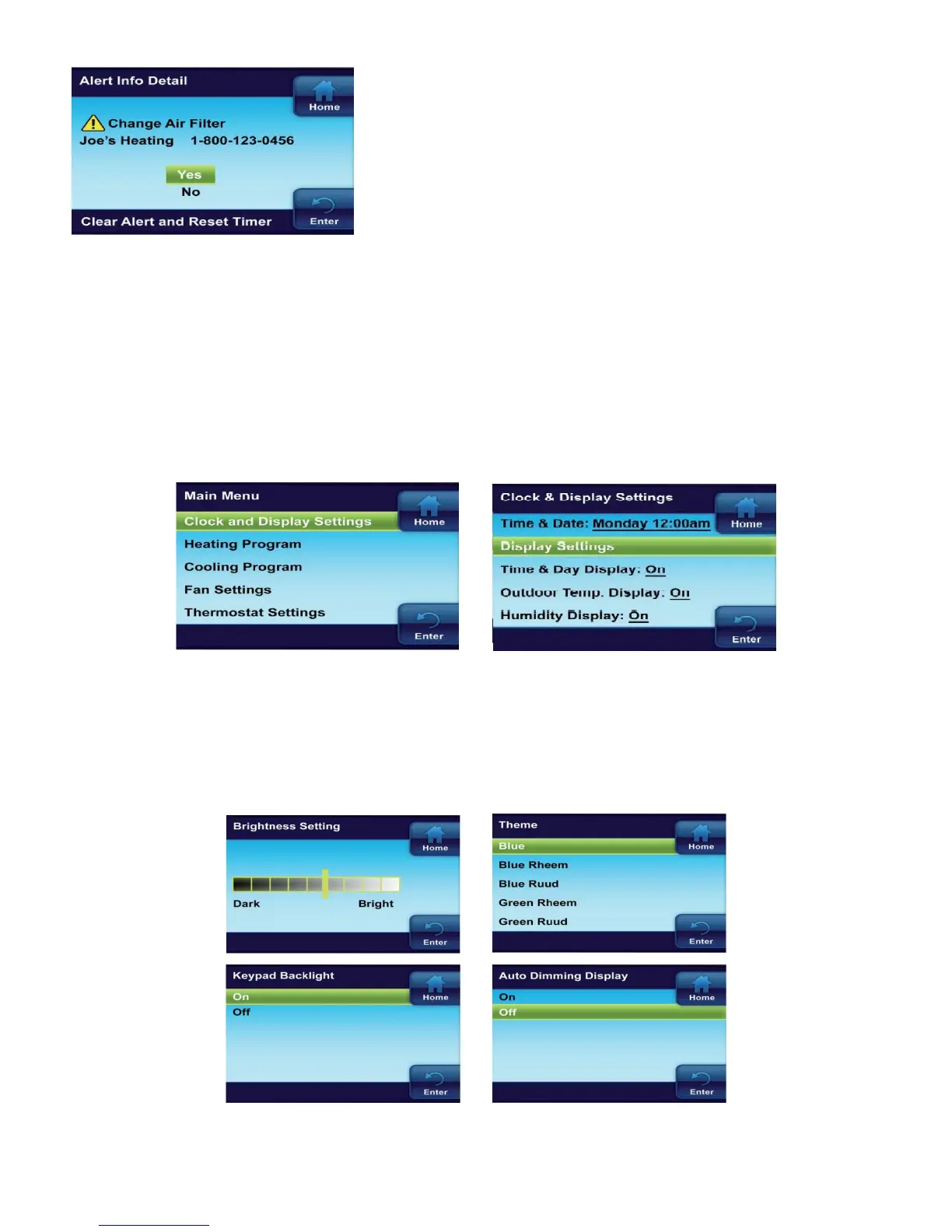
When a reminder appears, it can be turned off by entering
the Alert Information Detail menu on the Main Menu.
Select Yes to “Clear Alert and Reset Timer”.
3.8 Display settings
In addition to setting time and day on this menu, you can use the Display Settings menu to adjust the
screen brightness, choose the background color, select the keypad backlight, and the auto dimmer.
Other choices select what will be displayed on the Home screen, Time & Day, Outdoor Temp Display,
Humidity Display and Alert Message Area.
1. On the Main Menu, highlight and Enter Clock and Display Settings
2. Highlight and Enter Display Settings
Keypad Backlight When selected On, the light on the keypad will be on to give the keypad better
visibility. If selected Off, the keypad light will turn on for a short time when a button is pressed and
then turn off again.
Auto Dimmer When selected On, the display will change to a darker background during the hours
of 10:00 PM to 5:00 AM when no buttons are pressed. If selected Off, the display will remain at the
same brightness.
13


 To Next Page