Celeris User Manual
14770-A || ECN # 844 || ECN Date: 28 July 2017 Page 9 of 23
Figure 7 - Channel labeling guide
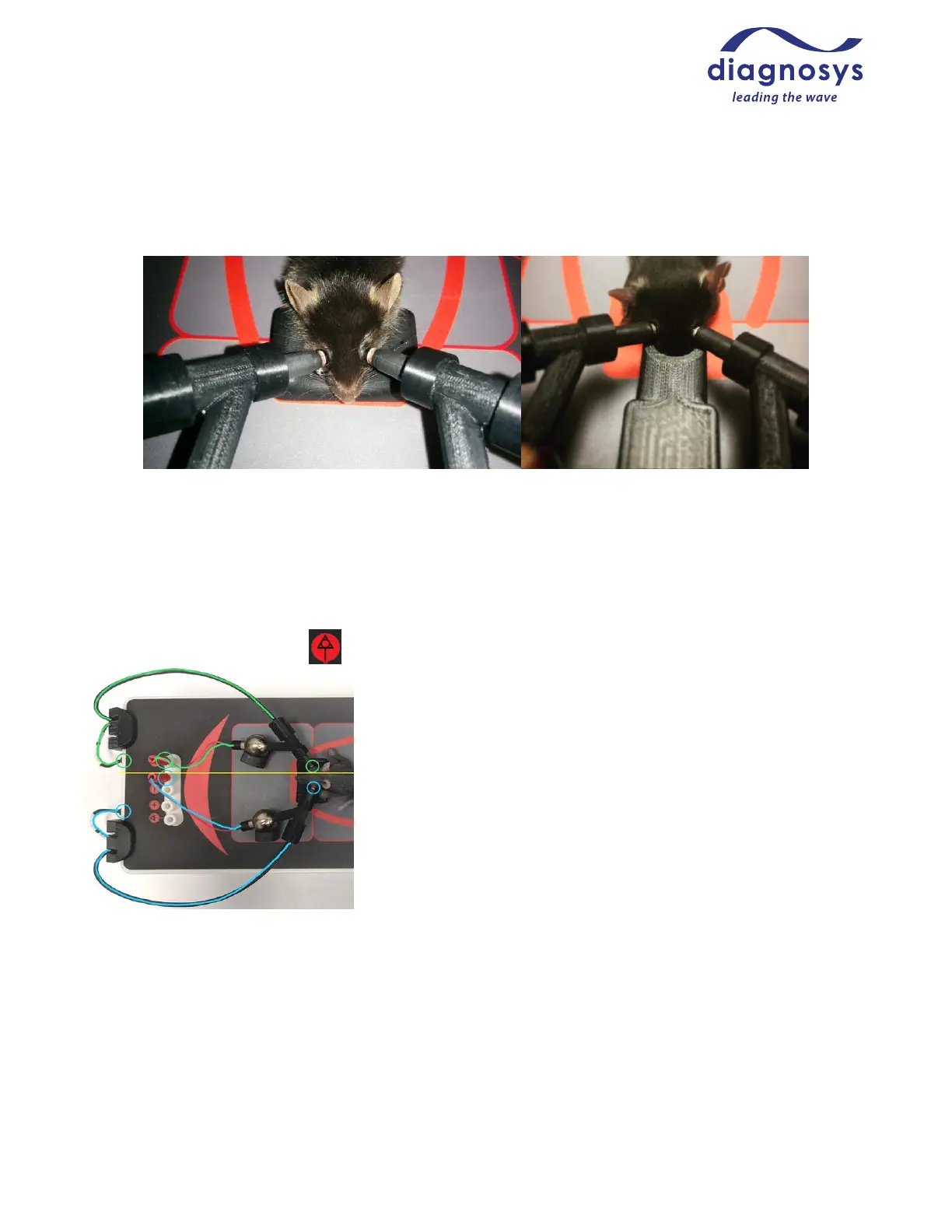
Figure 8 - The TOUCH/TOUCH Setup Figure 9 - The TOUCH/TOUCH Setup with gas nose cone
When plugging a TOUCH/TOUCH protocol into the Celeris, imagine bisecting both the rodent and the Celeris
along the midline of the animal, as seen in Figure 8 below. Every plug/input on the right side of the animal
should stay on the right; every plug/input on the left side of the animal should stay on the left. See Figure 8
below for how the electrodes should be plugged into the amplifier for a TOUCH/TOUCH protocol. The right eye
should be plugged into Channel 1+; the left eye should be plugged into Channel 1-. If a ground is used, it should
be plugged into the GND input ( ).
Figure 10 - Amplifier Setup of a TOUCH/TOUCH
TM
Protocol
The electrode/stimulator contacting the animal’s right eye (green) is
plugged into the amplifier input 1+ (on the animal’s right) and the
stimulator port to the animal’s right. The electrode/stimulator
contacting the animal’s left eye (blue), is plugged into 1- (the channel 1
input closest to the animal’s left), and the stimulator port to the
animal’s left.
Protocols labelled ACTIVE/REF/GND
ACTIVE/REF/GND protocols are traditional protocols that use binocular stimulation, a shared reference
electrode, and a ground electrode to reduce or eliminate mains interference. Typically reference electrodes are
placed either subcutaneously in the forehead area, or a bite bar placed in the mouth. Ground electrodes are
typically needle electrodes placed subcutaneously in the tail or the hindquarters near the tail. The right eye will
be plugged into Channel 1+, the left eye will be plugged into Channel 2+, the shared reference will be plugged
into both Channel 1- and Channel 2-, and the Ground into the ground input.



 To Next Page