Celeris User Manual
14770-A || ECN # 844 || ECN Date: 28 July 2017 Page 12 of 23
Runtime Menu Controls / Celeris Control Buttons
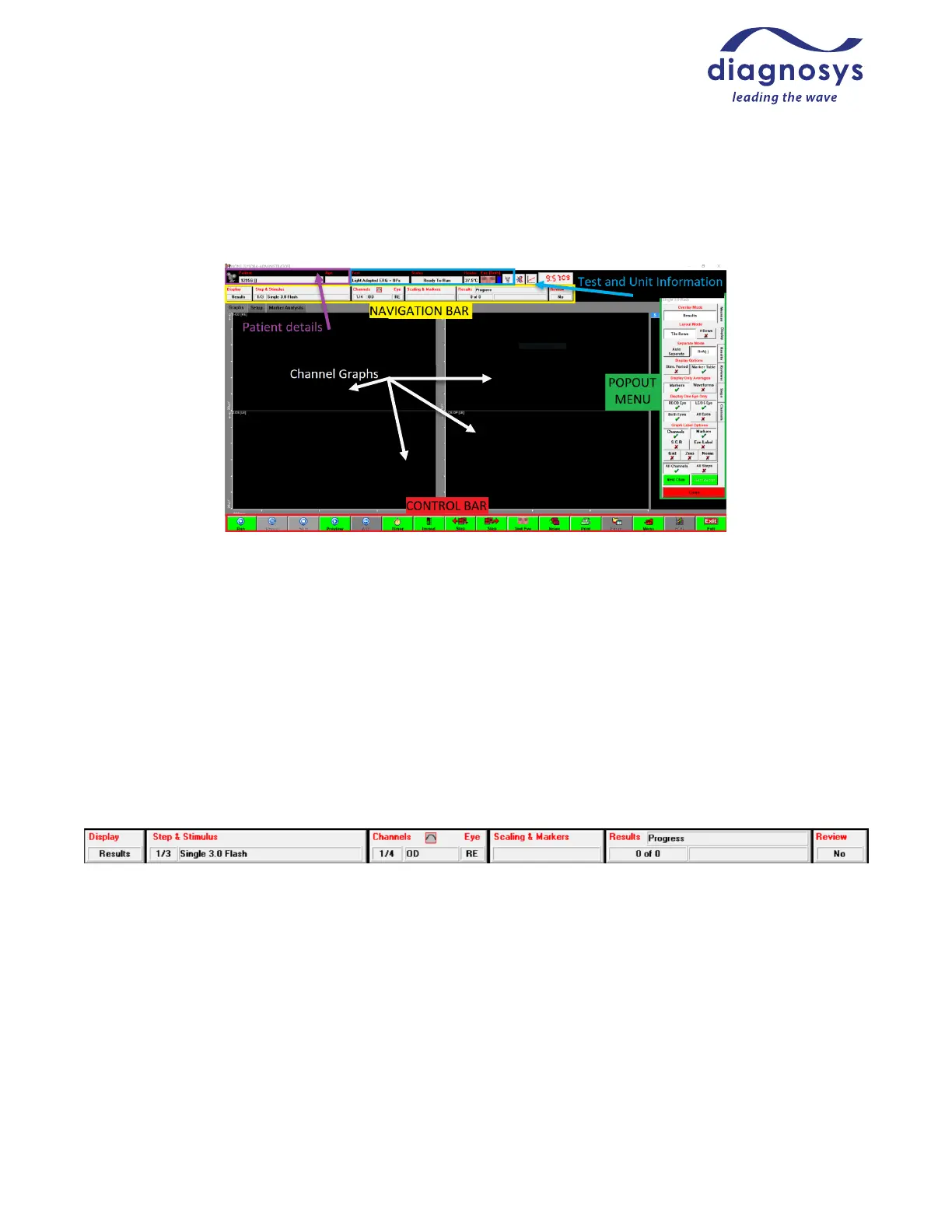
This is the runtime menu of the Diagnosys software:
Figure 14 - runtime menu
The Patient Details Bar includes the identifying information filled out in the subject record, such as study
name, animal number, cage number, and age (in years).
The Test and Unit Information includes the name of the test being performed; the test status (ready to run,
paused, previewing, waiting for an adaptation timer to complete, or waiting for an interstimulus delay to end. It
also reports the current measured heater temperature (target temperature is 37 °C, ±1) and which eye is being
tested by this step of the protocol. A small lightbulb icon at the top controls the safety light on the Celeris.
The Navigation Bar at the top controls the popout menu at the right. Pressing any of those buttons will cause
the corresponding popout menu to appear; depressing the buttons will cause it to close. The popout menu can
also be navigated using the tabs on the right edge.
Figure 15 - Navigation Bar
There are six buttons on the navigation bar. The first button is Display, which controls the display settings for
the test. The Step & Stimulus menu reports current stimulus and acquisition parameters; these are primarily
used during new protocol creation, not typical use. The Channels & Eye menu houses the 50/60 Hz line filter; it
also reports the current filter and auto-rejection window settings. The Scaling and Markers button allows you
to adjust marker placement or change channel scaling as necessary. The Results menu allows you to delete or
toggle the visibility of recorded results, reject individual artifacts, change the color of responses, and create
grand averages. Review is primarily used in multi-site clinical trials and allows a reviewer to analyze each step
of each test for changes or problems in order to alert safety committees; it is not commonly used in a research or
clinical setting.



 To Next Page