DA16600 FreeRTOS Getting Started with EVK
© 2021 Dialog Semiconductor
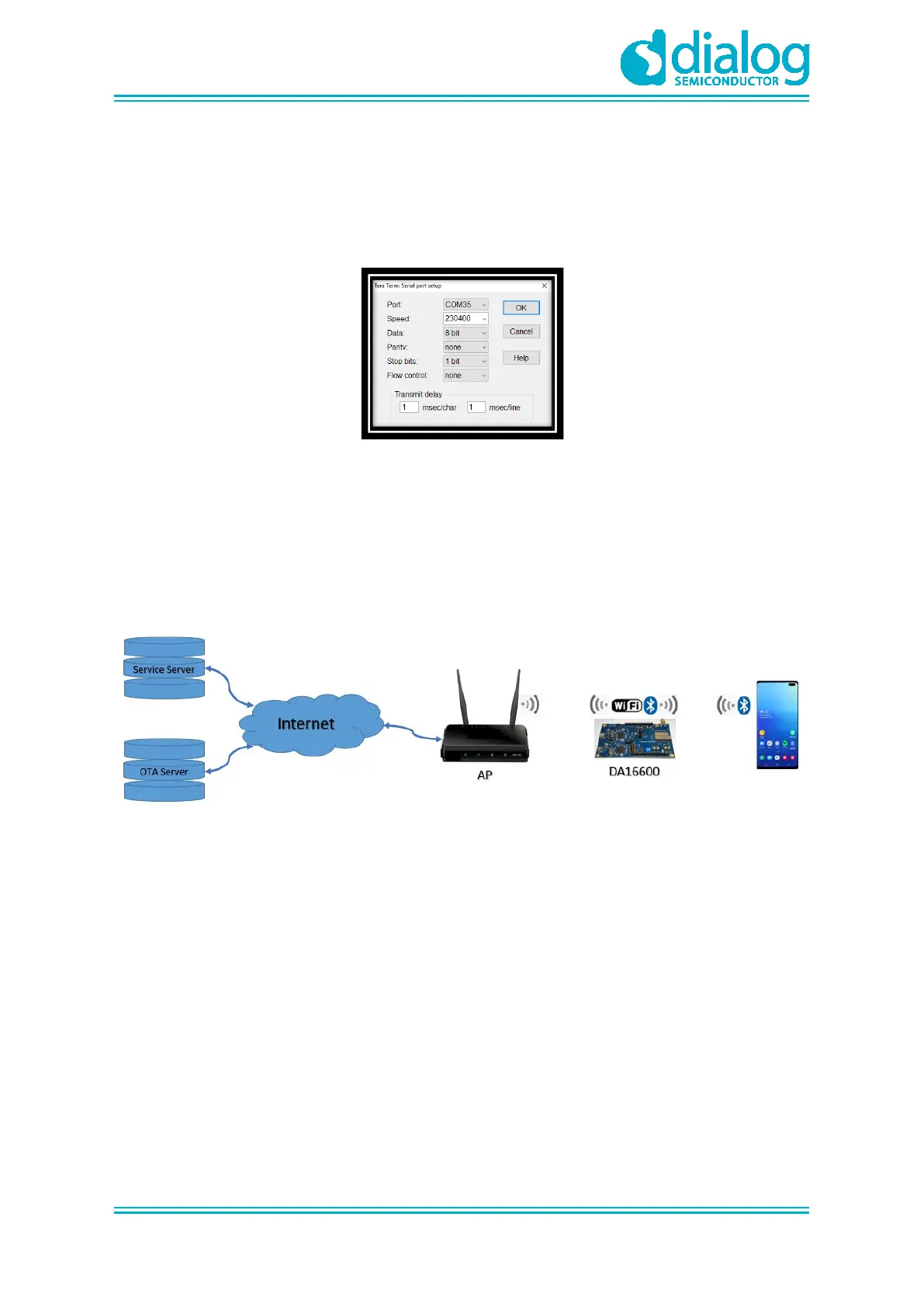
5. Select Setup > Serial Port and configure your UART port using the parameters as shown in
Figure 8.
6. Open the Lowest COM port number assigned to the DA16600 EVK.
Figure 7 shows which port number to select in Device Manager in Windows. Make sure that the
UART is configured as shown in Figure 8.
Figure 8: Serial Port Setup
5.3 Setup for Wi-Fi Provisioning Using Bluetooth
®
LE
DA16600 module may be used in a product like Wi-Fi door-lock where Wi-Fi is playing the main role,
and Bluetooth
®
LE assists with Wi-Fi Provisioning at the product's initial setup (Out-of-Box). A
Bluetooth
®
LE peer application (for example Android/IOS mobile application) interacts with users to
set up the DA16600 device – by giving Wi-Fi Provisioning information (for example, Wi-Fi Home
router's SSID, password, server info, and other).
Figure 9: Provisioning via Bluetooth
®
LE
To set up Wi-Fi provisioning:
1. Download Dialog WiFIProvisioning App at App Store and install it.
2. Check the prompt [/DA16600] #.
3. Run Provisioning App and follow the steps in Table 1.



 To Next Page