DA16600 FreeRTOS Getting Started with EVK
© 2021 Dialog Semiconductor
update , sflash completed
[/DA16600/NVRAM] # nvedit load sflash
nvedit , load completed
[/DA16600/NVRAM] #
Figure 26: Initialize NVRAM
8.7 Serial Flash Recovery from Boot
If there are any memory conflicts during updating the image or errors while building the SDK, there
may be a case that it cannot run DA16600. In this case, you cannot do anything in the command
window. DA16200 must be forced to enter boot mode. Follow the procedure below.
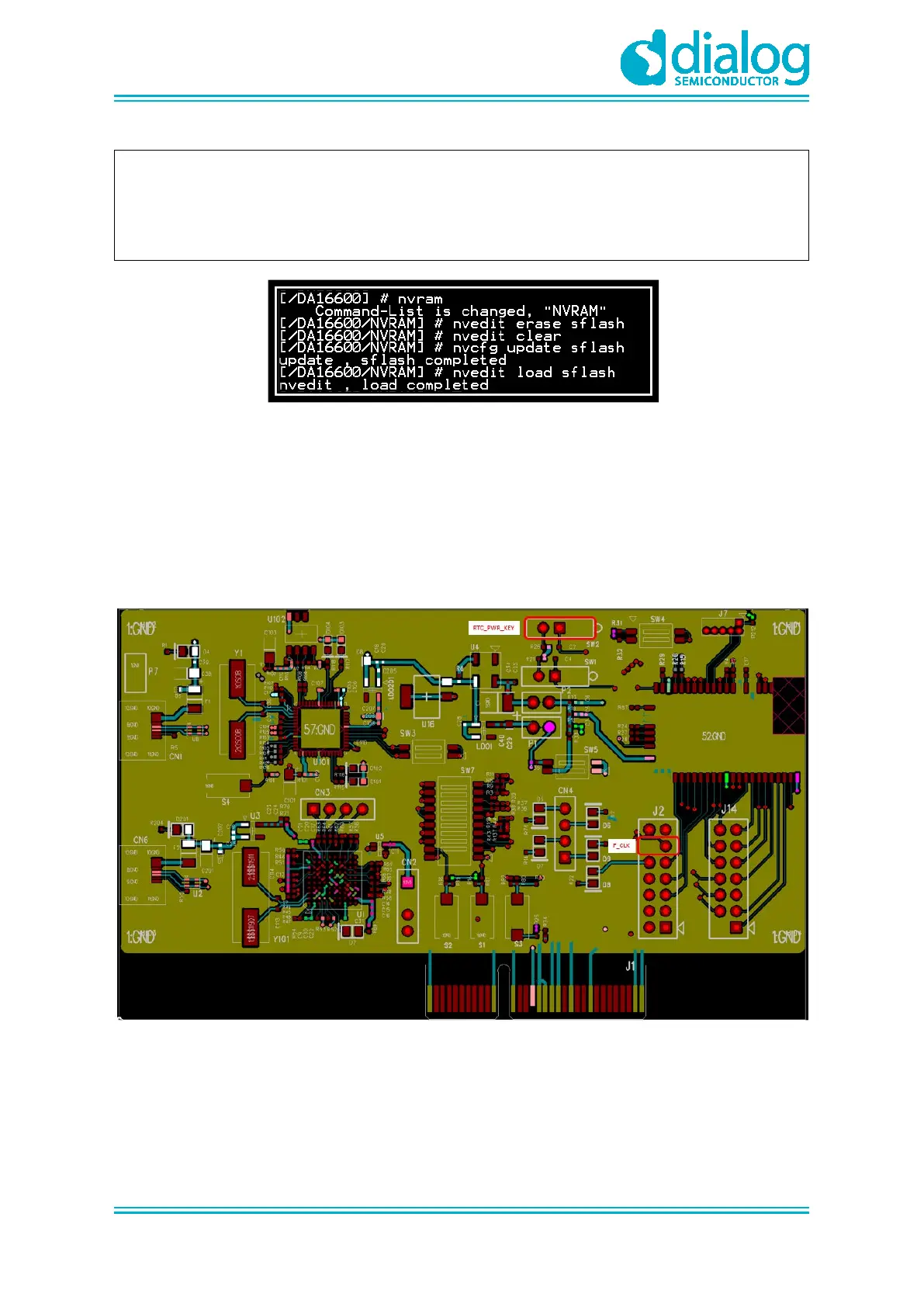
1. Use RTC_PWR_KEY to turn off (move to the OFF position).
○ Connect the two pins: Pin 11(F_CLK) and P12(GND) of J2. See Figure 27
Figure 27: Recovery Point in the EVK
2. Use RTC_PWR_KEY to turn on (move to the ON position).
a. Boot DA16600. Turn the power on when the two pins are connected.
b. Disconnect the two pins of J2. Pin 11 (F_CLK) and Pin 12 (GND).
3. See the DA16600 go into the BOOT mode. See Figure 28.



 To Next Page