1 Introduction
ECO 9099 SOP05-5090F Rev.00 Effective Date: 12/20/18 Page 12 of 58
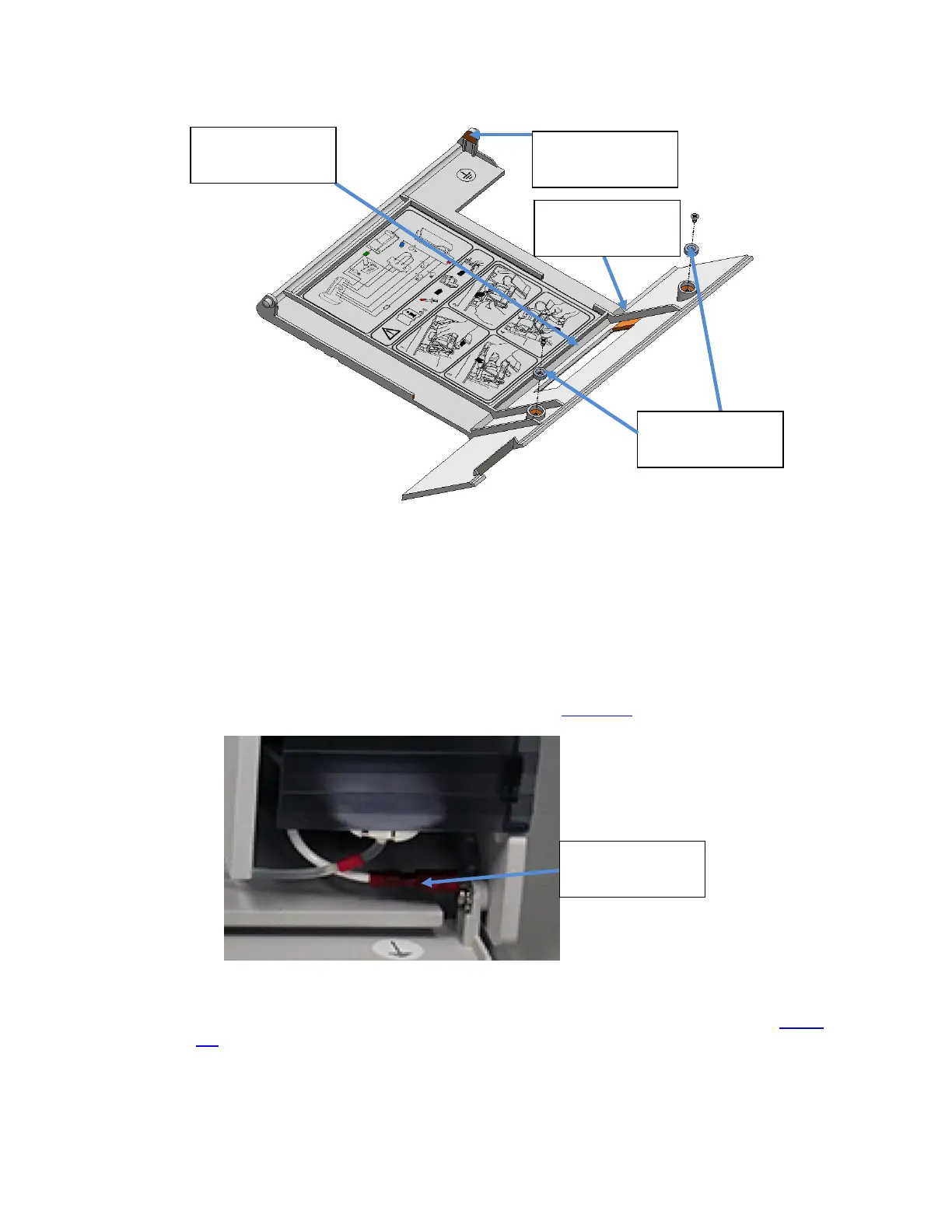
Figure 1-4 Front Door Assembly, Rear View
To remove the front door from the analyzer;
1. Move the analyzer to the edge of a work surface so the analyzer door, when opened, will
extend beyond and below the work surface.
2. Remove the red ground connector from the Right Angle Tab by grasping the red connector
and pulling to the left exposing the Right Angle Tab. (Figure 1-5
)
Figure 1-5 Door Ground Connector, Red
3. Then remove the ground screw, external tooth washer, right angle tab, and hex nut. (Figure
1-6)
Ground Connector
EMI Window
beneath Plastic
Door Magnets
Right Hinge Pin
Copper Conductive
Tape



 To Next Page