Operator’s Manual DigiPump LP8 Infusion Pump - Digicare Biomedical Technology Inc.
- 7 -
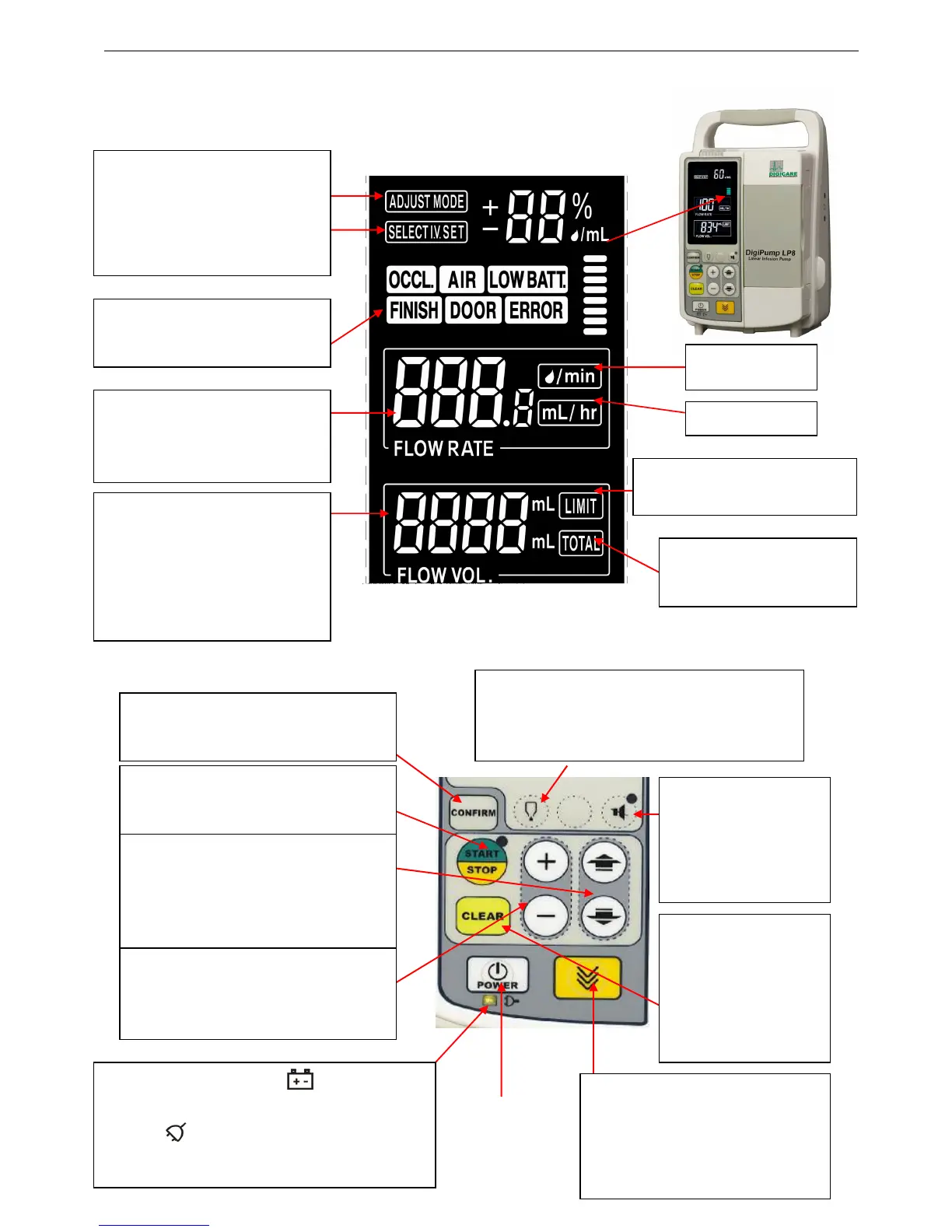
1.4.3 LCD
1.4.4 Keyboard
Adjust
Mode Indicator
Select IV set:Set to
10,15,20 or 60d/ml
window
Set
the Flow Rate in
drop/min or ml/h
Set
volume to be infused
and display the total
volume infused
VTBI indicator
infused indicator
Empty-mode key: Press it to start or stop
the empty-mode when setting infusion
volume.
Power
switch
Confirm key: To confirm and store
the data
Start/Stop: It lights when turn on
the pump
Arrow-key: To advance and return
throughout the display menu
settings
Data Input Key: Press it to
increase or decrease the data.
Silence switch:
Press to disable and
enable the audio
alarm.
Power indicator: When illuminates,
indicate powered by the internal battery.
When illuminates, indicates powered
by AC mains.
Clear-key: Clear the
alarm or the setting
parameter to zero.
Purge rate: Press and hold to
start the purge function. Release
to stop.


 To Next Page