Operator’s Manual DigiPump LP8 Infusion Pump - Digicare Biomedical Technology Inc.
- 19
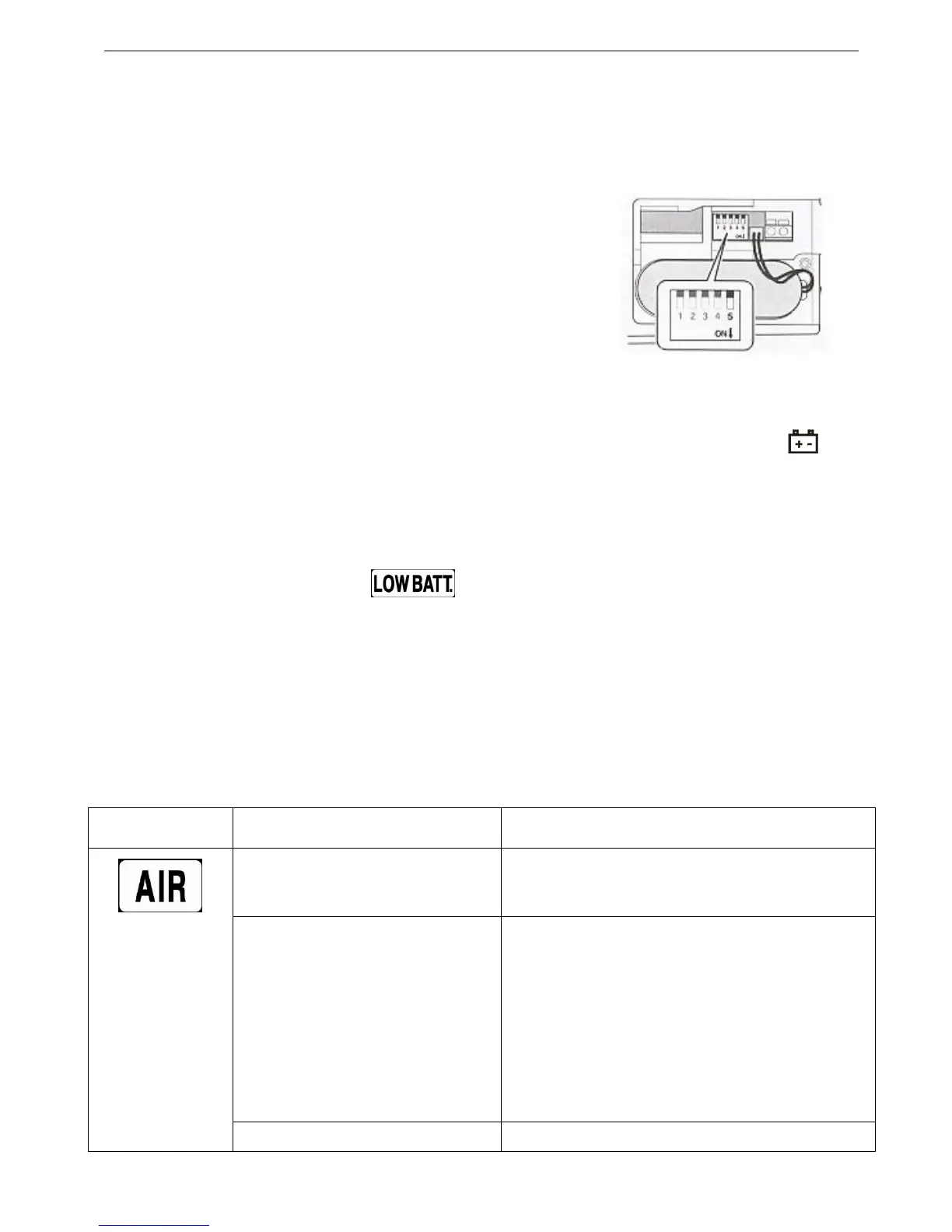
3.9.8 Toggle switch
5 toggle switches are provided at the bottom of the infusion pump. They are used for engineering only
Note: Pin the down position they are ON
In the up position they are OFF
For normal operation all 5 switchws shall be kept to OFF.
3.9.9 Battery
In the following cases, the pump will automatically switch to battery supply and the indicator ‘ ’ will
illuminate.
(1)The AC power supply is cut off.
(2)AC power switch is turned off.
Note: When the battery is low, “ ”will flash with alarm.(The infusion pump will stop
infusion after 27 minutes, and turn off automatically after 30 minutes).
When the AC power is reconnected the infusion pump will recharge the battery automatically.
3.10 Trouble Shooting
3.10.1 Alarms and Alarm Codes
Alarm code Possible causes Action
No IV set installed or IV set not
properly installed
Check whether IV set is mounted to the specified
position for air detection.
Air in tube
1. Open the pump door, the tube clamp will grip
tube tightly automatically.
2. Remove the tubing upper of the tube clamp.
3. Tap on tubing to expel the air back to drop
chamber.
4. Reinstall the tubing and close the pump door.
Continue the infusion.
“ ”
Occlusion in solution container Check whether the air inlet of solution container is


 To Next Page