
 Need help?
Do you have a question about the DigiTech BP200 and is the answer not in the manual?
Warns against opening the unit and exposure to water, emphasizing professional servicing for safety.
Details conditions for operation to ensure compliance and prevent harmful interference.
Lists the items that should be included with the BP200 Bass Processor upon purchase.
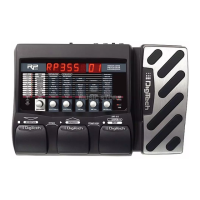
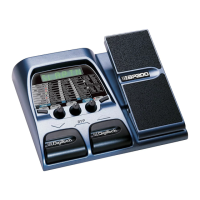
Identifies and describes the function of the foot switches, knobs, buttons, display, and LEDs on the front panel.
Explains the initial power-up mode and the function of buttons, knobs, and footswitches during operation.
Details the process for creating new presets and modifying existing ones using the unit's controls.
Guides users on how to store modified settings to user preset locations and name them.
Illustrates the connection setup for mono operation, linking the BP200 to an amplifier.
Explains how to bypass the BP200 for a clean signal and how to return to the previous mode.
Details how to access and use the built-in tuner, including note indication and reference tuning.
Describes how to activate and control the Rhythm Trainer for timing practice.
Explains how to assign effect parameters to the expression pedal for real-time control.
Provides steps to calibrate the expression pedal for proper functionality and error handling.
Details the procedure to reset the BP200 to factory settings, including recalibration.
Illustrates the signal flow and the order of effect modules within the BP200.
Describes the fretless simulator and wah effects, including parameter controls and selection.
Explains the compressor's function for sustain and clipping prevention, detailing its controls.
Lists and describes the various amp and stompbox models available for preset selection.
Details the 3-band EQ for tonal shaping, explaining bass, midrange, and treble controls.
Describes cabinet simulation for speaker emulations and the noise gate's functionality.
Explains the chorus effect, its sound creation, and the controls for speed, depth, and level.
Describes the flanger effect, its principles, and controls for speed, depth, and level.
Details the phaser effect, its sound characteristics, and controls for speed, depth, and level.
Explains the envelope filter as a dynamic wah, detailing sensitivity and mix controls.
Describes the vibrato effect's pitch modulation, detailing speed and depth controls.
Details the octavider effect for unison notes one octave below, noting its 'Amount' control.
Explains the Synth Talk effect for bass speech-like sounds, detailing synth voice and sensitivity controls.
Describes the pitch shifting effect, its illusion of multiple basses, and controls for interval and mix.
Explains the detune effect for creating a chorus-like sound, detailing detune amount and mix.
Details the Whammy effect, its pitch bending via expression pedal, and selection of pitch bend types.
Describes the delay effect for repeating signals, detailing type, time, and feedback controls.
Explains reverb for simulating acoustic spaces, detailing reverb type, decay, and level controls.
Lists the technical specifications of the BP200, including inputs, outputs, power, and memory.
 General
| Amp Modeling | Yes |
|---|---|
| Type | Multi-effects Processor |
| Effects | Distortion, Delay, Reverb |
| Presets | 40 |
| Expression Pedal | Built-in |
| Inputs | 1 x Instrument |
| Outputs | 1 x 1/4" Headphone Output |
| Power | 9V DC power supply (not included) |


 To Next Page