© 2019 Digitrax, Inc. www.digitrax.com
10
10
5.0 DCS52 Front Panel
Before diving into running trains take a few minutes to familiarize yourself
with the DCS52’s controls and display.
5.1 DCS52 Front Panel Controls and Indicators
TRACK
STATUS
FORWARD
BRAKE
REVERSE
STOP FULL
1
2
3
4
5
R
DCS 52
5. Throttle
Knob
3. Direction/Brake
Lever
4. Track Status
Indicator
1. Keypad 2. Display
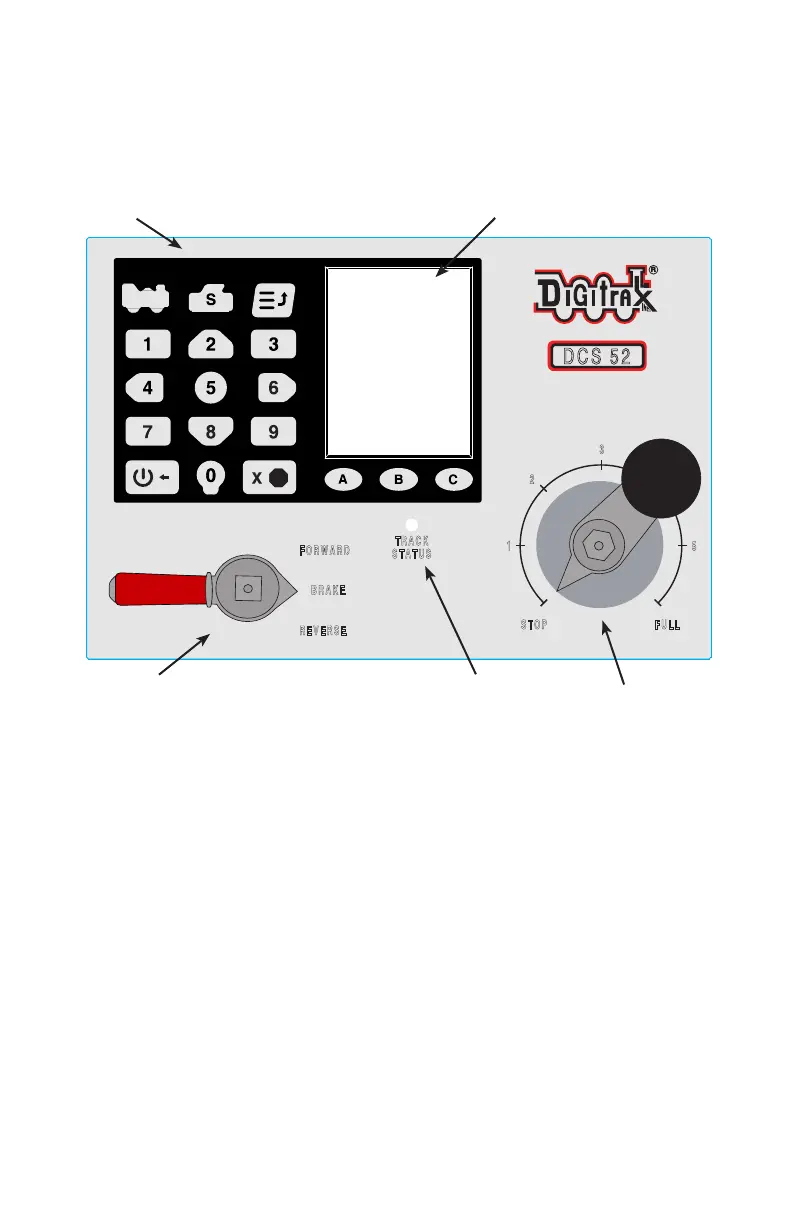
1. The Keypad consists of 18 back-lit keys. It features a full numeric keypad
for direct data entry, 3 context sensitive soft keys, and other task specic
keys. Most keys serve more than one use depending on the operation mode
of the DCS52. The Keypad is covered more in depth in section 5.2
2. The Display is a 2.4 inch color LCD screen. The screen will provide you
with a variety of information and input prompts to assist in running loco-
motives. The Display is covered more in depth in section 5.3.
3. The Direction/Brake Lever is the small red and silver lever that is used to
control the selected locomotives direction or set the brake. The lever has
3 positions FORWARD, BRAKE, and REVERSE. When set in BRAKE
the loco will slow to a stop and a message will scroll in the display. When
the Direction/Brake Lever is turned to FORWARD or REVERSE the
loco will accelerate back to the speed set on the Throttle Knob.
4. The Track Status Indicator is lit when Track Power is on and being pro-
vided to the track. If this indicator is not lit Track Power is turned o or
the booster is short circuited.



 To Next Page