© 2019 Digitrax, Inc. www.digitrax.com
8
8
2.5 Select and Run A Non-DCC Locomotive
TRACK
STATUS
FORWARD
BRAKE
REVERSE
STOP FULL
1
2
3
4
5
R
DCS 52
Throttle Knob
Direction/Brake
Lever
Loco Key
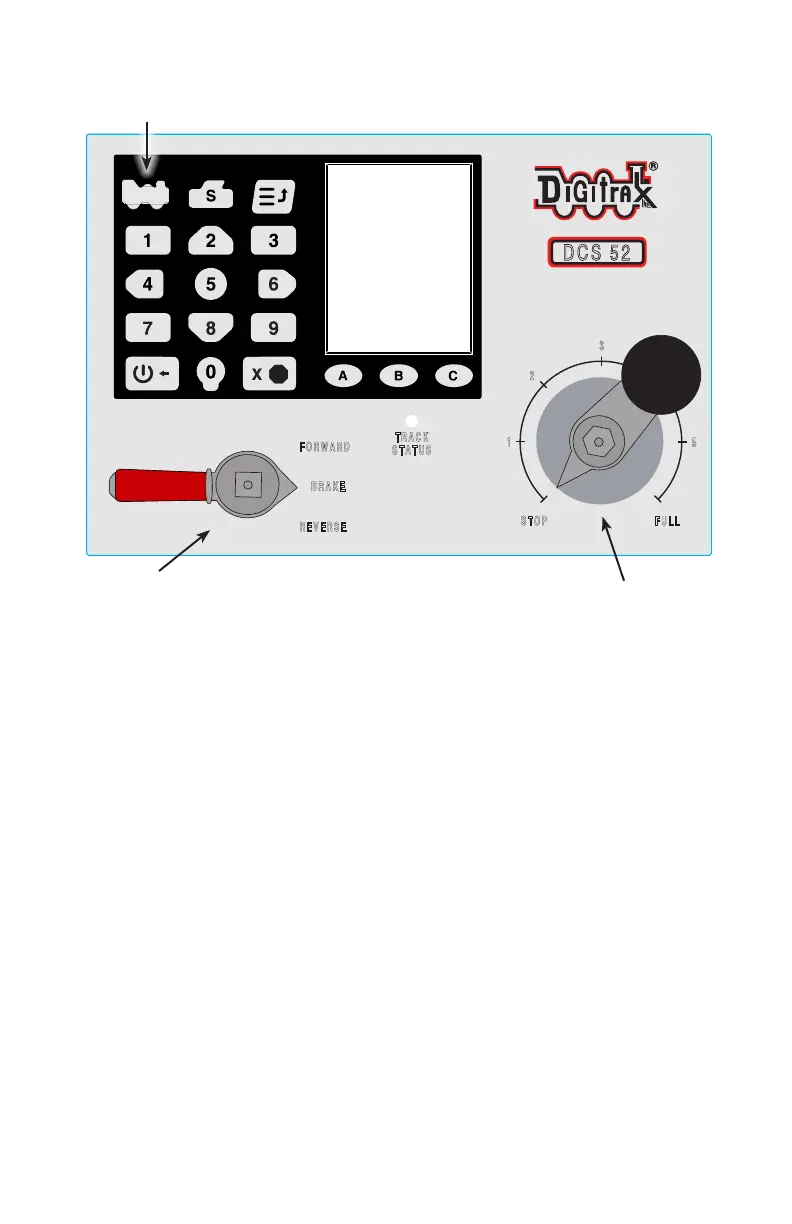
1. To select a non-DCC equipped (Analog) locomotive to run, look at the top
left of the keypad on the front panel. Locate the key that looks like a loco-
motive. This is the Loco Key.
2. Press the Loco Key ONCE, the address number will begin to flash alter-
nating black and grey.
3. Enter 00 on the keypad and press the Loco Key once again. The address
number will go solid black. You have selected a locomotive to run!
4. To run the locomotive, place the non-DCC locomotive on your layout,
move the Direction/Brake Lever to either FORWARD or REVERSE,
depending on which way you want the locomotive to move, and slowly
turn the Throttle Knob clockwise until the locomotive starts to move.
5. To stop the locomotive, either turn the Throttle Knob back to STOP, or
shift the Direction/Brake Lever to BRAKE.
2.6 Select and Run A DCC Locomotive
1. To select a DCC equipped locomotive to run, you must know the address
assigned to the decoder in the locomotive. Most new decoders and decoder
equipped locomotives have a default address of 03.
2. For now we will assume you are using a new DCC-equipped locomo-
tive with and address that is set to 03. If you do not know the decoder’s
address please refer to section 11.2 for details on reading and setting a
decoder address.



 To Next Page