© 2019 Digitrax, Inc. www.digitrax.com
11
11
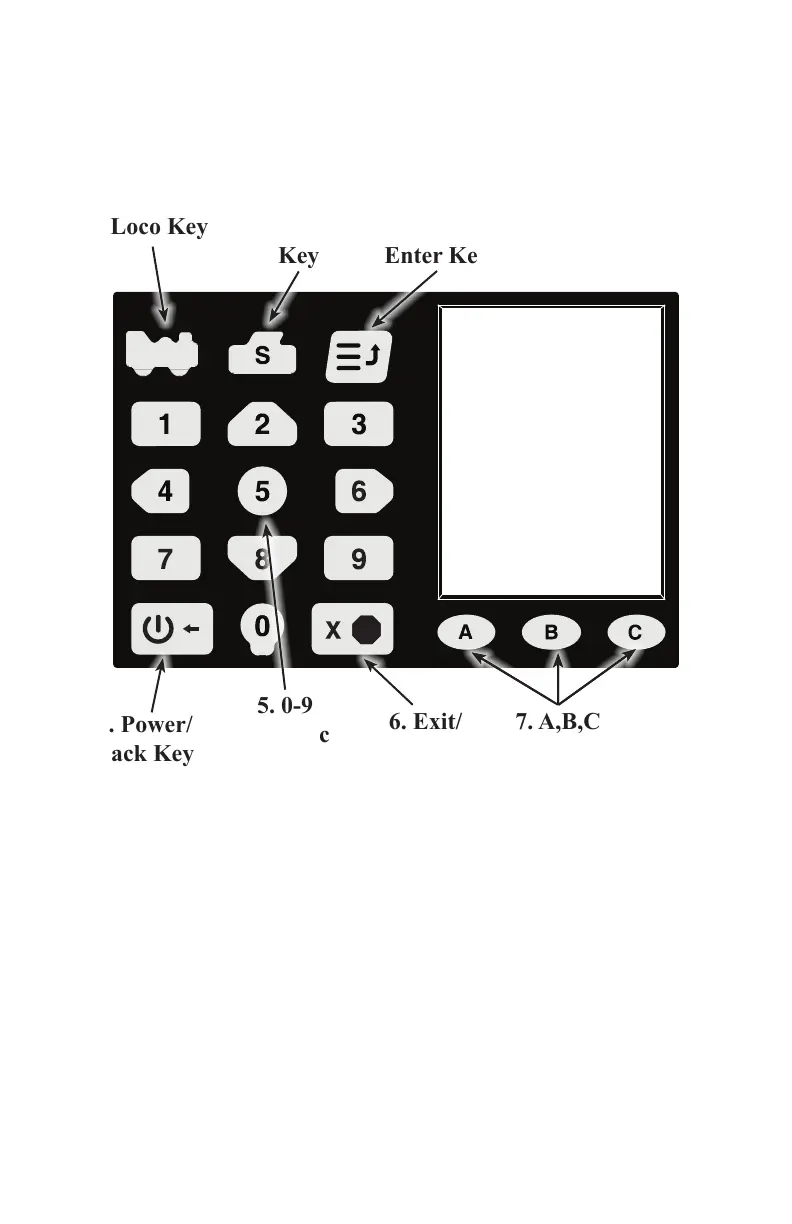
5.2 DCS52 Keypad
The DCS52 Keypad consists of 18 back-lit keys. It features a full numeric key-
pad for direct data entry, 3 context sensitive soft keys, and other task specic
keys. Most keys serve more than one use depending on the operation mode of
the DCS52.
1. Loco Key 2. Switch
Key
3. Menu/
Enter Key
4. Power/
Back Key
6. Exit/
Stop Key
5. 0-9
Numeric
Keys
7. A,B,C
Soft Keys
1. The Loco Key is primarily used for selecting locomotives to run. Pressing
the Loco Key will enter locomotive selection mode and give you access to
the Mu, Recall, Disptch (Dispatch), and St Edit (Status Edit) soft keys to
access those features.
2. The Switch Key is used to activate switch mode during normal operation.
Pressing the Switch Key will allow for direct input of switch addresses
and access to the Thrown and Closed soft keys to control switch position.
3. The Menu/Enter Key is used to open the DCS52 Main Menu giving you
access to programming and setup functions.
4. The Power/Back Key is primarily used to turn track power on or o.
During normal operation pressing the Power/Back Key will toggle track
power on or o as indicated by the Track Status Indicator discussed in



 To Next Page