© 2019 Digitrax, Inc. www.digitrax.com
7
7
3. Locate the barrel plug connector marked DC IN: from PS314.
4. Connect the PS314 to the DCS52 by inserting the barrel plug into the con-
nector. Only the PS314 should be used to power the DCS52.
5. Plug the PS314 to an AC wall power outlet that matches the power cord
supplied with your PS314. The PS314 will work universally on 110-240V
AC.
6. The DCS52 should beep and power on. A start screen will display briey
saying “Welcome to DCS52” followed by a software version and the unit’s
serial number.
2.4 Turn On Track Power
Turning On Zephyr Express Track Power
TRACK
STATUS
FORWARD
BRAKE
REVERSE
STOP FULL
1
2
3
4
5
R
DCS 52
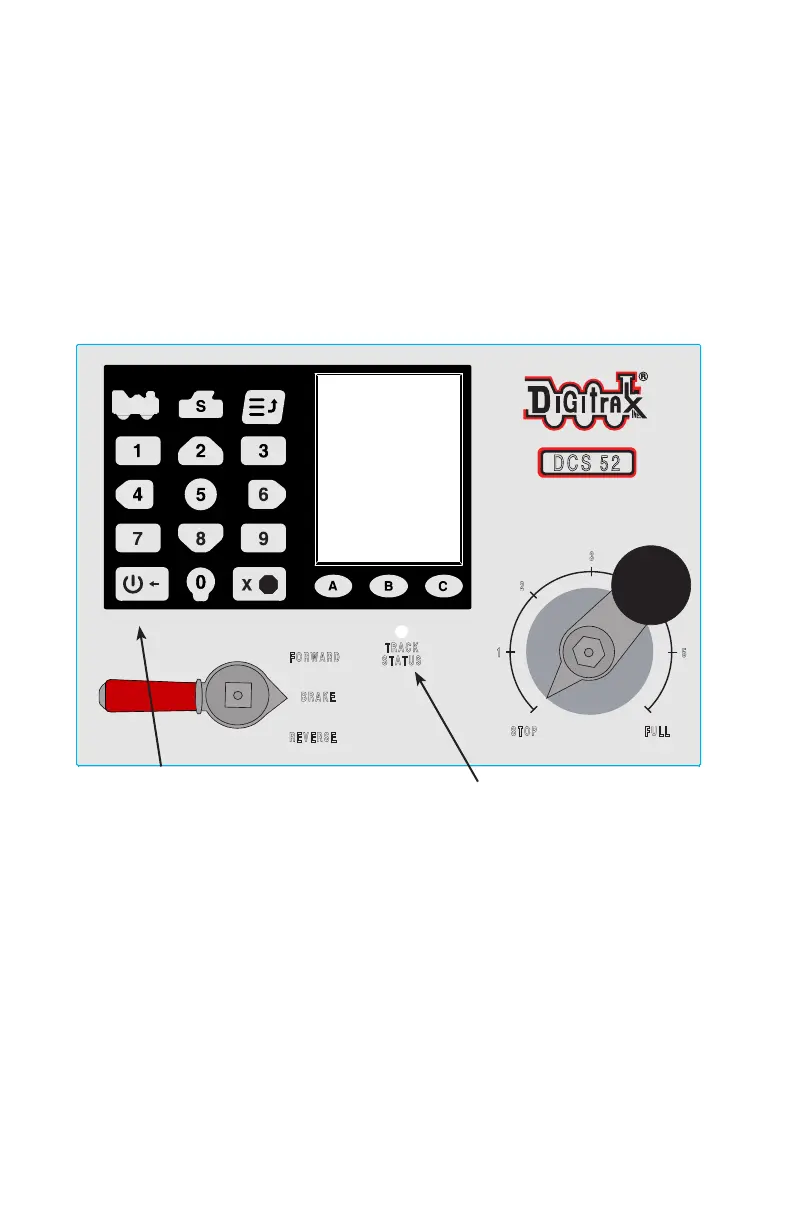
Track Status Indicator
Power/Back Key
1. On the front panel of the DCS52 locate the Power/Back Key on the bot-
tom left of the keypad.
2. Press the Power/Back Key to toggle track power on and o. The Track
Status Indicator will be lit ON green when the DCS52 is in normal
Command Station mode and track power is ON. When track power is o
the Track Status Indicator will not be lit.



 To Next Page