14 www.dimplex.com
synchronize up to 5 units to one
remote control.
Battery Replacement
To replace the battery:
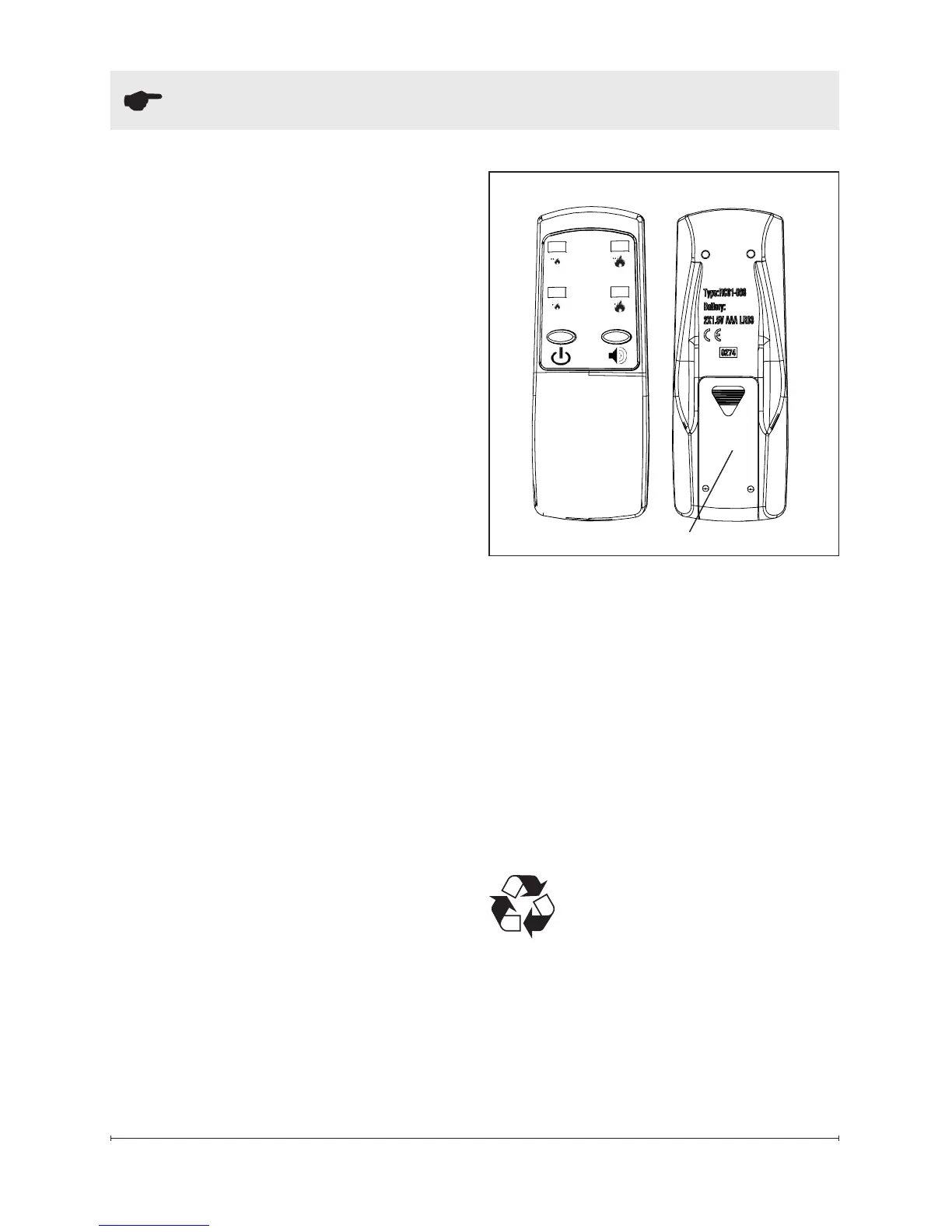
1. Slide battery cover open on
the remote control (Figure 6).
2. Install two 1.5 Volt (AAA) bat-
tery in the battery holder.
3. Close the battery cover.
Battery must be recycled
or disposed of properly.
Check with your Local
Authority or Retailer for recycling
advice in your area.
Battery Cover
Figure 6
to the unit - plug into the port
on the on the right module
and run the wire out of the
housing through the open-
ing in the center of the back
panel.
2. Place the On/Off Switch
(Figure 4A) in the On (“I”)
position.
3. Press the blue tooth initializa-
tion button on the Primary
controls (left side).
4. The unit will begin to beep
and turn the lights on and off
every 2 ½ seconds to indicate
that the unit is in synchroniza-
tion mode.
5. Within 20 seconds of pressing
the blue tooth button, press
any button on the remote con-
trol (Figure 6).
!
NOTE: You will have only 20
seconds to perform this last step.
Failure to do so will result in these
steps needing to be followed
again.
6. If the synchronization was
successful the unit will go to
Standby.
This will synchronize the remote
control and the replace receiver.
!
NOTE: It is possible to
Operation




 To Next Page