4 www.dimplex.com
RLG25
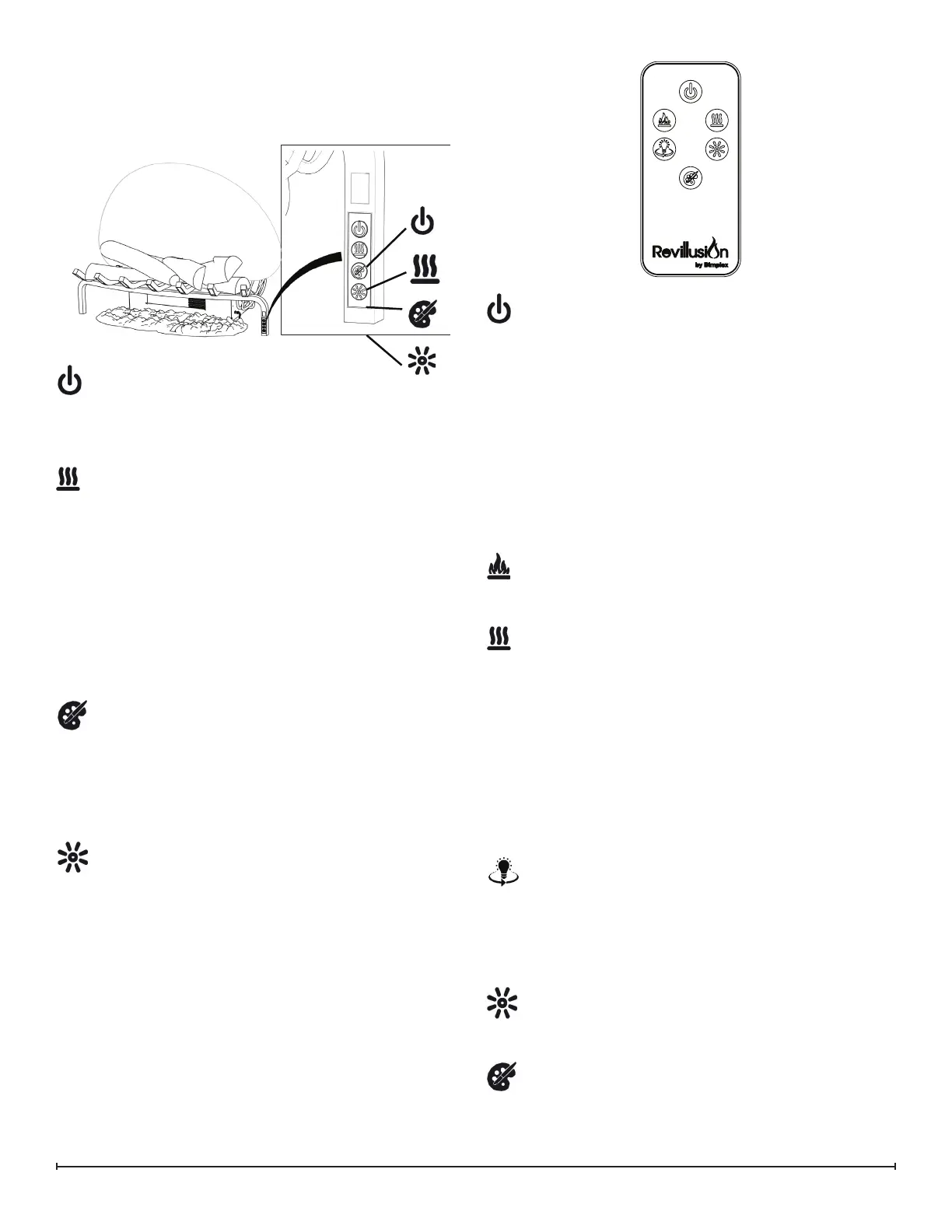
Manual Control
The manual controls for the Revillusion are located on the
right-front leg of the log grate.
Power
Press to turn the ame eect on and activate the
previous heat setting (O, Low, or High). Press again
to put the unit in standby mode.
Heat
• Heat On
Press to set the heat to Low (indicated by 1 short
beep). Press again to set the heat to High (indicated
by 2 short beeps).
• Heat O
Press to turn heat O (indicated by 1 long beep).
NOTE: After the heater is switched o, the fan will
continue on for 60 seconds before turning o. The
log LEDs remain On when the heater is ON and the
ame eect is O.
Color Themes
Press multiple times to change the LED lights from:
ame base yellow, ame base blue, ame base
yellow with yellow 360 LEDs, ame base blue with
360 LEDs. (Feature is active only when the ame
eect is On.)
Brightness
Press multiple times to toggle the log set LEDs
through its four brightness settings.
Remote Control
The replace is supplied with a multi-function remote con-
trol.
The remote control has a range of approximately 30ft (9m).
To operate correctly, the remote control must be pointed
toward the front of the unit.
!
Power
Press to activate the current standby state (On/O).
• Standby State On
Press to turn everything O. Press again to active the
previous ame eect state.
• Standby State O
Press to activate the previous ame eect state.
- If the ame eect was On, the previous heat setting
will be activated (High, Low, or O).
- If the ame eect was O, the previous heat setting
will be activated (High or Low).
Press again to turn everything O.
Flame
Press to light the back log, grate log, and ember mat,
and start the ame eect.
Heat
Heat On
Press to set the heat to Low (indicated by 1 short
beep). Press again to set the heat to High (indicated
by 2 short beeps).
• Heat O
Press to turn heat O (indicated by 1 long beep).
NOTE: After the heater is switched o, the fan will
continue on for 60 seconds before turning o. The
log LEDs remain On when the heater is ON and the
ame eect is O.
360
o
Light
Press multiple times to change the LEDs on the
sides and back of the unit from natural yellow
ickering to yellow solid to white ickering to white
solid to O. (Feature is active only when the ame
eect is On.)
Brightness
Press multiple times to toggle the log set LEDs
through its four brightness settings.
Color Themes
Press multiple times to change the ame base colors
from Yellow to Blue to O. (Feature is active only
when the ame eect is On.)
!



 To Next Page