16
DS8515
for light bulbs and
eating element to cool off to avoid accidental burning of skin.
ny maintenance or cleaning to reduce the risk of
lectric shock or damage to persons.
on a flat surface.
located on the bottom of the stove and
motor assembly by removing the screws on the front
ermostat.
ew thermostat.
. Reassemble in the reverse order as above.
T
If unit was operating prior to servicing allow at least 10 minutes
h
Disconnect power before attempting a
e
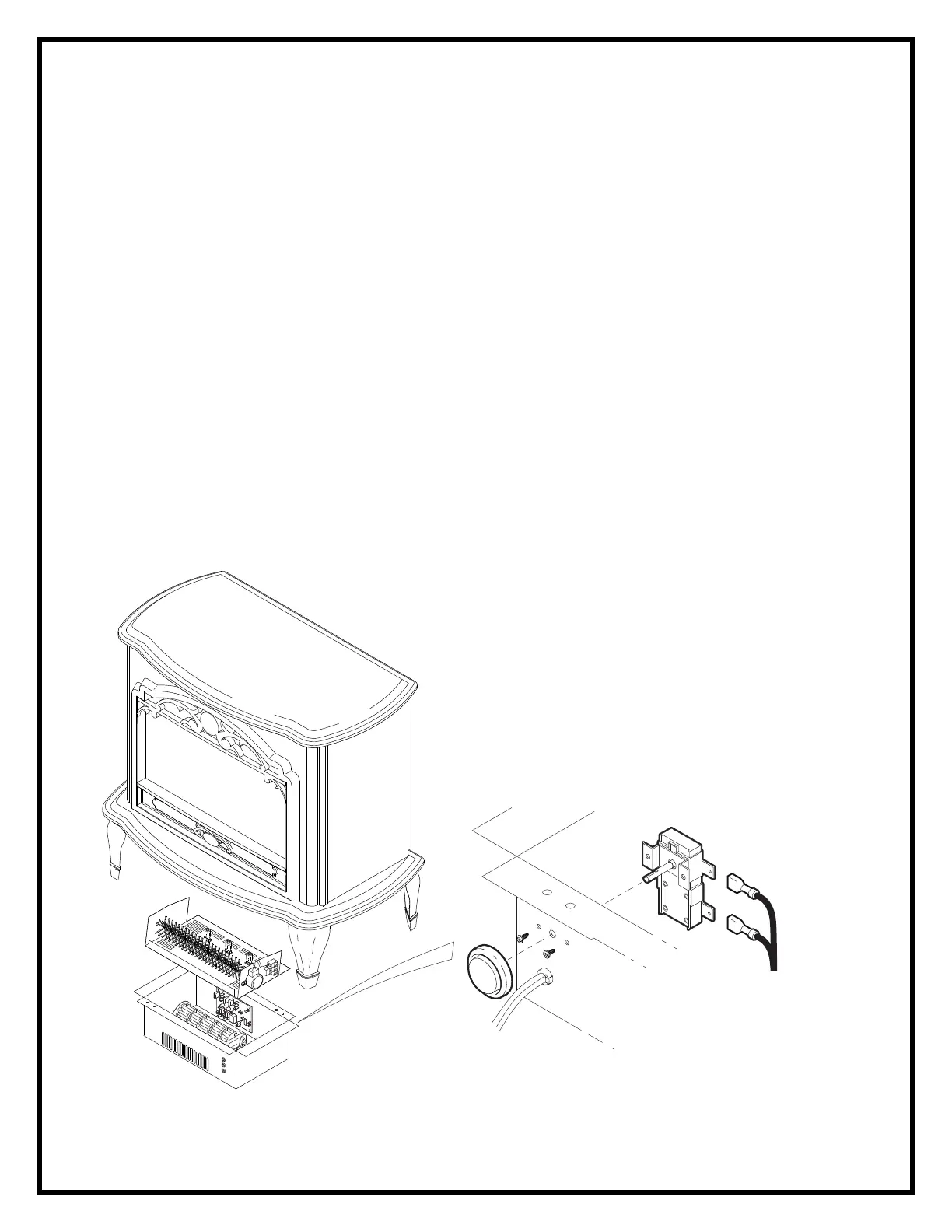
O REPLACE THE THERMOSTAT T
1. Gently place stove on its back
2. Remove the thermostat knob.
3. Remove the heater cover retaining screws
lower heater/light assembly onto the floor.
4. Remove the reflector rod and
and rear of the heater cover.
5. Disconnect the wiring clips from the thermostat.
6. Remove the 2 thermostat mounting screws and remove the th
7. Connect all of the wiring connections to the n
8



 To Next Page