7 Configuration
SAFEONE DN3PD2 Manual 29
7.11 Validation
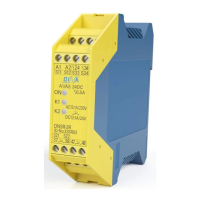
► Select the validation step
► If the device is password-protected, you will be asked to enter a valid password.
The states are recorded and can be printed out as a protocol.
The validation level is automatically reset after 10s.
► Press the “Stop” button to stop recording
Alternatively, you can use the “auto. Start “. The validation levels are run through step by step
and reset again. The automatic validation stops automatically



 To Next Page