page 19 of 44M.1k2 Hardware Guide - Version 1.3
CHAPTER 4: Operation
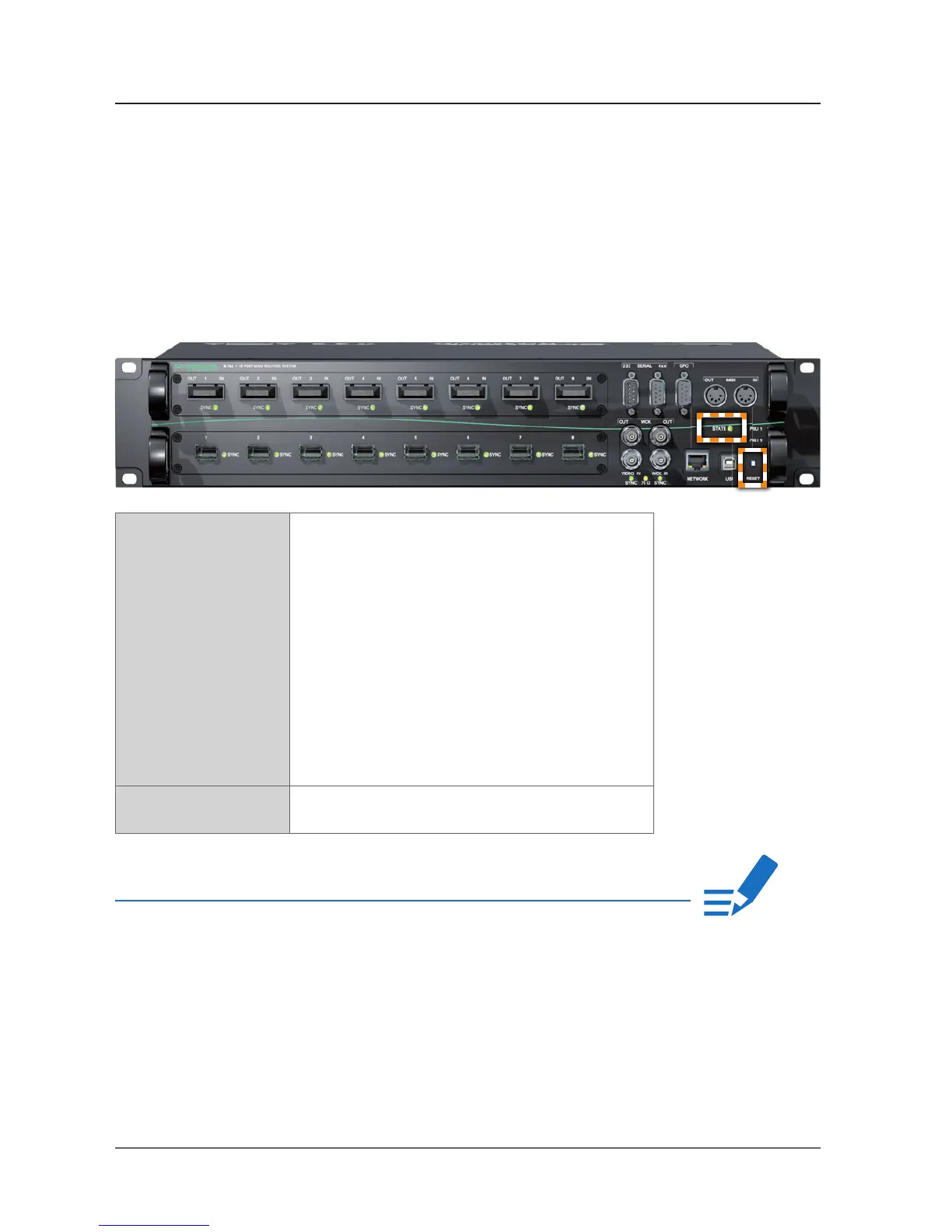
Device State & RESET
As most of the system information is available in the GUI (or a telnet shell) only,
the basic system state is indicated by the led ‘STATE’.
If the device can’t be reached via network an emergency recovery may be
executed using the RESET button. See „Appendix A - Emergency recovery“ on
page 26.
STATE LED (green) indicates current system state.
LED ON = controller is idle
(normal operation)
LED “heartbeat” = controller is idle
(normal operation)
LED blinking
once per second = factory default network
setting is active
LED blinking
4 times per second = unsaved confi guration data,
device will return to idle state
after saving to the fl ash
memory.
RESET Push button
Press and hold > 5 seconds for emergency recovery.
NOTE!
The behaviour of the led ‘STATE‘ may be confi gured in the GUI. Please consult the
offl ine help available from our website or use the online help within the GUI.


 To Next Page