page 26 of 44 M.1k2 Hardware Guide - Version 1.3
Appendix A - Emergency recovery
Appendix A - Emergency recovery
There is one static network confi guration which you cannot modify, it is called
‘Factory preset’. If you somehow managed to create a dysfunctional set of network
settings or cannot reach the device for other reasons, you can always return to the
factory preset via the front panel.
Procedure: Press the RESET button on the front panel for about 5 seconds. As
soon as you press the button, it will start fl ashing rapidly. When it stops fl ashing,
the factory preset has been activated. You can then access the device via the initial
IP address (10.0.0.24).
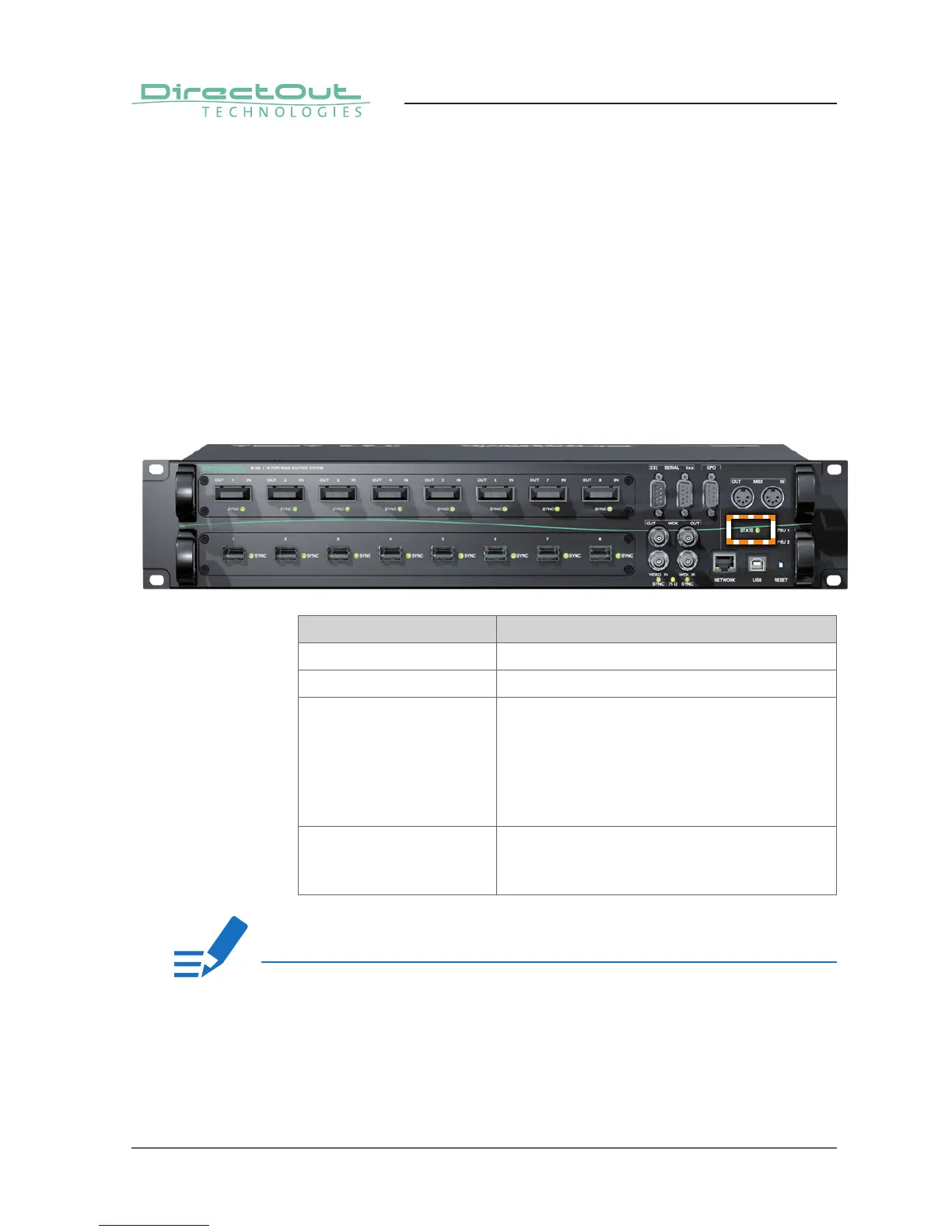
The LED STATE indicates the operating condition:
LED Operating Condition
Constant on The controller is idle (normal operation).
Heartbeat The controller is idle (normal operation).
Blinking once per second The factory default network settings are active.
This state should only be active when confi guring
the device for the fi rst time, or after the RESET
button has been pressed.
You can confi gure the network in ‘Confi guration-
Device-Network’ settings.
Blinking 4 times per second There is unsaved confi guration data. After the
changes have been written safely to the fl ash
memory, the state LED returns to the idle state.
NOTE!
This procedure will only reset the IP confi guration. All other device settings (e.g.
routing, channel labels, clocking, ...) will remain unchanged.


 To Next Page