32
DIRECTV
®
DVR USER GUIDE
Finding something to watch or record is fast and easy! Whether you’re looking
for a movie, show, person, channel, sport, etc… as soon as you start typing
we’ll instantly give you results. Smart Search finds all matching programs
within the 14-day program guide as well as, within the DIRECTV CINEMA
library.
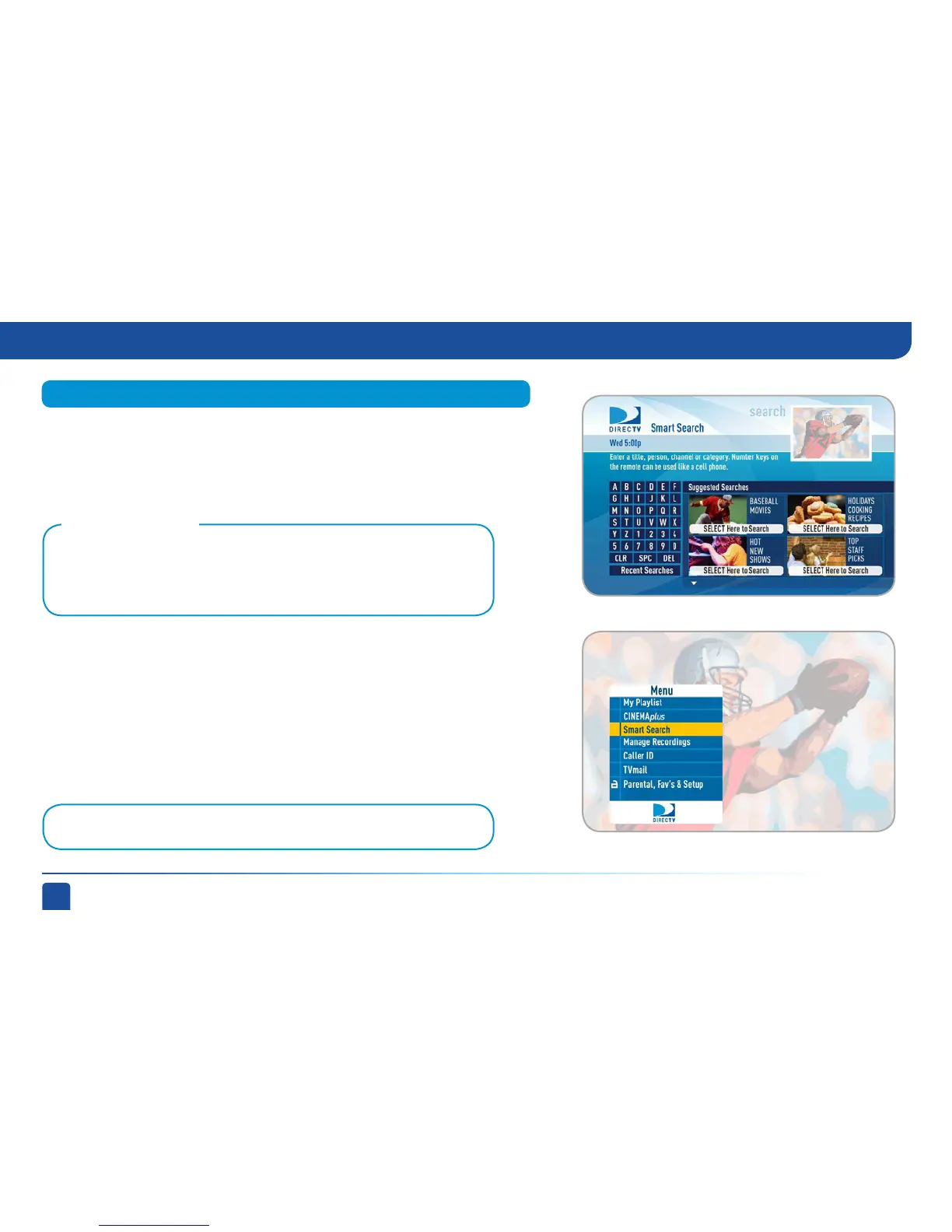
Press MENU on your remote, select “Smart Search”, and start typing. There
are two ways to input your search term:
1. Number keys on your remote – Use the number keys on your remote like
a cell phone to enter your search term. To erase letters, press the LEFT
ARROW. To enter a space, press 0 (zero). Press 0 twice to enter a zero.
2. Onscreen keypad – Highlight a letter in the keypad and press SELECT.
To erase the last letter, select DEL (delete) or select CLR (clear) to start
over.
Smart Search
When you first get to the search screen, select a poster for recommendations such
as, interesting new programs, the most popular shows this week or programs about
current events.
Tip: There’s no need to enter articles like “The” or “An“ preceding your search term.
Suggested Searches:
Smart Search (High-Definition DVRs)



 To Next Page