Page 21
Installing the Receiver in an Existing System
BROWSE BANNER
Use the Browse Banner to change channels, or to see what other programs
are available without changing the program that you are watching.
INSTALLING THE RECEIVER IN AN EXISTING SYSTEM
These instructions explain how to make basic connections between your
satellite TV receiver, dish, TV, and DVD/VCR. If you’d like to connect
other equipment, such as an amplifier, review the Back Panel section on
page 5 and the user guide that came with the equipment.
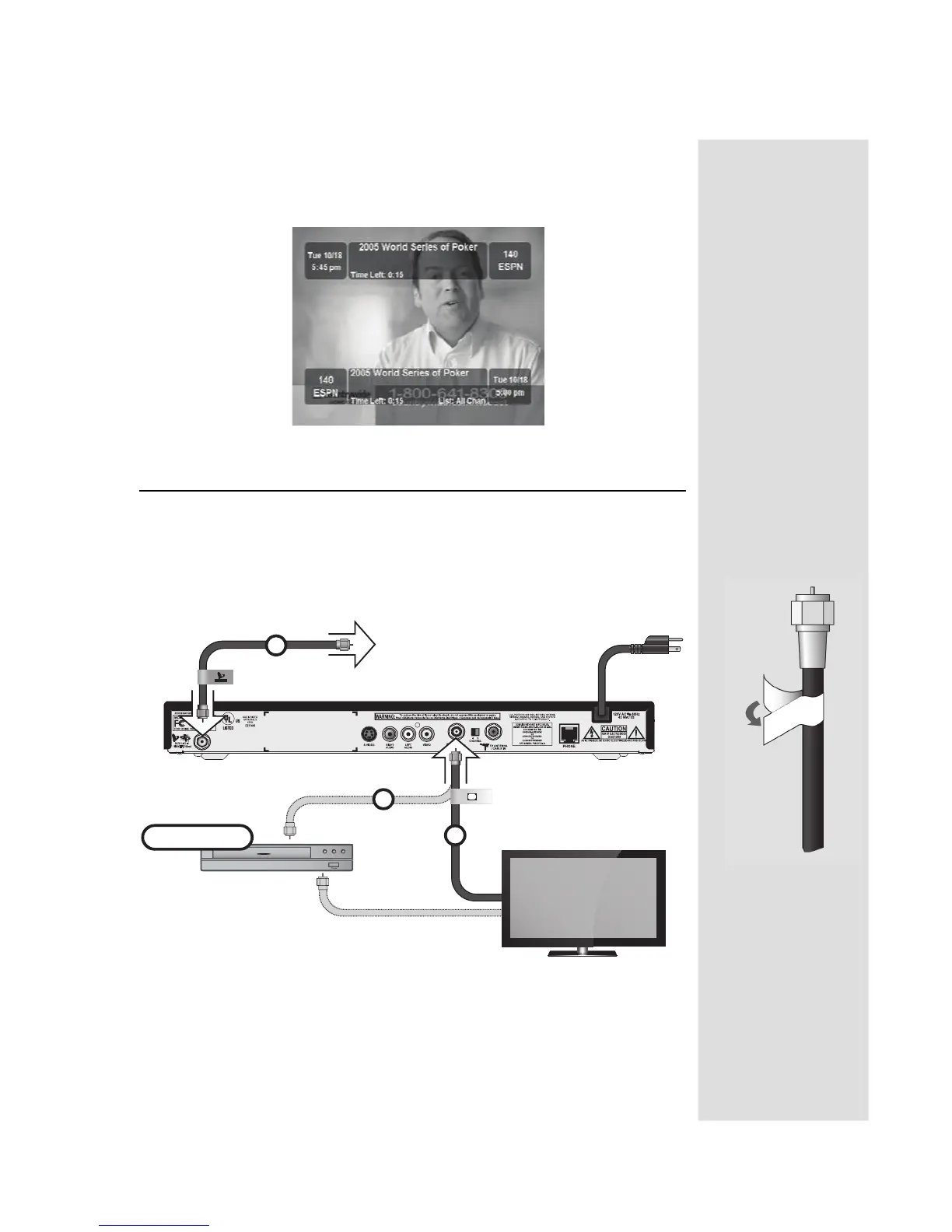
1. Connect the RG-6 cable coming from the satellite dish to S
ATELLITE IN
on the back of the receiver. Peel off the blue sticker and place it on the
cable close to the S
ATELLITE IN connection.
DVD
DVD (optional)
TO SATELLITE DISH
1
3
2
TO POWER
SATELLITE IN
TV SET
OUT
Tip: Using cable
labels makes it easy
to tell which cables
to connect to the
receiver ports.
Inside the front
cover of this guide
are the stickers that
are color-coded the
same way as the
coaxial connections.











 To Next Page