EasyManua.ls Logo

Distech Controls ECB Series - User Manual

Distech Controls ECB Series
20 pages
Print Icon
To Next Page IconTo Next Page
Loading...
ECB Series BACnet
®
Controllers
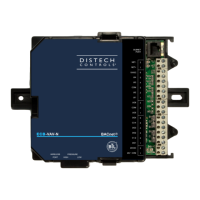
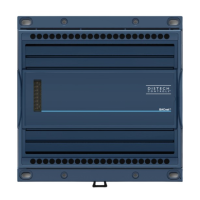
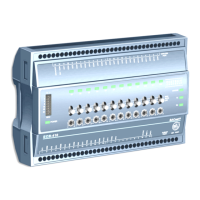
Figure1: From left to right: ECB-650 with operator interface, ECB-410 with HOA, ECB-203
Product Description
This document describes the hardware installation procedures for the ECB Series BACnet controllers.
The Distech Controls ECB Series controllers are designed to control and monitor various HVAC equipment such as roof top units, air handling units as
well as chillers, boilers, and central plant applications. Moreover, these controllers are suitable for any lighting control and power measurement applica-
tions. This product line includes the following controllers: ECB‑203, ECB‑300, ECB‑400 Series, ECB‑600 Series.
For controllers equipped with an operator interface (ECB-x50 models), refer to the ECL‑x50 and ECB‑x50 Series Controller User Guide for how to use
the this interface.
The ECB‑600 Series are compatible with the IO Extension Module product line, which includes the following modules: ECx‑400, ECx‑410, and ECx-420
(refer to the ECx‑400 series IO Extension Module Hardware Installation Guide).
Each controller uses the BACnet
®
MS/TP LAN communication protocol.
This document describes the hardware installation procedures for the following controllers: ECB‑203, ECB‑300, ECB‑400 Series, and ECB‑600 Series
controllers only.
£ These controllers are all built on a similar platform, but have different numbers of inputs and outputs. Moreover,
each individual model has different amounts of digital and/or universal outputs. For more information on the
specific layout and functionality of each controller, please refer to their individual datasheets.
£ The following controllers are housed in small enclosures: ECB‑203 Series and ECB‑300 Series.
£ The following controllers are housed in large enclosures: ECB‑400 Series and ECB‑600 Series.
General Installation Requirements
For proper installation and subsequent operation of the device, pay special attention to the following recommendations:
£ It is recommended that the controller(s) be kept at room temperature for at least 24 hours before installation to allow any condensation that may
have accumulated due to low temperature during shipping/storage to evaporate.
£ Upon unpacking, inspect the contents of the carton for shipping damages.
Do not install a damaged device.
£ The device is designed to operate under environmental conditions that are specified in its datasheet.
£ Ensure proper ventilation of the device and avoid areas where corroding, deteriorating or explosive vapors, fumes or gases may be present.
£ Allow for proper clearance around the device’s enclosure and wiring terminals to provide easy access for hardware configuration and maintenance.
£ When installing in an enclosure, select one that provides sufficient surface area to dissipate any heat generated by the device and by any other de-
vices installed in the enclosure. A metal enclosure is preferred. If necessary, provide active cooling for the enclosure.
£ Orient the controller with the ventilation slots and power supply/output terminal block connectors towards the top to permit proper heat dissipation.
£ The device’s plastic enclosure has a back plate that is separable from the front plate allowing the back plates (with the connectors) to be shipped di-
rectly to the installation site while all the engineering is done in the office.
£ The device’s datasheet specifies the power consumption (amount of heat generated), the operating temperature range, and other environmental
conditions the device is designed to operate under.
£ Ensure that all equipment is installed according to local, regional, and national regulations.
£ Do not drop the device or subject it to physical shock.
£ If the device is used and/or installed in a manner not specified by Distech Controls, the functionality and the protection provided by the device may
be impaired.
H a r d w a r e I n s t a l l a t i o n G u i d e

Questions and Answers

  • C
    Cynthia GarciaSep 13, 2025
    What does Long Long Long blink mean on Distech Controls Controller?
    • K
      Kelli MatthewsSep 13, 2025
      If your Distech Controls Controller shows a Long Long Long blink (800ms On, 300ms Off, 800ms On, 300ms Off, 800ms On), verify that the controller’s MAC Address is unique on the BACnet MS/TP Data Bus. Make sure the controller’s BAUD rate is the same as the BACnet MS/TP Data Bus’ BAUD rate. Verify that the Max Master is set high enough to include this controller’s MAC Address.
  • S
    scottchavezSep 15, 2025
    What does Short Short Long blink mean on Distech Controls ECB Controller?
    • P
      Patricia RobertsonSep 15, 2025
      If your Distech Controls Controller shows a Short Short Long blink (150ms On, 300ms Off, 150ms On, 300ms Off, 800 ms On), it indicates that the device has browned-out: The voltage at the 24VAC and 24VCOM terminals has gone below the device’s acceptable limit during power up.
  • K
    Kevin MendezSep 18, 2025
    What does Short Long blink mean on Distech Controls Controller?
    • J
      Joseph MooreSep 18, 2025
      If your Distech Controls Controller shows a Short Long blink (150ms On, 300ms Off), it means that the device’s MAC address is set to zero (0) or is set to an address higher than the Max Master.
  • C
    Christopher EspinozaNov 19, 2025
    Why is my Distech Controls ECB not communicating on a BACnet MS/TP network?
    • R
      robertmcgeeNov 19, 2025
      If your Distech Controls Controller cannot communicate on a BACnet MS/TP network, check the following: 1. Ensure the power supply voltage between 24VAC ±15% and 24VCOM pins is within acceptable limits and check for tripped fuse or circuit breaker. 2. Verify that the transformer used is powerful enough to supply all controllers. 3. Double check that the wire connections are correct. 4. Check the network termination(s). 5. Configure the maximum number of master devices on the MS/TP network in all devices to the controller’s highest MAC address used on the MS/TP trunk. 6. Ensure each controller on a BACnet MS/TP data bus has a unique MAC Address. Check the MAC Address DIP switch or use an Allure EC-Smart-Vue sensor. 7. Ensure each controller on a BACnet intranetwork has a unique Devic...
  • M
    Mark HillNov 21, 2025
    What to do if Distech Controls ECB communicates on a short network but not on a large network?
    • X
      xsaundersNov 21, 2025
      If your Distech Controls Controller communicates well over a short network but not on a large network, consider the following: * Verify that the total wire length does not exceed the specifications. * Confirm that the wire type agrees with the specification. * Double-check that the wire connections are correct. * Check the network termination(s). Incorrect or broken terminations will affect communication based on the controller’s position on the network. * Ensure the number of controllers on a channel does not exceed 50. Use a router or repeater if needed. * Configure the maximum number of master devices on the MS/TP network in all devices to the controller’s highest MAC address used on the MS/TP trunk. * Each controller on a BACnet MS/TP data bus must have a unique MAC Addr...
  • T
    tiffany91Nov 25, 2025
    What causes a Distech Controls I/O Extension Module to not communicate on the subnetwork and how to fix it?
    • L
      Lauren HamiltonNov 25, 2025
      If a Distech Controls I/O Extension Module cannot communicate on the subnetwork, check the following: 1. Verify the power supply voltage between 24VAC ±15% and 24VCOM pins is within acceptable limits and check for tripped fuse or circuit breaker. 2. Verify that the transformer used is powerful enough to supply all controllers. 3. Double check that the wire connections are correct. 4. Ensure each I/O Extension Module on the subnetwork has a unique Subnet ID. Check the Subnet ID DIP switch on the faceplate of each module. 5. Check that the total wire length does not exceed the specifications. 6. Check that the wire type agrees with the specification. 7. Check the network termination(s). Only the last ECx-400 I/O Extension Module must have its EOL termination set to ON. When one or mo...

Summary

Product Description

General Installation Requirements

Device Markings Symbols

General Wiring Recommendations

Controller Dimensions Components

Mounting Instructions

DIN Rail-Mounted Installation

Procedure for mounting controllers on a DIN rail for quick installation.

Wall-Mounted Installation

Steps for securely mounting controllers to a wall surface.

Power Wiring

Jumper Identification and Configuration

Input Wiring

Output Wiring

Subnet-Wiring

Communications Wiring

Device Addressing

Temporary Network Access

Setting the Communicating Sensor Subnet ID

Commissioning ECB-Series Controllers

Setting the BAUD Rate

Wireless Installation

Connecting the Wireless Receiver

Details on connecting the Wireless Receiver using a telephone cable.

Strain relief and Terminal Block Cover

Installation of strain reliefs and terminal block covers for large enclosures.

Maintenance

Disposal

North American Emissions Compliance

Troubleshooting Guide

Distech Controls ECB Series Specifications

General IconGeneral
Enclosure RatingIP20
Communication PortsEthernet, RS-485
Protocols SupportedBACnet MS/TP, BACnet IP, Modbus RTU, Modbus TCP
InputsUniversal Inputs (configurable as Analog or Digital)
OutputsAnalog Outputs, Digital Outputs
ProcessorARM Cortex
Power Supply24 VAC/DC
Controller TypeProgrammable BACnet Advanced Application Controller (B-AAC)

Related product manuals