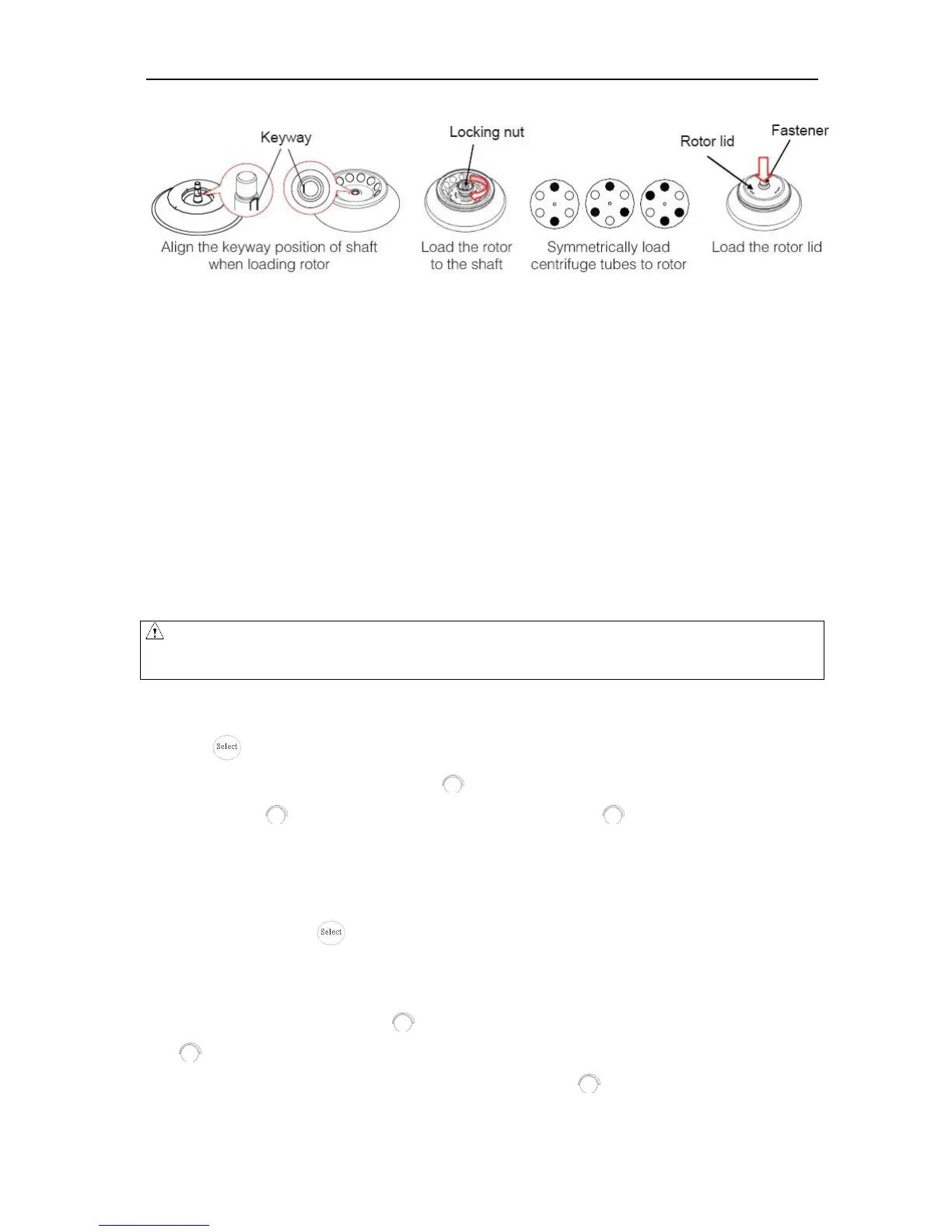
Figure 8-2 the rotor installation
Load the rotor to the shaft to ensure rotor is in position until it connected well with the shaft.
Rotate the rotor slightly by your fingers to check, if the rotor vibrates, if so attach the rotor again.
Hold on the rotor with one hand, tighten clockwise the nut with the other hand, and make sure tighten
firmly.
Put the rotor lid to the rotor, press the fastener down and make the fastener attach the locking nut
tightly.
Close the door and start running.
To release the rotor, firstly pull the fastener up to remove the lid, and then turn the locking nut
anti-clockwise.
8.1.2 Set the operation parameters
Press the button to select required parameters. The parameter can be modified when the parameter is
flashing. Clockwise rotate the parameter button to increase parameter value; counter-clockwise rotate the
parameter button to decrease parameter value. Parameter button rotate faster, parameter value
increase faster. The minimum speed increment is 100 rpm, the minimum time increment is 1 second.
(1)Set the speed
Press the select button until the speed rpm is displayed.
When the speed button is selected, the speed symbol will flash the speed value.
The minimum speed value you can set 500rpm, the minimum increment is 100rpm.
Rotate program button clockwise to increase speed value, rotate the program button anti-clockwise
to decrease speed value.
You can speed-up set the speed value by rotating program button quickly.
There is a circulating function to increase/decrease the speed values. Rotate the program button



 To Next Page