ORIENTATION 1
AIR 2
HARDWARE 3
SOFTWarE 4
MAINTENANCE 5
ADV. MAINTENANCE 6
SOF T Wa rE 4 .1 INTrODUCTION TO PrOGrammING
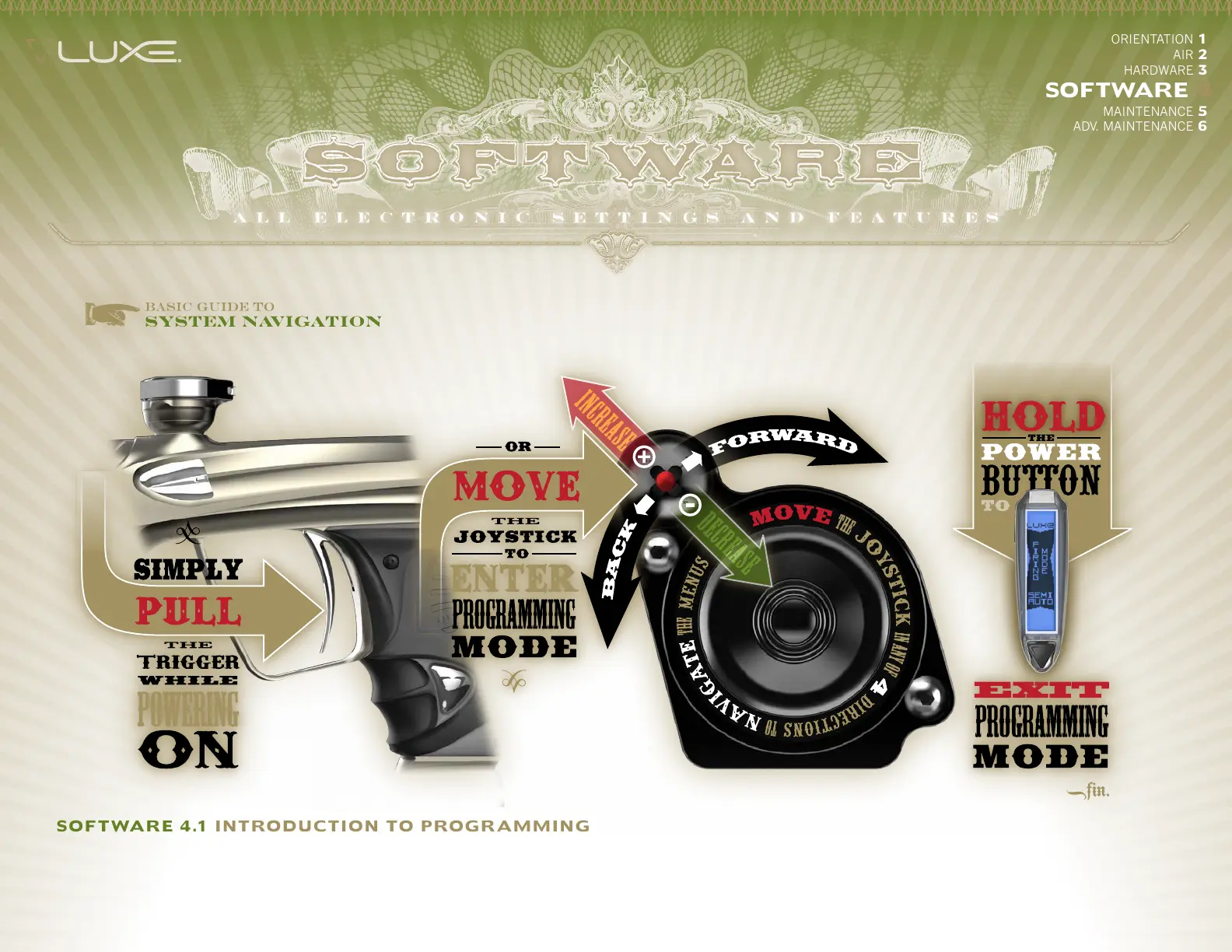
YOUR LUXE® COMBINES VOICE FEEDBACK with its OLED display to make electronic adjustment simple. All adjustments are performed with the Luxe® turned
on, but unloaded and degassed (see HARDWARE 3.2). Adjustments are made with a five-way joystick controller located inside the grip frame, or via the trigger and
power button if the Luxe® is unlocked. To access the joystick, use a 5/64-inch allen wrench to remove all four grip screws and the grip. The joystick is located next
to the Luxe® speaker. It is marked with arrows to indicate the directions it must be moved to scroll through menu items, and with + and – symbols to indicate the
directions used for increasing and decreasing setting values.


 To Next Page