DNP IMS America Corp. 13
Properties Software Update Procedure
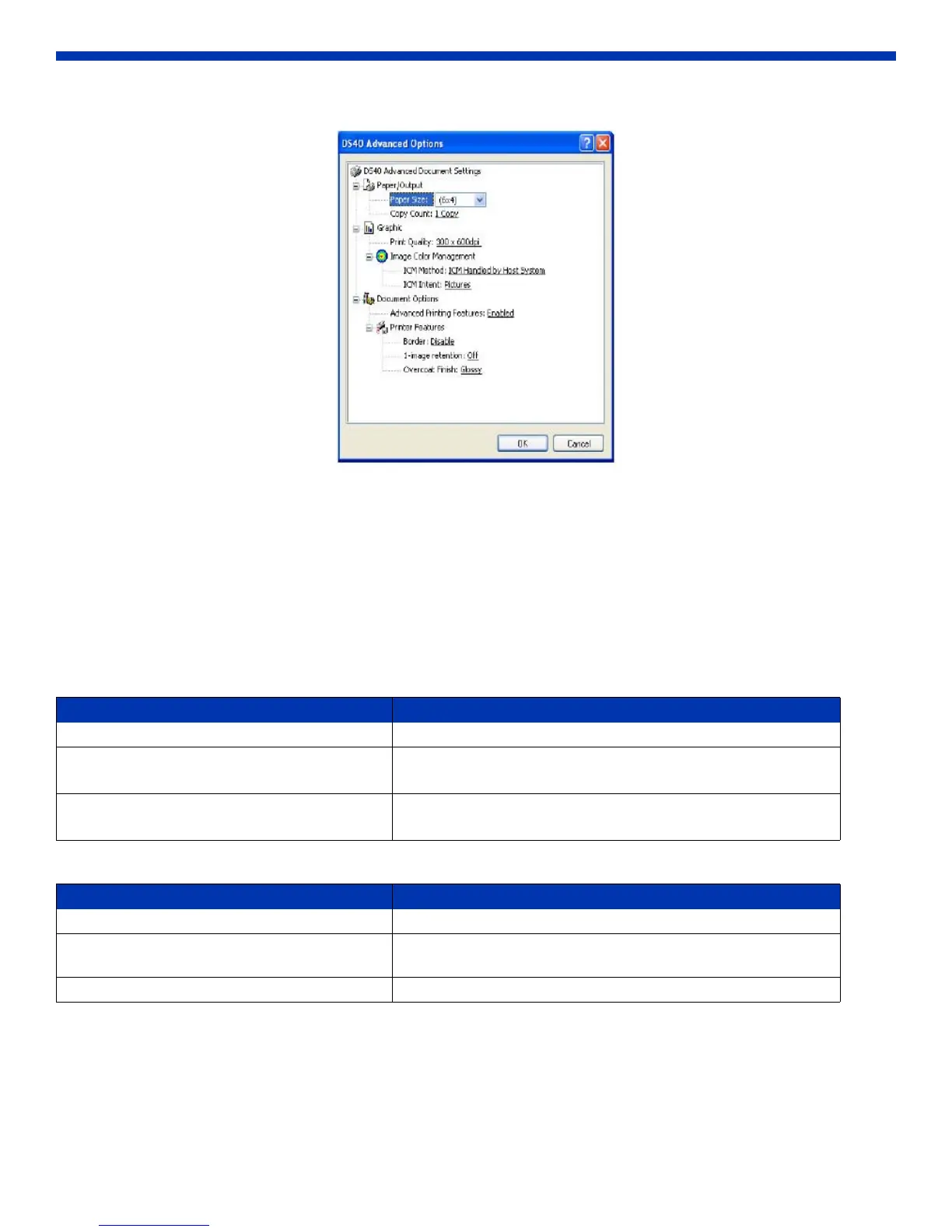
2. The Advanced Options window will open.
Figure 27. Advanced Properties
Paper Size
You can designate the default paper size. Please match the paper size to the media size with which the printer is equipped.
Copy Count
You can designate the number of times an image will print.
Print Quality
You can designate the print quality. Please match the print quality to the printer settings.
ICM Method
ICM Intent
This designates the rendering method when using ICM. Always have the ICC profile for the DS40 set to “Picture”. DO NOT
change it to other settings.
Print Quality Function
300 x 300 dpi Printing in high-speed mode
300 x 600 dpi Printing in high-quality mode
If the application can not set as an asymmetric aspect resolution, use 600x600.
600x600 dpi Printing in high-quality mode
Printer driver converts to 300x600 dpi data and sends to printer.
ICM Method Function
ICM Disabled Synchronous with “Color Management: None” in Paper tab.
ICM Handled by Host System Synchronous with “Color Management: ICM” in Paper tab.
Performs color management with the driver.
ICM Handled By Printer This is the same setting as “ICM Handled by Host System.”


 To Next Page