3.5. Batch Counting
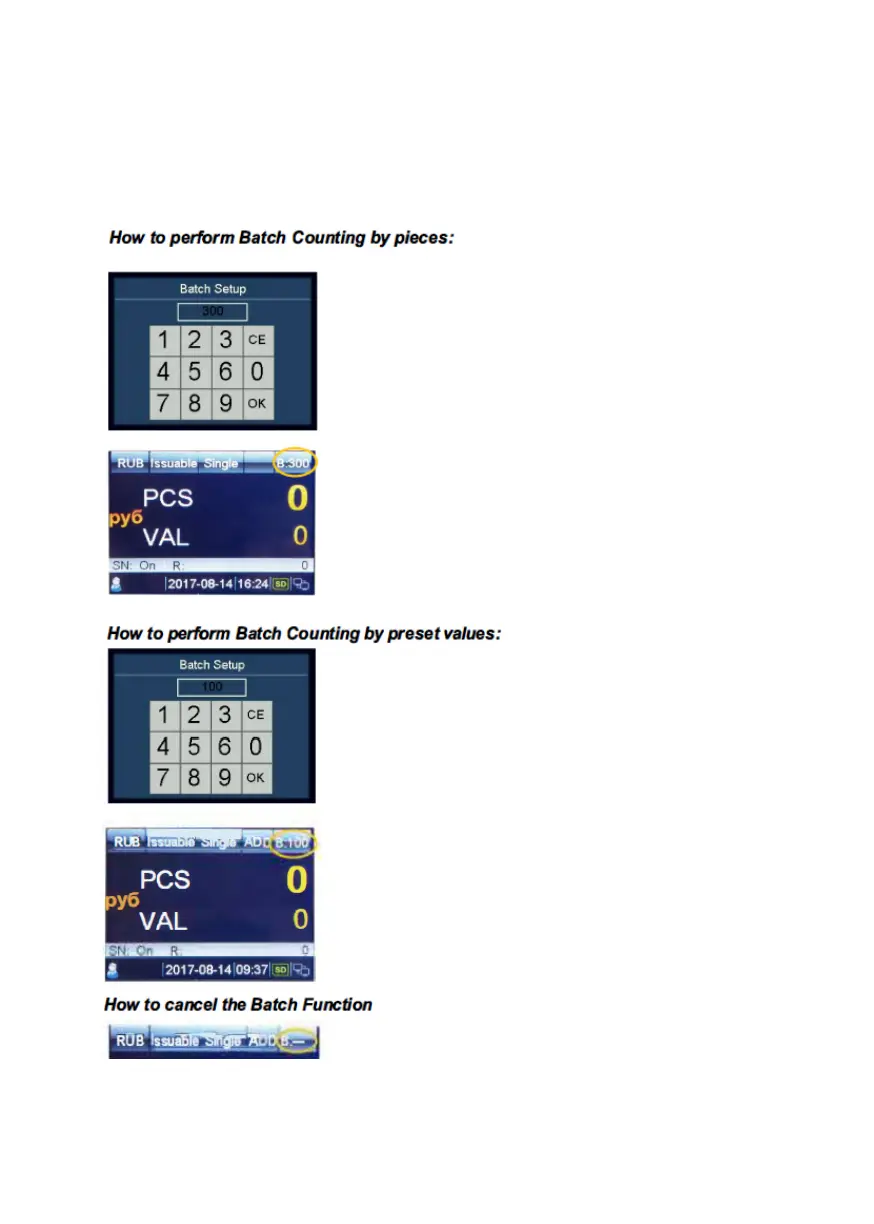
How to count a preset number of banknotes or a preset values.
1. Press BAT or +1/+10 to select banknote batch by pieces or
banknote batch by preset values.
Press BAT.
Input the desired banknote pieces batch
value by using the touch screen (The
largest batch value can be set to 999), and
then confirm with OK" or RESET.
The preset batch value is shown on the
upper right corner of the display.
You can also increase the batch value by
1 by pressing +1/+10. Press and hold this
button, increase by 10.
When counting, the machine stops once
the counted banknotes reach the preset
batch quantity.
Press BAT, and the left window will
show.
Then press BAT multiple times." 100, 50,
20, 10, 0" are sequentially shown on the
display.
Select the desired banknote preset batch
value. Press "OK" or RESET to confirm
the batch value and go back to the main
menu. If you have no operation in 1 Os or
feed banknotes, the batch setting will be
also saved.
When counting, the machine stops once
the preset batch value is reached.
When switch to "---", the batch preset
value is disabled.
Press CLEAR or BAT to clear the preset
value.
DoCash DC-45F
12
www.docash.de


 To Next Page