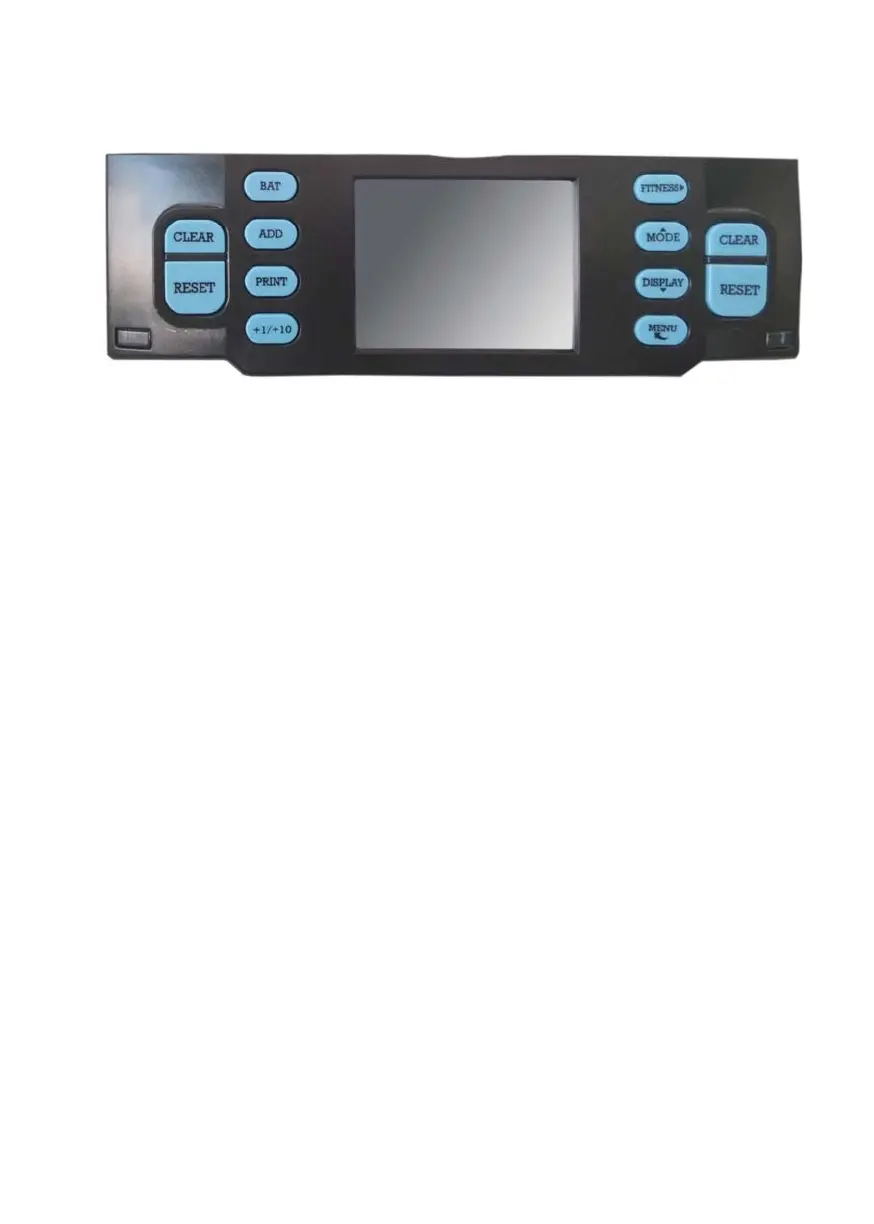
2.2. Control Panel Overview
[CLEAR]: Clear the number of counted banknotes and turn the
batch function off.
[RESET]: Star t counting/ Confir m selection in MENU.
[BAT]: Press to turn Batch mode on/off.
Press for setting of batch number.
[ADD]: Press to turn ADD mode on/off.
[PRINT]: Press for a print receipt.
[+1/+10]: Increase the batch number by 1 (short press) or 10 (1ong
press).
[FITNESS]: Switch among Issuable, ATM and Count.
[MODE]: Counting mode selection. Mix, Face, Orient, Count,
Single. Also served as a navigation key UP.
[DISPLAY]: View the count r esult. Also ser ved as a navigation
key DOWN.
[MENU]: Open device menu/Step back in MENU.
DoCash DC-45F
8
www.docash.de


 To Next Page