18
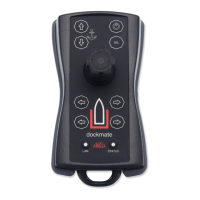
• Engine button(s)
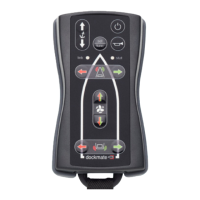
By pressing the upper left button (red = port), the port engine is engaged forward. By pressing
the lower left button (red = port), the port engine is engaged in reverse.
By pressing the upper right button (green = starboard), the starboard engine is engaged
forward. By pressing the lower right button (green = starboard), the starboard engine is
engaged in reverse.
On the SINGLE remote there is only one set of engine buttons for a single engine or motor.
Depending on your Dockmate configuration and settings, engaging the engine(s) can be just
idle forward and reverse, or forward and reverse with a certain amount of predetermined
throttle.
By pressing the “sel” button together with an engine button (on the TWIN+ or SINGLE+), you
can engage the engine in Throttle+. It offers predetermined throttle on every TWIN and
SINGLE. This means that every Dockmate can have 2 levels of engine/motor control: minimum
or idle forward/reverse and predetermined throttle forward/reverse (which is Throttle+). This
predetermined amount of Throttle+ can be calibrated per direction (forward and reverse) to


 To Next Page