24
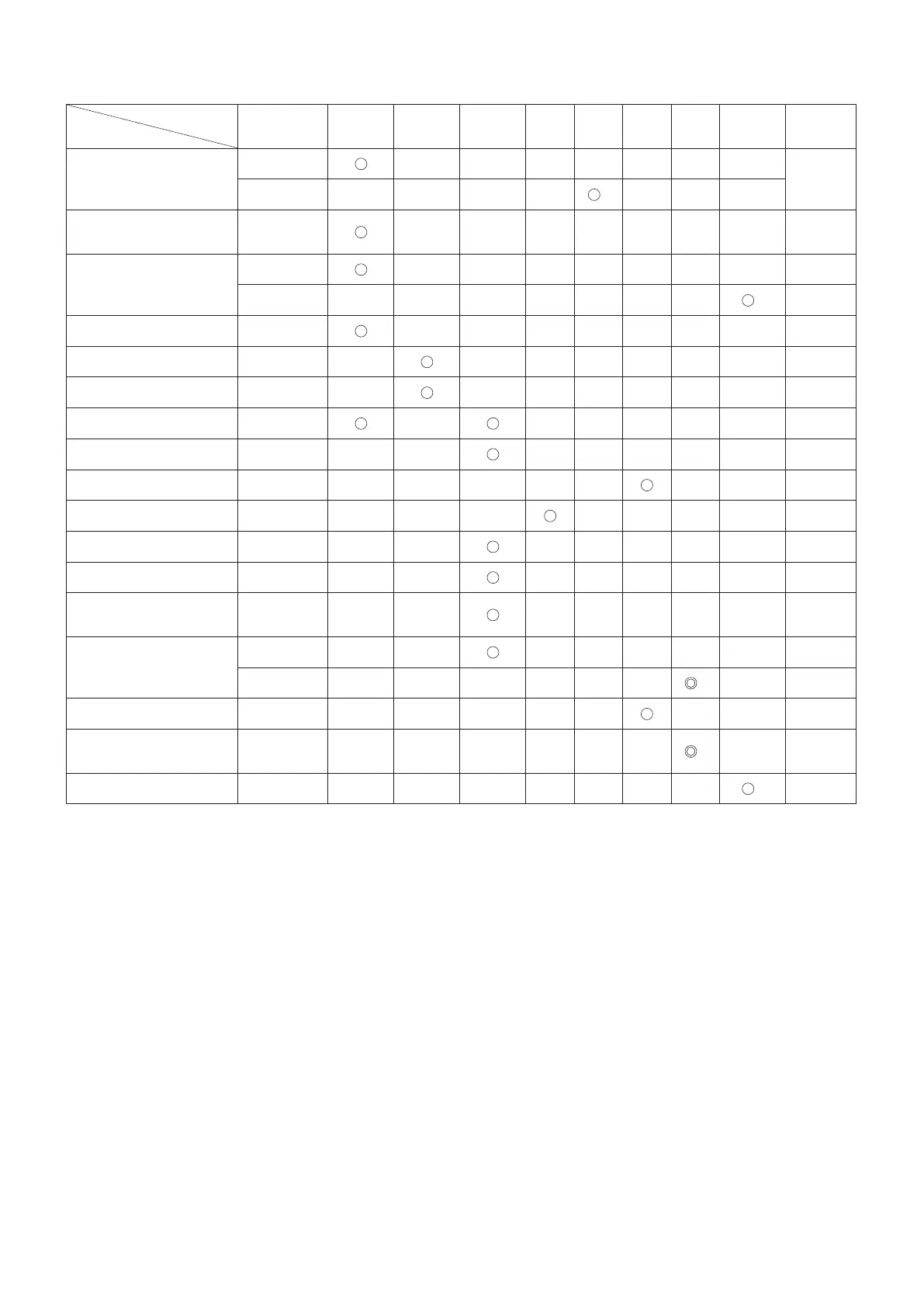
Maintenance chart
Operating time
Item
Before
operation
After
refuleling
Daily
(10h)
20h 30h 50h 200h
Before
storage
Corres-
ponding P
Engine oil
Inspect/clean
14
Replace
*
1
Tightening parts
(bolt, nut)
Inspect
—
Fuel tank
Clean/inspect
—
Drain fuel
*
3
9
V-belt Inspect/adjust
18
Throttle lever Check function
—
Stop switch Check function
16
Cutting disc Inspect
6
Idle speed Inspect/adjust
17
Air lter Clean
19
Dust bag lter Clean/replace
19
Prelter Clean/replace
19
Spark plug Inspect
20
Cooling air passage and
cylinder ns
Clean/inspect
—
Fuel pipe
Inspect
—
Replace
*
2
—
Fuel lter Clean/replace
20
Valve clearance (intake valve
and exhaust valve)
Inspect/adjust
*
2
—
Carburetor Drain fuel
*
3
9
*1 Perform initial replacement after 20h operation.
*2 For the 200 operating hour inspection, request Authorized Service Agent or a machine shop.
*3 After emptying the fuel tank, continue to run the engine and drain fuel in the carburetor.


 To Next Page
 Loading...