11Repair Manual PS-6400/PS-7300/PS-7900
P
O
W
E
R
M
A
T
E
3
/
8
-
7
1
5
3
4
6
89
2
(1,5 Nm ± 0,2)
7
(1,5 Nm ± 0,2)
03 CHAIN BRAKE
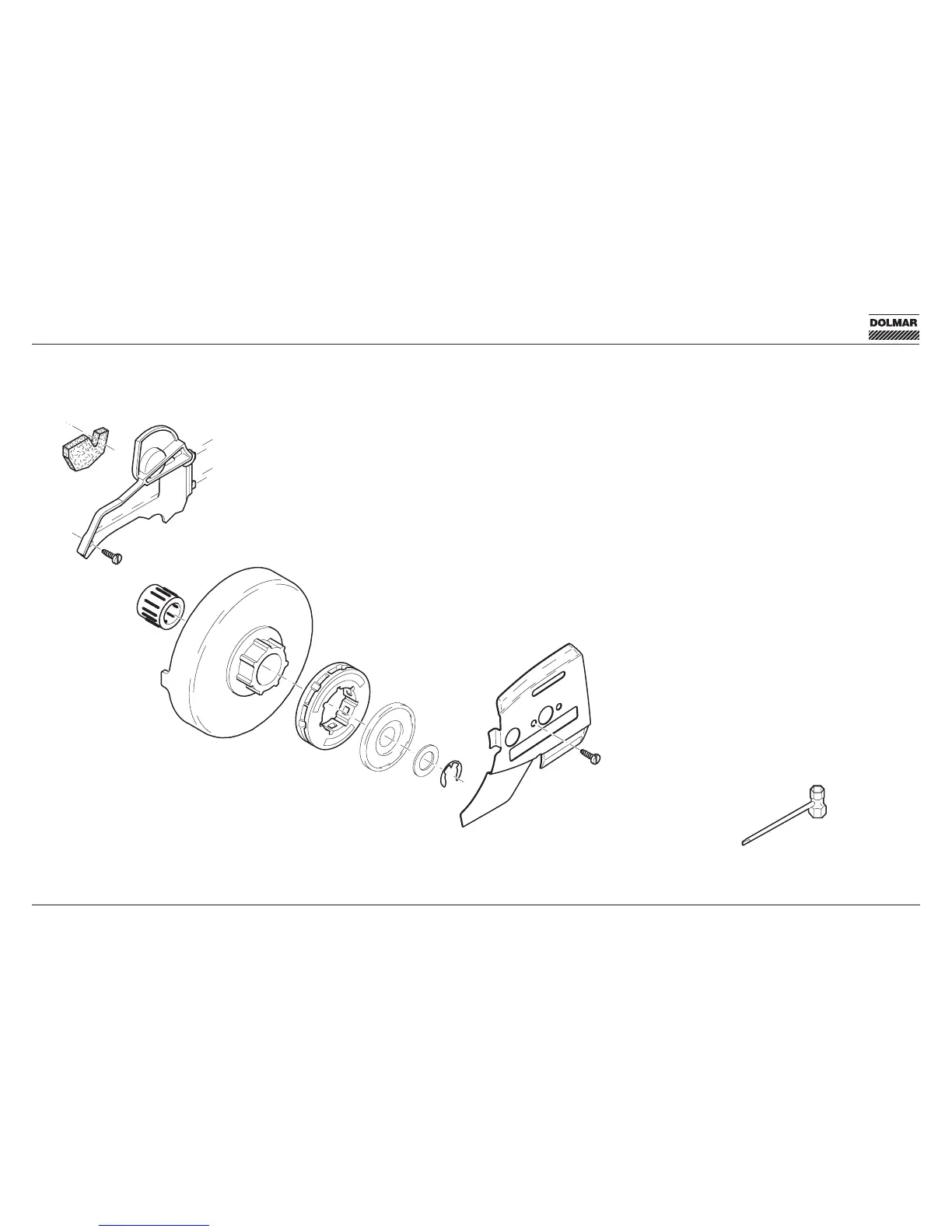
Removing the sprocket and clutch drum,
exposing the chain brake
Remove the sprocket guard, saw chain and guide
bar.
Remove the chain guide plate 1, assembly with
slotted screw 2 (3.5 x 9.5 mm).
Remove the washer 3 and pull off the sprocket 4
with discs.
Pull the hand guard slightly towards the tubular
handle (do not let it disengage!) and hold it firmly,
to cancel the brake force on the clutch drum.
Important: If the hand guard disengages, push
it forward again.
Never actuate the hand guard without the
clutch drum! This could break the linkage or the
housing.
Remove the clutch drum 5 (note needle bearing 6)
and release the hand guard again slowly.
Remove the covering plate 8, assembly with slot
head screw 7 (3.5 x 9.5 mm).
Remove foam sponge 9.
Tool


 To Next Page