12 - 2
Convenient Storage
The intelligent battery charging system makes this base a safe and convenient storage receptacle for
your Dolphin terminal.
Capacity
The base holds one terminal and features an auxiliary battery well behind the terminal well that can
charge a battery pack independently of the terminal well. This means that one base can charge two bat-
tery packs: the one installed in the terminal and a spare.
We recommend use of Honeywell Li-ion or Li-poly battery packs. Use of any non-Honeywell battery may result
in damage not covered by the warranty.
We recommend use of Honeywell peripherals, power cables, and power adapters. Use of any non-Honeywell
peripherals, cables, or power adapters may cause damage not covered by the warranty.
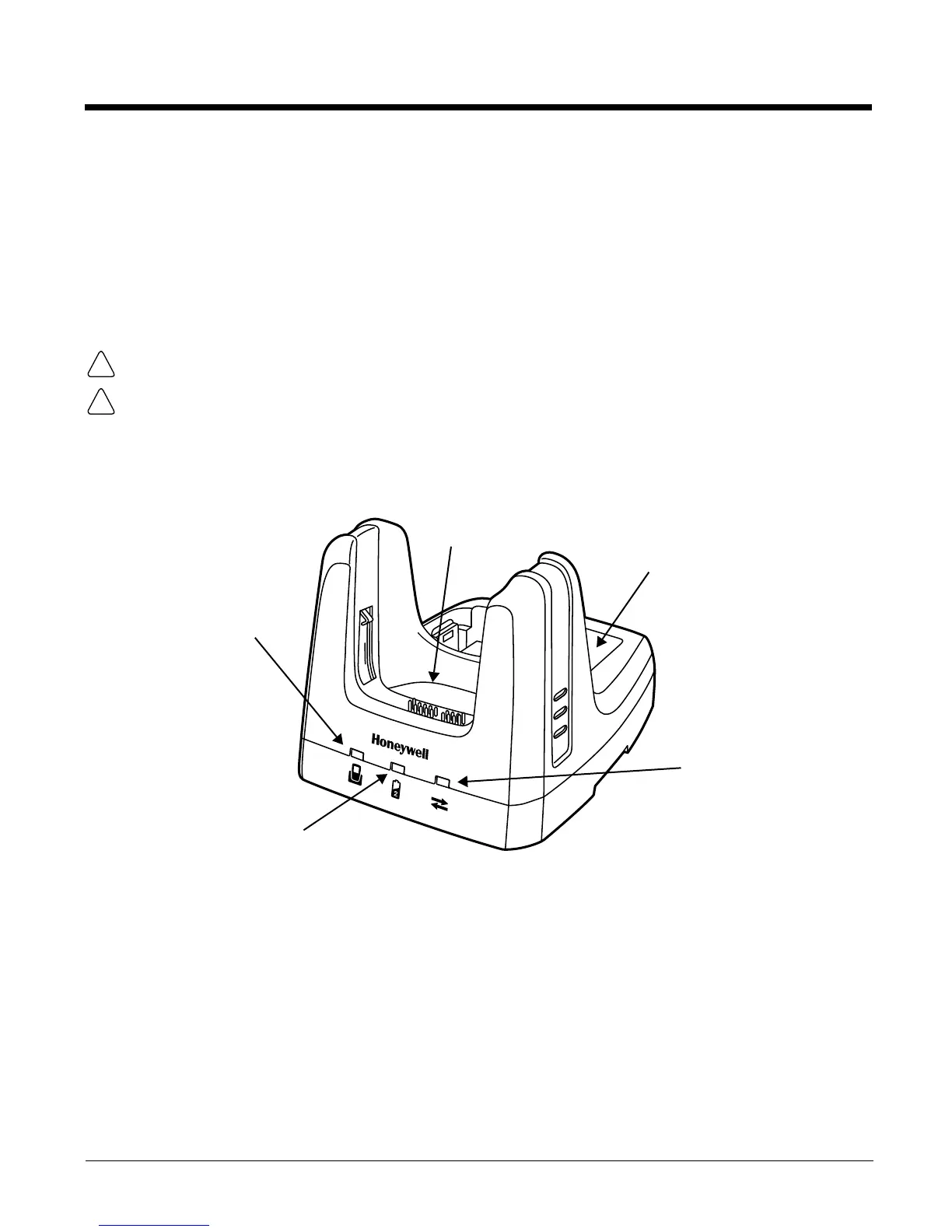
Parts and Functions
Front Panel
Terminal Well
Place the terminal in this well to communicate with a host device, power the terminal, and
charge the installed battery pack. The base completely charges the main battery in a Dolphin
terminal in 4 hours for the standard 3.7V battery or 6 hours for the extended 3.7V battery. If the
host device is a workstation that uses ActiveSync, synchronization begins immediately.
Auxiliary Battery Well
See Auxiliary Battery Well on page 12-4.
Power/Dock LED
Auxiliary Battery Well
AUX Battery LED
COMM LED
Ter m in al We ll



 To Next Page