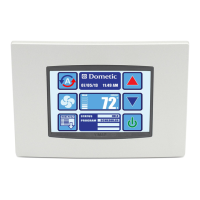
SystemMenu
FirmwareVersion #
DisplaySetup
SleepModeSettings
DisplayLock
CleaningMode(30sec) Save
DisplaySetup
DisplayBrightness [5Ͳ100]%
BackgroundColor Selectcolor
ButtonTextColor Selectcolor
ButtonInsideColor Selectcolor
ButtonBorderColor Selectcolor
DataBlock&TitleColors Selectcolor
SleepModeSettings
SleepModeDisplay StandardLogo/BlankScreen
BacklightOn/BlankScreenBacklight
Off/CustomText/CustomLogo
SleepModeDelay(sec) Off/[10Ͳ600]sec
SleepModeTextEdit EnterText(max25characters)
SleepModeTextColor SelectColor
DownloadCustomLogo*
DisplayLock
SetAccessLockedbyPin None(NoLock)/Control
Parameters/AllMenu
Settings/MainScreen/
HomeScreen
ChangePin
EnterCurrentPin ####
EnterNewPin ####


 To Next Page