Smart Touch Cabin Control Installation & Operations Manual OPERATION
L-3380 ENGLISH 7
OPERATION
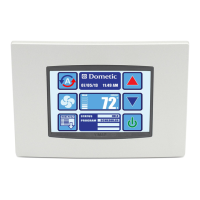
OPERATOR CONTROLS AND DISPLAY PANEL
HOME SCREEN ICON FUNCTIONS
Figure 6: Smart Touch Home Screen Icon Functions
1. Power On/Off Icon - Press and release to toggle between the On and Off Modes.
2. Up Icon - Press and release to display the set point. Press and release the Up icon as many times as desired to
increase the set point. Set point increases one degree each time the icon is pressed.
3. Down Icon - Press and release to display the set point. Press and release the Down icon as many times as desired to
decrease the set point.
4. More Icon - Press and release to change display to Main Screen.
5. Status Icon - Shows the system status. (OFF, PENDING, ACTIVE, STANDBY, FAULT)
6. Temperature Indicator Icon - Press and release to select from Set Point(s), Inside, Outside, Service/Water
Temperatures, and Humidity.
7. Force Sleep Mode Icon - Press and release to force sleep mode to initiate immediately, if enabled (i.e. Sleep Delay
not equal to OFF)


 To Next Page