TROUBLESHOOTING Smart Touch Cabin Control Installation & Operations Manual
34 L-3380 ENGLISH
DIGITAL CONTROLS TROUBLESHOOTING
See also “General Troubleshooting” on page 32.
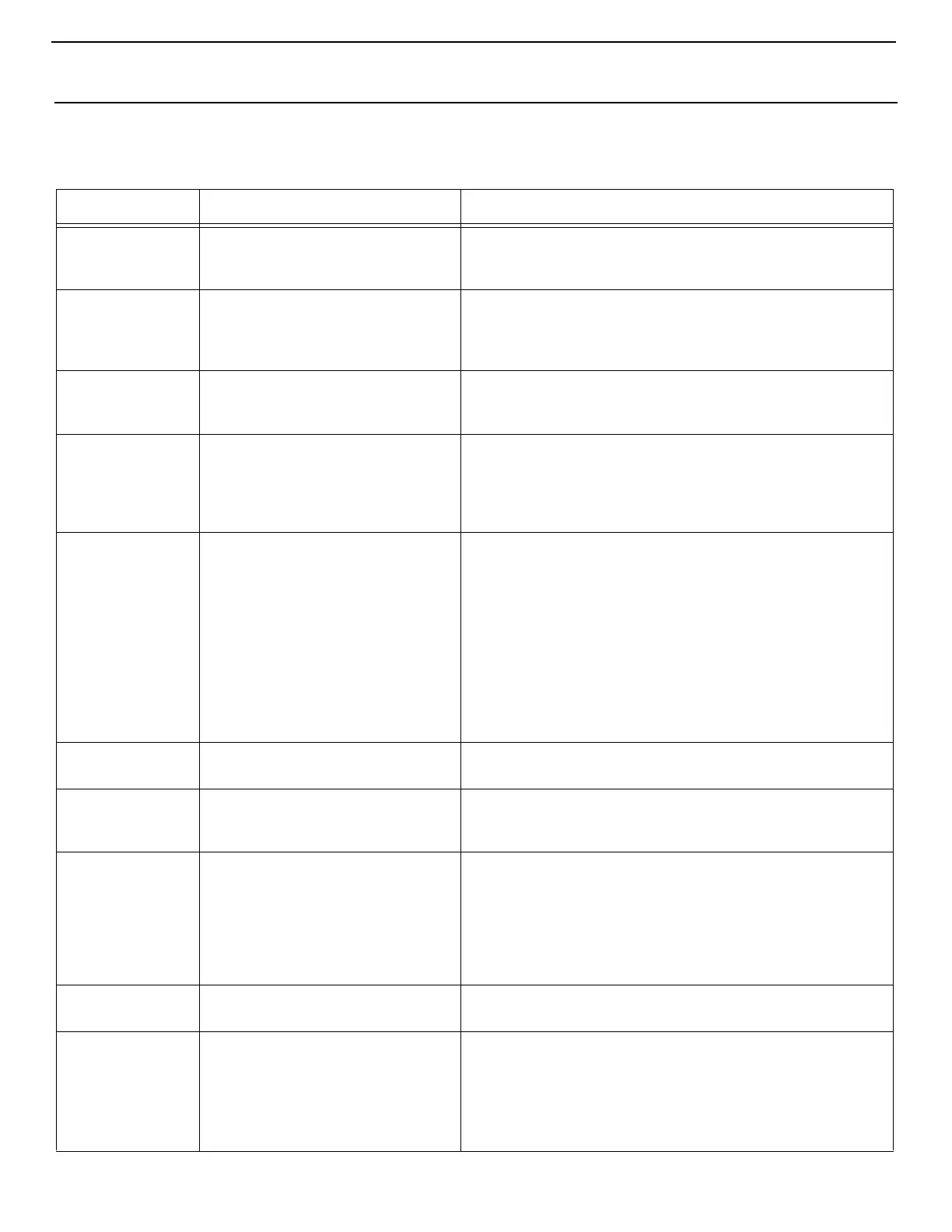
PROBLEM POSSIBLE REASONS SOLUTIONS
Digital display
panel is not
shown.
The 8-pin display-cable plugs are not
making contact (unplugged, dirty, bent,
or broken pins).
With POWER OFF at the circuit breaker, remove connector and
inspect. If damaged, replace connector or entire display cable.
Fan is not running
or runs
continuously.
Digital control is set for either fan
cycling with compressor or continuous
fan operation.
Under Control Parameters, General Settings, change the fan
operation to cycled or continuous. Note: When configured for
electric heat, after a heat cycle ends the fan will stay on for 4
minutes even if the fan is set to cycled operation.
Fan is not running
but the
compressor is.
Failed triac on circuit board. Send for repair or call local service technician.
Fan runs
continuously
although it is set
to cycle with
compressor.
Failed triac on circuit board. Send for repair or call local service technician.
No cooling or
heating
1. Digital control programmed for heat
or cool only.
2. “High Pressure Fault” or “Low
Pressure Fault” is displayed.
3. (For CW systems only) Chilled-
water loop is inadequately cooled
or heated, chiller system is not in
the proper mode of operation, or
Electric Heater is disabled.
1. Press Mode icon to achieve desired mode.
2. See below.
3. If the air handler system is equipped with water-temperature
sensors, check the water temperature at the digital control. If
the water temperature is not at least 15°F warmer (for heat
mode) or cooler (for cool mode), the water valve will not open.
See
“CW Operational Settings” on page 17.
If the air handler
system is equipped with an electric heater, ensure that Option
7, Electric Heat or Auxiliary Heat option, is enabled.
No heat Digital Control may be set to Electric
Heat, not Reverse Cycle.
Reprogram Reverses Fan Speed in Heat under General Settings
Unit switches to
heat while in Cool
Mode.
De-icing feature enabled due to coil
icing up.
Reprogram De-Ice Cycle under the DX settings.
Fan coil is iced. Improper airflow. See the General Troubleshooting section first, before
reprogramming digital control.
Reprogram De-Ice Cycle under the DX settings to enable de-icing.
If de-icing cycle does not melt ice, switch air conditioning unit to
heat until ice melts or use hair dryer to melt ice.
If problem persists, reprogram Low Fan Speed Limit to 75 for
maximum value.
System runs
continuously.
Improper air sensor location. Verify display head location with criteria found in the control
manual. Install alternate air sensor if necessary.
“ASF” (Air Sensor
Failure) is
displayed.
1. Indicates failed face plate air
sensor, alternate air sensor or
display cable.
2. Damaged jack/socket in display
head or on circuit board.
1. Unplug alternate air sensor if installed or plug in alternate air
sensor if not installed. Try another display cable.
2. Visually check to see that pins inside socket are not bent or
corroded. Repair or replace display or circuit board if needed.


 To Next Page