Operation Section
72
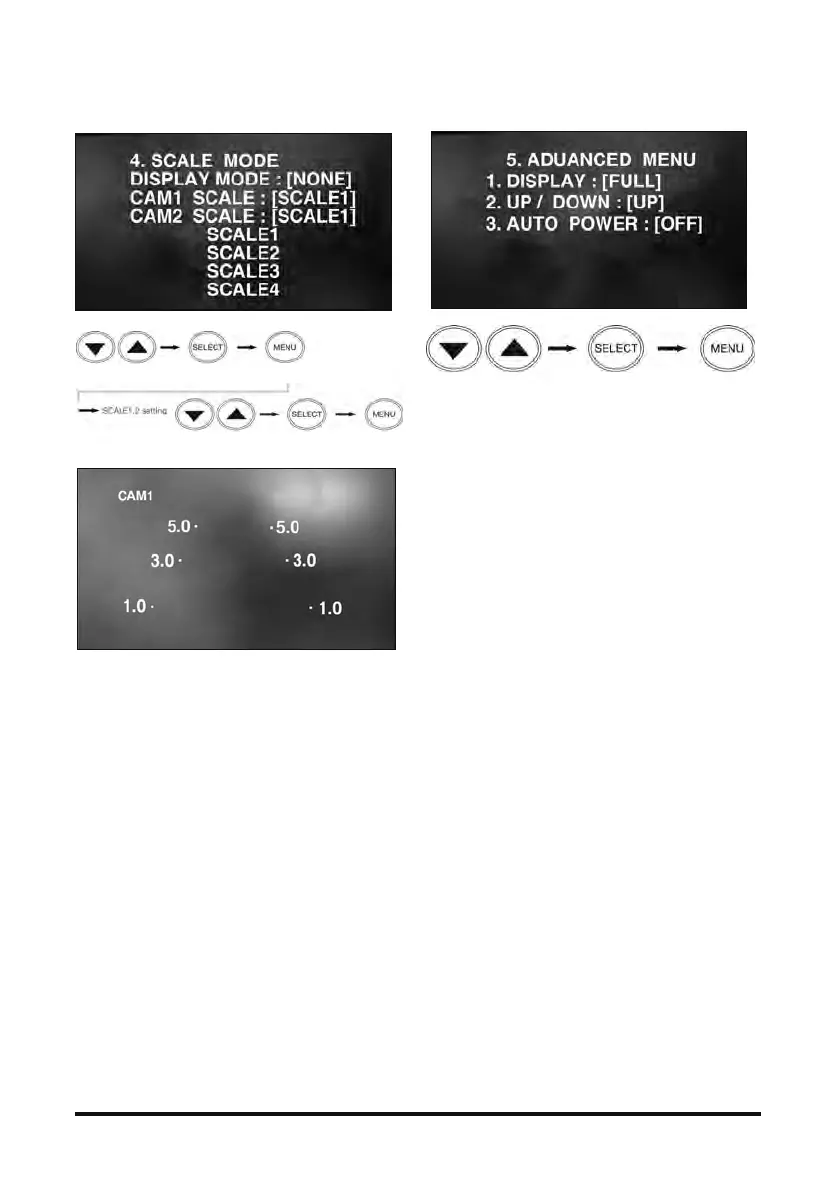
4. SCALE MODE
- To show distance together with the camera image
on the monitor, this function controls figures and
dots of a certain size.
- Other scale modes of CAM1~CAM2 can be set up,
which can be turned ON/OFF in DISPLAY
MODEP.
- SCALE1 and SCALE2 are indicated with
adjustable figures.
- When trigger signal is activated, the scale OSD
set up in the screen appears.
▪ This is simply an electrical expression of the
distance from the truck.
5. ADVANCED MENU
- DISPLAY
▪ FULL: images are displayed in a 16:9 ratio.
▪ NORMAL: images are displayed in a 4:3 ratio.
- UP/DOWN
▪ Turns images upside down.
- AUTO POWER
▪ If AUTO POWER is set to ON, the monitor turns
‘AUTO ON’ when the vehicle power is turned
on.
▪ If AUTO POWER is set to OFF, the monitor is
not turned on automatically when the vehicle
power is turned on.
Search menu Select ima
e Reset function
Search menu Select ima
e Reset function
Search menu Select image Reset function



 To Next Page