Operation Section
74
Weight Scale Optional (Hydraulic Pressure Sensing Type)
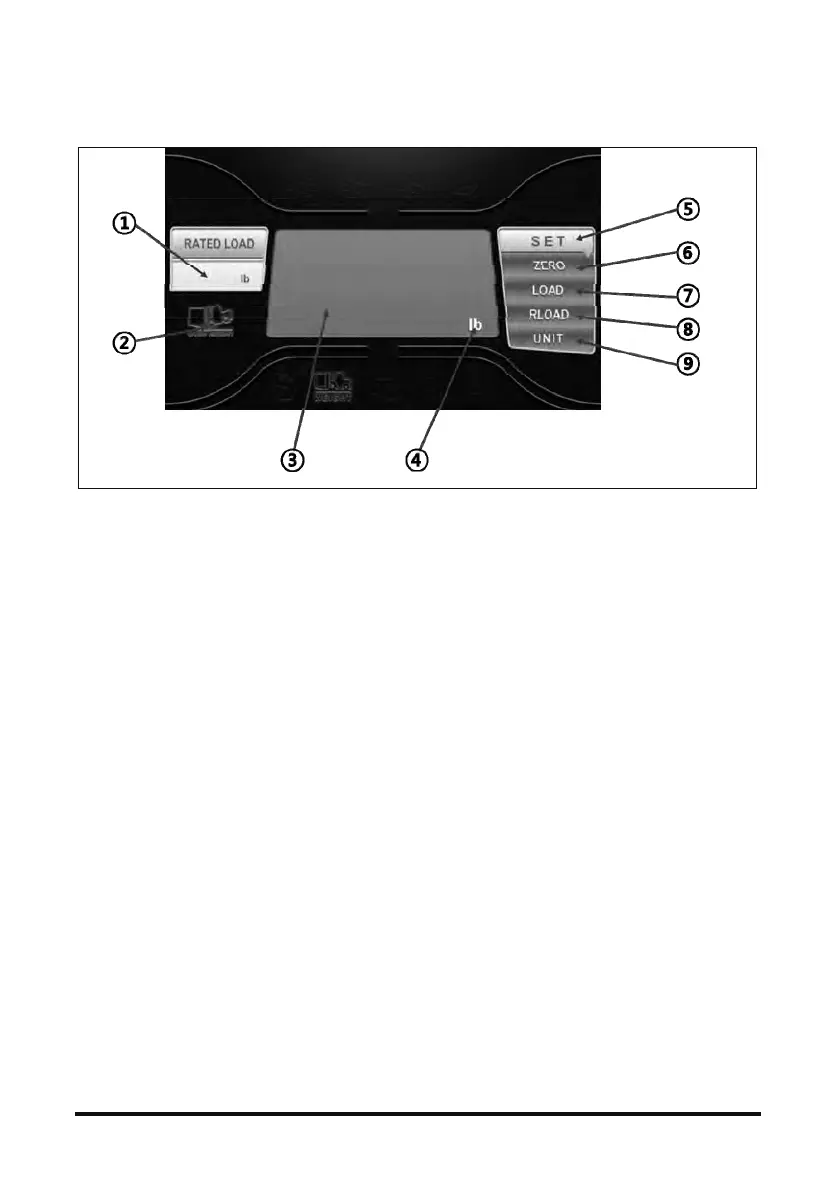
If weight scale option(Hydraulic Pressure Sensing
Type) equipped, operator can measure and limit
load with display. Press “MODE” to convert display
from normal to weight scale.
a) Initial setting
To use weight Scale option, need initial setting. i)
Unload (Zero) mode, ii) Load mode, iii) Rated load
mode.
i) Unload (Zero) Setting
Press “MODE” 2 sec, ‘SET (
⑤ )’ and ‘ZERO
(
⑥ )’ light will on. Weight digit will blink with “ - -
- -
△▽“. Then Press , button and set “0”.
Finish with ‘Enter’
⑤⑥button 1 sec. (‘SET( )’ and ‘ZERO( )’ lamp
will blink 3 second and off)
ii) Unload Setting
⑤⑥Press “MODE” 2 sec, ‘SET( )’ and ‘ZERO( )’
light will on. Press “MODE” one more time.
⑤⑦‘SET( ) and ‘LOAD( )’ light will on. Weight
digit will blink with
“ - - - -
△▽“. Then Press , button and set
weight of the load. Finish with
⑤⑦‘Enter’ button 1 sec. (‘SET( )’ and ‘LOAD( )’
lamp will blink 3 second and off)
iii) Rated Load Setting
⑤⑥Press “MODE” 2 sec, ‘SET( )’ and ‘ZERO( )’
light will on. Press “MODE” twice.
⑤⑧‘SET( ) and ‘RLOAD( )’ light will on. Weight
digit will blink with “ - - - - “. Then p
△▽ress ,
button and set weight of the load. Finish with
⑤⑧‘Enter’ button 1 sec. (‘SET( )’ and ‘RLOAD( )’
lamp will blink 3 second and off)
b) Unit change
⑤⑥Press “MODE” 2 sec, ‘SET( )’ and ‘ZERO( )’
light will on. Press “MODE” .
⑤⑧‘SET( ) and ‘RLOAD( )’ light will on. Load
④△unit( ) will blink. User can change unit by using ,
▽ button. Finish with ‘Enter’ button 1 sec.
c) If operator try to lift weight over rated load,
②
warning lamp( ) will be on.



 To Next Page